Windows 10의 시작 폴더에 프로그램 및 앱 추가
Summary: 간단한 단계와 명령을 사용하여 Windows 10의 시작 폴더에 앱을 추가하는 방법. 빠른 부팅을 위해 시작 프로그램을 최적화하고 셸 시작 명령의 사용법을 알고 있어야 합니다.
This article applies to
This article does not apply to
This article is not tied to any specific product.
Not all product versions are identified in this article.
Instructions
참고: Microsoft의 Windows 10에 대한 지원이 2025년 10월 14일에 종료됩니다. 자세한 내용은 Microsoft Windows 10 지원 종료 공지를 참조하십시오.
Windows 10에서 시작 앱 추가
-
추가할 시작 앱의 바로 가기를 만들어야 합니다. 시작 메뉴에서 바탕 화면으로 앱을 끌어다 놓으면 바탕 화면에 해당 앱의 바로 가기가 만들어집니다.
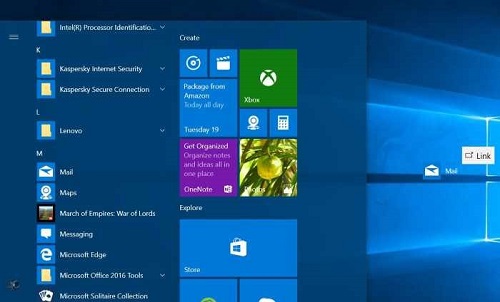
그림 1: 바탕 화면 바로 가기 만들기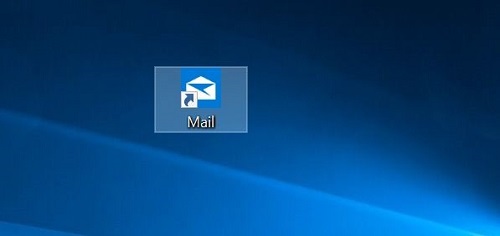
그림 2: 바탕 화면 바로 가기 -
Windows 로고 + R 키를 눌러 명령 실행 상자를 엽니다. 명령 실행 필드에 shell을 입력합니다. 시작 한 다음 Enter 키를 눌러 시작 폴더를 엽니 다.
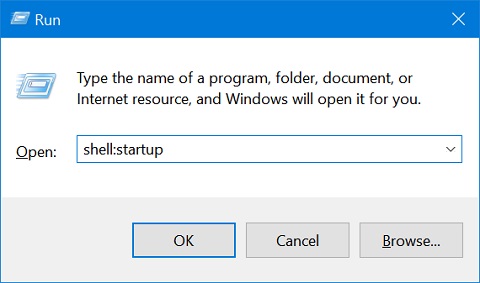
그림 3: 명령 실행 상자 -
바탕 화면에서 이 시작 폴더로 앱 바로 가기를 복사하여 붙여 넣으면 앱이 시작 폴더에 추가됩니다.
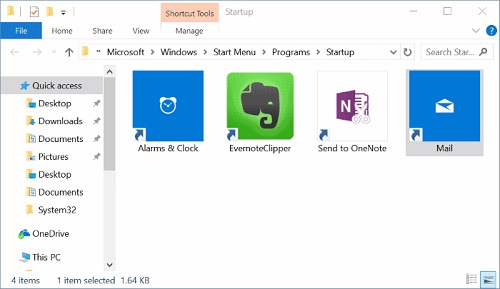
그림 4: 시작 폴더
Affected Products
Chromebox, Alienware, Dell All-in-One, Dell Pro Max Micro, Dell Pro Max Slim, Dell Pro Max Tower, Dell Pro Micro, Dell Pro Slim, Dell Pro Tower, Dell Slim, Dell Tower, Inspiron, Legacy Desktop Models, OptiPlex, Vostro, XPS, G Series, Chromebook
, G Series, Alienware, Dell Plus, Dell Pro, Dell Pro Max, Dell Pro Plus, Dell Pro Premium, Inspiron, Latitude, Dell Pro Rugged, Vostro, XPS, Legacy Laptop Models, Latitude Tablets, Surface, XPS Tablets, Mobile Workstations
...
Article Properties
Article Number: 000124550
Article Type: How To
Last Modified: 10 Jul 2025
Version: 15
Find answers to your questions from other Dell users
Support Services
Check if your device is covered by Support Services.