如何确定 Dell Encryption Enterprise 或 Dell Encryption Personal 版本
Summary: 通过遵循这些说明,可以识别 Dell Encryption Enterprise 或 Dell Encryption Personal 的版本。
This article applies to
This article does not apply to
This article is not tied to any specific product.
Not all product versions are identified in this article.
Symptoms
了解 Dell Encryption Enterprise 的版本(以前称为 Dell Data Protection |Enterprise Edition)或 Dell Encryption Personal(以前称为 Dell Data Protection |Personal Edition)允许用户:
- 识别已知问题。
- 确定 UI 差异。
- 了解工作流更改。
- 验证系统要求。
受影响的产品:
- Dell Encryption Enterprise
- Dell Encryption Personal
- Dell Data Protection | Enterprise Edition
- Dell Data Protection | Personal Edition
受影响的操作系统:
- Windows
Cause
不适用
Resolution
可以通过产品用户界面 (UI) 或产品安装程序确定版本。单击相应的选项卡以了解更多信息。
提醒:在通过 UI 识别版本之前,必须安装 Dell Encryption Enterprise 或 Dell Encryption Personal。
要使用 UI 确定产品版本:
- 登录 Windows 计算机。
- 在 Windows 系统托盘中,右键单击 Dell Encryption(以前称为 Dell Data Protection | Encryption)图标,然后选择 Open Dell Encryption 或 Open Dell Data Protection | Encryption。
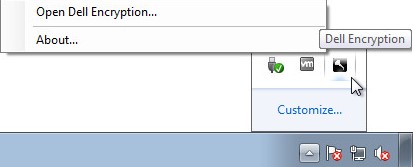
或
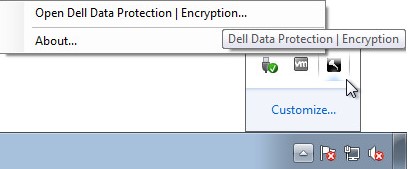
- 在产品 UI 中,单击 ?,然后记录 About Version X.X.X.XX 中的相关信息。前三个数字是要记录的最为重要的数字。在示例中,8.15.0 为前三个数字。

提醒:您的客户端的版本可能与上面的屏幕截图不同。
提醒:有关下载安装程序的信息,请参阅 如何下载 Dell Encryption Enterprise 或 Dell Encryption Personal 。
要使用安装程序识别产品版本:
- 右键单击 [INSTALLER],然后选择 Properties。
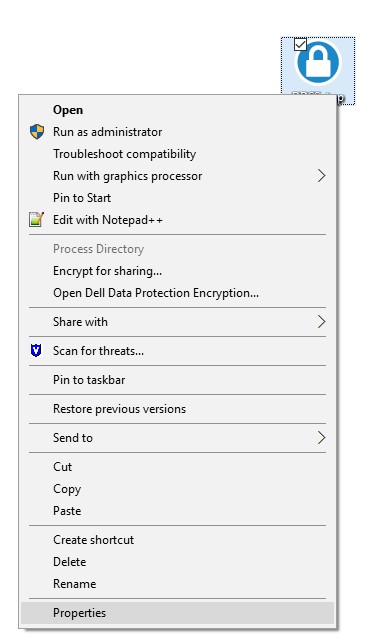
提醒:[INSTALLER] =
- Dell Encryption Enterprise = DDSSetup.exe
- Dell Encryption Personal = DDSSetup.exe
- Dell Data Protection | Enterprise Edition = DDPSetup.exe
- Dell Data Protection | Personal Edition = DDPSetup.exe
- 单击 Details 选项卡。

- 记下产品版本。前三个数字是要记录的最为重要的数字。在示例中,8.15.0 为前三个数字。
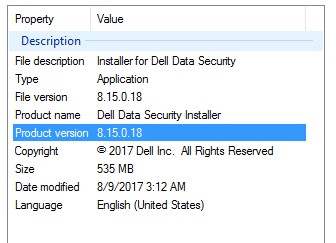
提醒:您的客户端的版本可能与上面的屏幕截图不同。
要联系支持部门,请参阅 Dell Data Security 国际支持电话号码。
转至 TechDirect,在线生成技术支持请求。
要获得更多见解和资源,请加入戴尔安全社区论坛。
Additional Information
Videos
Affected Products
Dell EncryptionArticle Properties
Article Number: 000124591
Article Type: Solution
Last Modified: 25 Sept 2023
Version: 11
Find answers to your questions from other Dell users
Support Services
Check if your device is covered by Support Services.