如何在 macOS 上允許 Dell Data Security 的核心擴充
Summary: 瞭解如何為 Mac 版 Dell Endpoint Security Suite Enterprise、Dell Threat Defense、Mac 版 Dell Encryption Enterprise、CrowdStrike Falcon Sensor 或 VMware Carbon Black Cloud Endpoint 允許核心擴充。
This article applies to
This article does not apply to
This article is not tied to any specific product.
Not all product versions are identified in this article.
Instructions
注意:
- 截至 2021 年 2 月,Mac 版 Dell Encryption Enterprise 已達到維護結束的期限。Dell 已不再更新此產品及其文章。
- 截至 2022 年 5 月,Dell Endpoint Security Suite Enterprise 已達到維護結束的期限。Dell 已不再更新此產品及其文章。
- 截至 2022 年 5 月,Dell Threat Defense 已達到其維護結束時間。Dell 已不再更新此產品及其文章。
- 如需更多資訊,請參閱 Dell Data Security 的產品生命週期 (支援結束及壽命結束) 政策。如果您對其他文章有任何問題,請聯絡您的銷售團隊或聯絡 endpointsecurity@dell.com。
- 請參考端點安全性,以取得有關目前產品的其他資訊。
macOS High Sierra (10.13) 中已強化系統完整性保護 (SIP),要求使用者允許的第三方核心擴充 (KEXT)。本文說明如何為 macOS High Sierra 和更新版本允許 Dell Data Security 核心擴充。
受影響的產品:
- Mac 版 Dell Endpoint Security Suite Enterprise
- Dell Threat Defense
- Mac 版 Dell Encryption Enterprise
- CrowdStrike Falcon Sensor
- VMware Carbon Black Cloud Endpoint
受影響的作業系統:
- macOS High Sierra (10.13) 和更新版本
在下列情況,使用者會遇到此安全性功能:
- 新安裝下列產品:
- Dell Threat Defense
- Dell Endpoint Security Suite Enterprise
- Mac 版 Dell Encryption Enterprise
- CrowdStrike Falcon Sensor
- VMware Carbon Black Cloud Endpoint
- SIP 已啟用。
在下列情況,使用者不會遇到此安全性功能:
- 升級下列產品:
- Dell Threat Defense
- Dell Endpoint Security Suite Enterprise
- Mac 版 Dell Encryption Enterprise
- CrowdStrike Falcon Sensor
- VMware Carbon Black Cloud Endpoint
- SIP 已停用。
注意:如需更多管理 SIP 的資訊,請參閱 如何停用 Dell Data Security Mac 產品的系統完整性保護。
允許內核擴展在 用戶體驗 和 企業部署之間有所不同。如需詳細資訊,請選取適當的選項。
使用者經驗
如果在 macOS High Sierra 或更新版本上啟用 SIP,作業系統會在安裝 Dell Endpoint Security Suite Enterprise、Dell Threat Defense、Mac 版 Dell Encryption Enterprise、CrowdStrike Falcon Sensor 或 VMware Carbon Black Cloud Endpoint 時,收到延伸封鎖警示。這可能讀作“系統擴展被阻止 - 程序嘗試載入由”[NAME]“簽名的新系統擴展。如果要啟用這些擴展,請轉到“安全性與隱私”系統偏好設置面板。
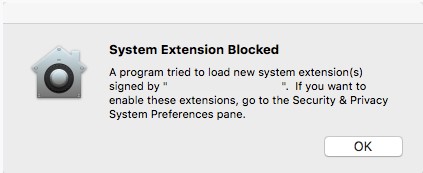
注意:Dell Encryption Enterprise for Mac 最多可能會出現兩個擴充區塊警示,來自:
- Dell Inc,先前稱為 Credant Technologies
- Credant Technologies
- Benjamin Fleischer (若已啟用 Encryption External Media 原則)
根據所安裝的 macOS 版本而定,允許擴充指令的程序會有所不同。如需詳細資訊,請按一下 v11。X (Big Sur) 或 v10.13.X 至 10.15.X (High Sierra、Mojave 和 Catalina)。
v11.X (Big Sur)
隨著 macOS Big Sur 即將推出系統擴充功能,因此可能會有在新安裝應用程式上無法正確載入核心擴充功能的情況。在升級至 macOS Big Sur 之前所安裝的應用程式應預先匯入核心擴充模組。
如果應用程式無法正確啟動,則可在作業系統外手動輸入應用程式的 TeamID。
- 以復原模式啟動受影響的 Mac。
注意:如需更多資訊,請參閱「關於 Intel 型 Mac 電腦上的 macOS Recovery: https://support.apple.com/102518
。
- 按一下公用程式功能表,然後選取終端機。
- 在終端機中,輸入
/usr/sbin/spctl kext-consent add [TEAMID]然後按下 Enter 鍵。注意:[TEAMID]= 所安裝產品的 Apple TeamID- Apple TeamIDs:
- Dell Endpoint Security Suite Enterprise:
6ENJ69K633 - Dell Threat Defense:
6ENJ69K633 - Dell Encryption Enterprise:
VR2659AZ37- Dell Encryption External Media:
3T5GSNBU6W(v10.1.0 及更早版本) - Dell Encryption External Media:
VR2659AZ37(v10.5.0 及更新版本)
- Dell Encryption External Media:
- CrowdStrike Falcon Sensor:
X9E956P446 - VMware Carbon Black Cloud Endpoint:
7AGZNQ2S2T
- Dell Endpoint Security Suite Enterprise:
- 例如,如果必須手動新增 VMware Carbon Black Cloud Endpoint,請輸入
/usr/sbin/spctl kext-consent add 7AGZNQ2S2T然後按下 Enter 鍵。
- 關閉「終端機」應用程式,然後重新開機至 macOS。
v10.13.X 至 10.15.X (High Sierra、Mojave 和 Catalina)
- 登入受影響的 Mac。
- 在 Apple Dock 中,按一下系統偏好設定。

- 按兩下安全性與隱私。

- 在「一般」標籤下,按一下允許以載入 KEXT。
 注意:允許按鈕僅可在安裝後 30 分鐘內使用。在使用者允許 KEXT 之前,將來的載入嘗試會導致核准 UI 再次出現,但不會導致其他使用者警示。
企業部署
Apple 管理解決方案 (如 Workspace One、Jamf) 可使用 Apple TeamID 避免使用者允許 KEXT。
警告:將 Apple TeamID 加入允許清單會自動核准任何由該 ID 簽署的應用程式。將 Apple TeamID 加入允許清單時,請務必謹慎。
注意:
- Apple TeamIDs:
- Dell Endpoint Security Suite Enterprise:
6ENJ69K633 - Dell Threat Defense:
6ENJ69K633 - Dell Encryption Enterprise:
VR2659AZ37- Dell Encryption External Media:
3T5GSNBU6W(v10.1.0 及更早版本) - Dell Encryption External Media:
VR2659AZ37(v10.5.0 及更新版本)
- Dell Encryption External Media:
- CrowdStrike Falcon Sensor:
X9E956P446 - VMware Carbon Black Cloud Endpoint:
7AGZNQ2S2T
- Dell Endpoint Security Suite Enterprise:
若要確認端點的 Apple TeamID 允許清單:
- 在端點上開啟「終端機」。
- 輸入
sudo kextstat | grep -v com.apple然後按下 Enter 鍵。 - 填入超級使用者的密碼,然後按下 Enter 鍵。
如要聯絡支援部門,請參閱 Dell Data Security 國際支援電話號碼。
請前往 TechDirect,以線上產生技術支援要求。
如需更多深入見解與資源,請加入 Dell 安全性社群論壇。
Additional Information
Videos
Affected Products
CrowdStrike, Dell Threat Defense, Dell Endpoint Security Suite Pro, Dell Endpoint Security Suite Enterprise, VMware Carbon BlackArticle Properties
Article Number: 000129477
Article Type: How To
Last Modified: 17 Feb 2025
Version: 16
Find answers to your questions from other Dell users
Support Services
Check if your device is covered by Support Services.