Windows 10 激活错误代码 0xC004C008
Summary: 从戴尔收到的新系统上出现 Windows 10 激活错误代码 0xC004C008 问题
This article applies to
This article does not apply to
This article is not tied to any specific product.
Not all product versions are identified in this article.
Symptoms
N/A
Cause
N/A
Resolution
遵循本文中提供的指导原则,解决系统开箱即用 (OOB) 激活中遇到的 Windows 10 激活错误代码 0xC004C008(已在使用产品密钥)。
错误代码 0xC004C008
您可能会在从戴尔收到的新系统上遇到 Windows 10 激活问题。在初始系统启动时,您可能会看到以下错误(图 1):
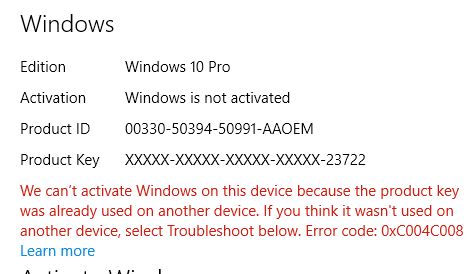
图 1:产品密钥已在使用的 Windows 10 激活错误
此错误源于激活服务器发现 Windows 10 产品密钥可能已在多台个人计算机上使用。安装 Windows 8.1 或 Windows 10作系统产品特定次数后,由于 Windows 8.1 或 Windows 10 许可证只能安装在单个设备上,因此会显示错误代码0xC004C008。
解决方案
 提醒:通过执行几次系统重新启动,然后重试激活序列,可以解决某些激活错误。参考:Microsoft Windows IT中心文章:
您还可以查看 激活疑难解答 ,以尝试解决此问题。疑难解答可加快 OA3 所需更新(OEM 激活过程 3.0)的下载。
如果问题继续出现,则通过拨打激活屏幕上列出的支持号码联系Microsoft(例如,在美国和加拿大:1-800-936-5700“),并说明您收到的错误消息是在新的戴尔计算机上。
Microsoft 可以提供电话激活。
Affected Products
Alienware, Inspiron, Legacy Desktop Models, OptiPlex, Vostro, XPS, G Series, G Series, Alienware, Inspiron, Latitude, Vostro, XPS, Legacy Laptop Models, Fixed Workstations, Mobile WorkstationsArticle Properties
Article Number: 000130292
Article Type: Solution
Last Modified: 17 Jul 2025
Version: 6
Find answers to your questions from other Dell users
Support Services
Check if your device is covered by Support Services.