Belirli Dell ChengMing, Vostro ve Inspiron Bilgisayarlarda Ubuntu İlk Çalıştırma Kurulumunda Birden Çok Dil Seçilemiyor
Summary: Bu makalede, Ubuntu ilk çalıştırma kurulumunda birden fazla dil seçememe sorunu hakkında bilgiler yer almaktadır. Bu durum belirli Dell ChengMing, Vostro ve Inspiron bilgisayarlarda görülür. ...
This article applies to
This article does not apply to
This article is not tied to any specific product.
Not all product versions are identified in this article.
Symptoms
Ubuntu işletim sistemini çalıştıran belirli Dell bilgisayarlarda, kullanıma hazır kurulumda birden fazla dil seçemeyebilirsiniz.
Sorun şu modellerde görülebilir:
- Dell ChengMing 3980
- Dell Vostro 3070
- Dell Vostro 3470
- Dell Vostro 3670
- Dell Inspiron 3470
- Dell Inspiron 3670
Cause
Neden bilgisi yok
Resolution
Çözüm
Bu sorunu çözmeye yardımcı olmak için:
- Sol üst köşedeki başlatma çubuğuna tıklayın
- Arama çubuğuna dell-recovery yazın ve Dell Recovery simgesine tıklayın
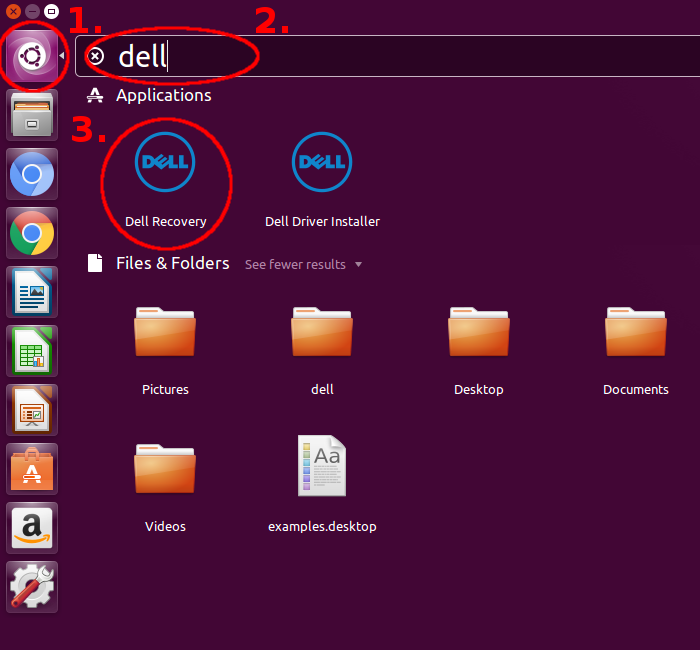
- Sistemi Geri Yükle öğesine tıklayın

- Geri yükleme işlem tamamlandığında Yeniden Başlat öğesine tıklayın

- Bilgisayar yeniden başlatıldıktan sonra artık birden çok dil seçebilirsiniz.

Affected Products
Inspiron 3470, Inspiron 3670, Vostro 3070, Vostro 3470, Vostro 3670Article Properties
Article Number: 000131787
Article Type: Solution
Last Modified: 22 Apr 2025
Version: 7
Find answers to your questions from other Dell users
Support Services
Check if your device is covered by Support Services.