使用配备傲腾加速的计算机强制关机时启动时出错
Summary: 强制关闭傲腾加速设备后,启动时可能会收到错误。
This article applies to
This article does not apply to
This article is not tied to any specific product.
Not all product versions are identified in this article.
Symptoms
Optane 启动错误
如果配备傲腾加速的计算机遇到强制关机,则在重新启动计算机时可能会看到错误消息:
"The operating system did not shut down cleanly. Reconstructing Cache Metadata."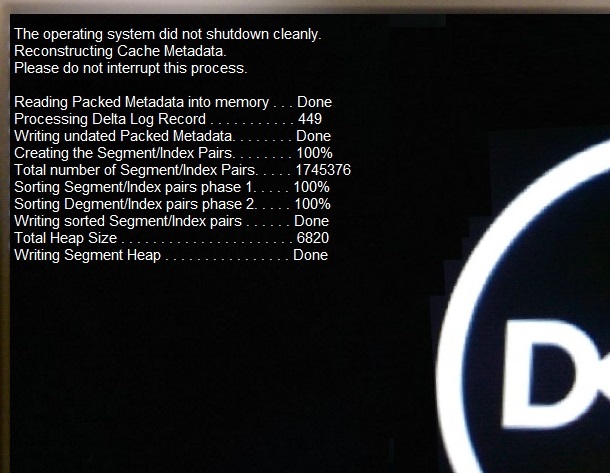
Cause
按设计规范工作
当傲腾加速计算机遇到强制关机时,串行 ATA (SATA) 和傲腾驱动器之间的驱动器元数据不再匹配。
Resolution
按设计规范工作
发生强制关机时,在下一次重新引导时,必须重新构建元数据。这会自动发生,不应花费过多的时间。
错误消息是重建过程的一个示例。
元数据重建后,计算机将启动。
提醒:如果计算机在元数据重建后无法启动或出现故障,则存在硬盘或操作系统损坏问题。运行增强型启动前系统评估 (ePSA) 诊断程序,如果需要,对操作系统进行故障处理。如果 ePSA 诊断程序失败,请使用以下链接联系戴尔技术支持以获得进一步的帮助:戴尔技术支持联系人
Affected Products
Alienware Aurora R6, Inspiron 3670, OptiPlex 3050 All-In-One, OptiPlex 3050 Tower, OptiPlex 3050 Micro, OptiPlex 3050 Small Form Factor, OptiPlex 5050 Tower, OptiPlex 5050 Micro, OptiPlex 5050 Small Form Factor, OptiPlex 5250 All-In-One
, OptiPlex 7050 Tower, OptiPlex 7050 Micro, OptiPlex 7050 Small Form Factor, OptiPlex 7450 All-In-One, Vostro 3670, XPS 8920
...
Article Properties
Article Number: 000133144
Article Type: Solution
Last Modified: 01 May 2026
Version: 13
Find answers to your questions from other Dell users
Support Services
Check if your device is covered by Support Services.