在随附 Windows 10 的戴尔系统上计算机名称显示为 Desktop-XXXXXX
Summary: 本文提供了在戴尔计算机上更改计算机名称(如果它显示 Desktop-XXXXXX)的步骤。
This article applies to
This article does not apply to
This article is not tied to any specific product.
Not all product versions are identified in this article.
Symptoms
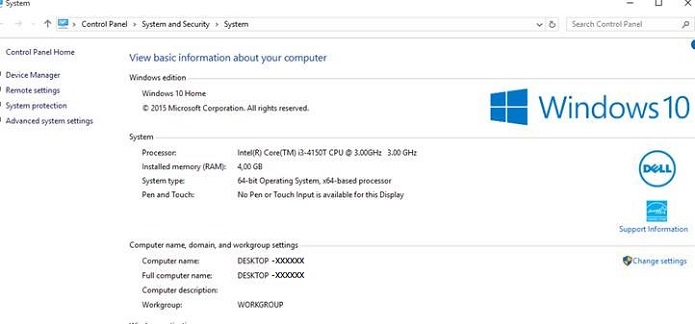
计算机名称显示 Desktop-XXXXXX
您可能会注意到,您的 Windows 10 计算机在台式机和笔记本电脑上都有计算机名称“Desktop-XXXXXX”。(XXXXXX = 七个字母或数字的任意组合)
Cause
无可用的原因信息。
Resolution
如何更改计算机名称
您有多个选项可用于更改 Windows 10 计算机的计算机名称。
从“开始”菜单
- 单击开始菜单上的设置,设置窗口将打开。
- 单击左上角的 系统 图标。
- 单击左侧菜单底部的 About 。
- 然后单击“ 重命名 PC ”按钮
- 在 重命名 PC 窗口中,在框中键入新名称,然后单击 下一步 ,然后单击立即 重新启动 按钮。
台式机模式菜单
- 在搜索框中键入 sysdm.cpl,然后按 Enter 键,这将打开“系统属性”窗口。
- 单击 更改。
- 在计算机名称/域更改窗口中,在计算机名称框中键入新计算机名称,然后单击确定,然后单击是以重新启动系统。
Affected Products
Alienware, Dell All-in-One, Dell Pro All-in-One, Dell Pro Max Micro, Dell Pro Max Slim, Dell Pro Max Tower, Dell Pro Micro, Dell Pro Slim, Dell Pro Tower, Dell Slim, Dell Tower, Inspiron, OptiPlex, Vostro, XPS, G Series, G Series, Alienware
, Dell Plus, Dell Pro, Dell Pro Max, Dell Pro Plus, Dell Pro Premium, Inspiron, Latitude, Dell Pro Rugged, Vostro, XPS, Fixed Workstations, Mobile Workstations, Dell Pro Max Micro XE FCM2250, Dell Pro Max Slim XE FCS1250, Dell Pro Max Tower T2 XE FCT2250, Dell Pro Max 16 XE MC16250, Dell Pro Micro Plus XE QBM1250, Dell Pro Slim Plus XE5 QBS1250, Dell Pro Tower Plus XE5 QBT1250
...
Article Properties
Article Number: 000137111
Article Type: Solution
Last Modified: 10 Jul 2025
Version: 7
Find answers to your questions from other Dell users
Support Services
Check if your device is covered by Support Services.