VPLEX: 교체 관련 문제를 해결하는 방법
Summary: 이 문서에서는 교체 작업에서 발생하는 문제를 해결하기 위해 SolVe Desktop 절차를 생성하는 단계를 자세히 설명합니다.
This article applies to
This article does not apply to
This article is not tied to any specific product.
Not all product versions are identified in this article.
Instructions
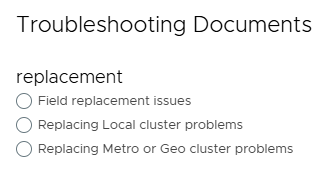
이 절차는 Solve Desktop 프로시저 생성기의 다음 위치에서 찾을 수 있습니다.
VPlex ->기타 ->문제 해결 ->문제 해결 문서 ->문제 해결 범주 ->교체 문제
다음 세 가지 옵션 중에서 선택한 교체 유형에 따라 절차가 생성됩니다.
참고: SolVe Desktop이 필요한 경우 KB SolVe Desktop 다운로드 및 설치 방법을 참조하십시오. (이 문서를 보려면 Dell 지원 계정이 필요함)
Affected Products
VPLEX GeoSynchrony, VPLEX VS2, VPLEX VS6Products
VPLEXArticle Properties
Article Number: 000158197
Article Type: How To
Last Modified: 30 Sept 2025
Version: 5
Find answers to your questions from other Dell users
Support Services
Check if your device is covered by Support Services.