VPLEX: Så här åtgärdar du problem med byten
Summary: I den här artikeln beskrivs stegen för att generera en SolVe Desktop-procedur för att åtgärda problem eller problem med ersättningsaktivitet.
This article applies to
This article does not apply to
This article is not tied to any specific product.
Not all product versions are identified in this article.
Instructions
Den här proceduren finns i Solve Desktop Procedure Generator på följande plats:
VPlex ->Diverse ->Felsökning ->Felsökningsdokument ->Felsökningskategorier ->Problem med byte
En procedur genereras baserat på den typ av ersättning som valts bland följande tre alternativ:
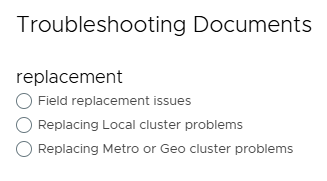
Obs! Om SolVe Desktop krävs följer du KB Ladda ner och installera SolVe Desktop för installation. (Du måste ha ett Dell-supportkonto för att se den här artikeln)
Affected Products
VPLEX GeoSynchrony, VPLEX VS2, VPLEX VS6Products
VPLEXArticle Properties
Article Number: 000158197
Article Type: How To
Last Modified: 30 Sept 2025
Version: 5
Find answers to your questions from other Dell users
Support Services
Check if your device is covered by Support Services.