VPLEX: Değiştirme ile ilgili sorunları giderme
Summary: Bu makalede, değiştirme etkinliğiyle ilgili görülen sorunları veya Sorunları gidermek için bir SolVe Desktop prosedürü oluşturma adımları ayrıntılı olarak açıklanmaktadır.
This article applies to
This article does not apply to
This article is not tied to any specific product.
Not all product versions are identified in this article.
Instructions
Bu prosedür, SolVe Masaüstü Prosedürü Oluşturucu'da aşağıdaki konumda bulunabilir:
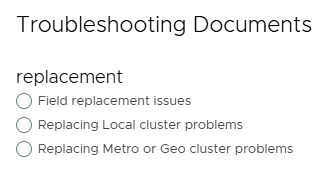
VPlex ->Çeşitli ->Sorun Giderme - Sorun Giderme Belgeleri> ->Sorun Giderme Kategorileri ->Değiştirme sorunları
Aşağıdaki üç seçenek arasından seçilen değiştirme türüne bağlı olarak bir prosedür oluşturulur:
NOT: SolVe Desktop gerekiyorsa KB makalesini izleyin: Yükleme için SolVe Desktop İndirme ve Yükleme . (Bu makaleyi görüntülemek için bir Dell Destek hesabı gereklidir)
Affected Products
VPLEX GeoSynchrony, VPLEX VS2, VPLEX VS6Products
VPLEXArticle Properties
Article Number: 000158197
Article Type: How To
Last Modified: 30 Sept 2025
Version: 5
Find answers to your questions from other Dell users
Support Services
Check if your device is covered by Support Services.