VPLEX:如何解決更換問題
Summary: 本文詳細說明產生 SolVe Desktop 程序的步驟,以解決更換活動出現的問題或問題。
This article applies to
This article does not apply to
This article is not tied to any specific product.
Not all product versions are identified in this article.
Instructions
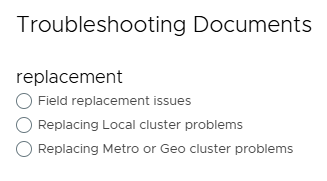
此程序可在 Solve Desktop 程式產生器的下列位置找到:
VPlex ->其他 ->故障診斷 ->故障診斷文件 ->故障診斷類別 ->更換問題
系統會根據從下列三個選項中選擇的更換類型來產生程序:
注意:如果需要 SolVe Desktop,請遵循 KB 文章如何下載和安裝 SolVe Desktop 。(需要有 Dell 支援帳戶才能檢視本文)
Affected Products
VPLEX GeoSynchrony, VPLEX VS2, VPLEX VS6Products
VPLEXArticle Properties
Article Number: 000158197
Article Type: How To
Last Modified: 30 Sept 2025
Version: 5
Find answers to your questions from other Dell users
Support Services
Check if your device is covered by Support Services.