Support for Dell OpenManage Enterprise
Summary: This article provides an overview and details of the OpenManage Enterprise (OME) console. This system's management console is designed to automate and unify management tasks.
This article applies to
This article does not apply to
This article is not tied to any specific product.
Not all product versions are identified in this article.
Instructions

Dell OpenManage Enterprise 4.5
- One-to-many management from a single console; built for scale
- Robust, intuitive, management capabilities, regardless of form-factor
- Automate IT processes for greater efficiency
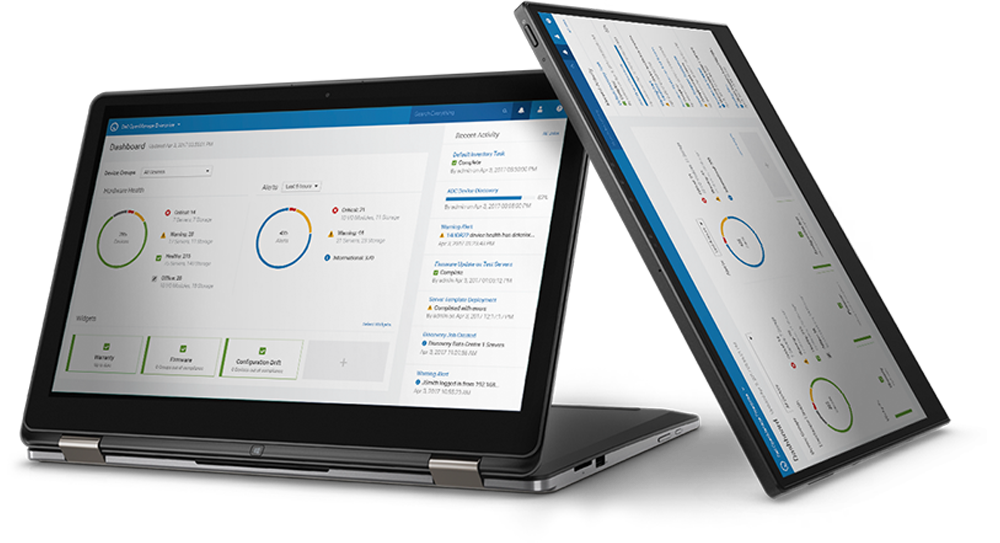
OpenManage Enterprise is an intuitive infrastructure management console. OpenManage Enterprise is a management and monitoring application that provides a comprehensive view of the Dell servers, chassis, storage, and network switches in the enterprise network.
Features and Benefits of OpenManage Enterprise
Simplify: Reduces complexity with an intuitive system management solution.
Unify: One-to-many consoles, built to scale
OpenManage Enterprise is a one-to-many systems management console for the data center.
Automate: IT management tasks from discovery to retirement
Secure: Security is a top priority.
OpenManage Enterprise detects drift from a user-defined configuration template, alerts users, and remediates misconfigurations based on preset policies.
Latest Enhancements to OpenManage Enterprise
New Features in OpenManage Enterprise 4.5
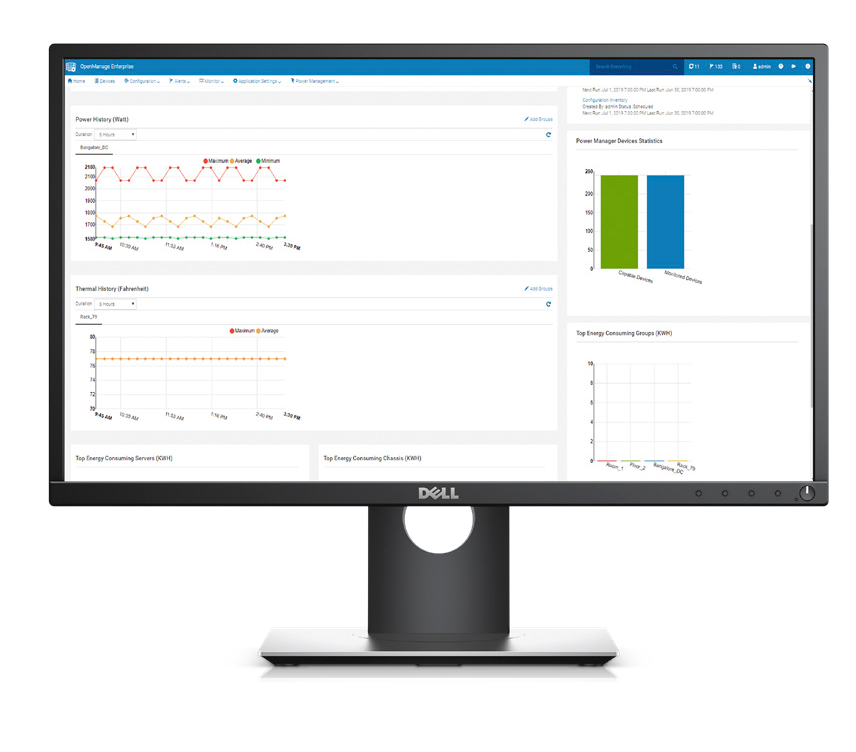
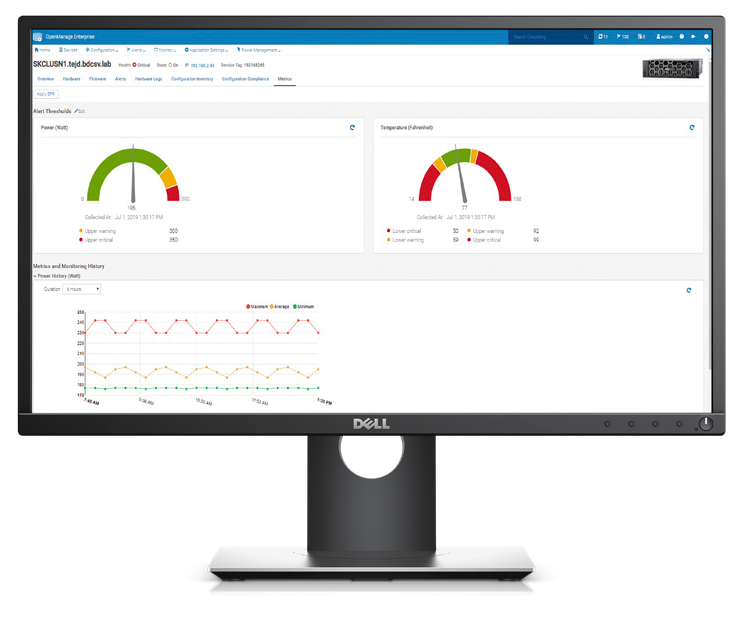
- All Power Manager features are now integrated into OpenManage Enterprise interface. A separate plugin is no longer required.
- Discovery, inventory, monitoring, and SNMP alerting for Power Shelves (For Dell IRSS - Integrated Rack Scalable Systems – racks only)
- Rack level GPU and CPU reporting, carbon footprint, GPU density visualization
- Perform a staggered power on or power off operation for rack groups
- Automatically add devices to groups based on the physical hierarchy
- Discovery, inventory, and monitoring for Dell Top-of-Rack switches running the SONiC operating system
- Enhanced data protection with an option to select SHA-384 and SHA-512 cryptographic hash algorithms when generating Certificate Signing Requests (CSRs)
- Credentials can now be encrypted using the AES-256 symmetric encryption algorithm
- Discovery, inventory, and health collection tasks now run asynchronously, improving performance and scalability in large environments
- Discovery, inventory, and alerting for platforms running Azure Stack HCI 24H2
- Discovery, inventory, monitoring, and alerting for PowerEdge R760 servers running Azure Stack HCI 23H2
- Ability to send critical messages as a banner to an OME console
- Support for new platforms and operating system versions. For details, refer to the latest support matrix.
Licensing for OpenManage Enterprise
Installing and using OpenManage Enterprise does not require the OpenManage Enterprise Advanced or OpenManage Enterprise Advanced Plus license. The OpenManage Enterprise Advanced or Advanced Plus license is needed for key automation features. These include bare metal server deployment and cloning, deploying automatically with Service Tags or Node IDs, Power Manager plug-in. Also advanced configuration features, for example, enforcing configuration compliance, IOA provisioning, and VLAN management, profile management. In addition, the OpenManage Advanced Plus license enables plugins for partner integrations (for example Plugin for VMware vCenter). (Note the OpenManage Advanced Plus license contains all the features of the OpenManage Advanced license.) Use of advanced features requires that the OpenManage Enterprise Advanced license be installed on the target server. The OpenManage Enterprise Advanced license is a perpetual license that is valid for the life of a server. The license can be bound to the Service Tag of only one server at a time. To view the list of devices and their licenses, select OpenManage Enterprise > Monitor > Reports > License Report, and then click Run.
OpenManage Enterprise Advanced or Advanced Plus licensed based features.
The OpenManage Portfolio Software Licensing Guide provides additional information for licensing options for your organization.
Evaluate, Purchase, and Download of the OpenManage Enterprise Advanced license.
Managing OpenManage Enterprise Licenses
OpenManage Enterprise Advanced or Advanced+ and iDRAC enterprise or data center licenses can be managed on either an individual server or one to many bases. Individual licenses can be imported onto an iDRAC. For one to many OpenManage Enterprise 4.1 or higher has integrated license management with integration to Dell Digital Locker and license deployment. Dell License Manager is a stand alone tool where OpenManage Enterprise is not available.
Download and install the new OpenManage Enterprise appliance
OpenManage Enterprise is an appliance that is deployed to a hypervisor.OpenManage Enterprise can be installed on VMware vSphere, Microsoft Hyper-V, or Kernel-based KVM. See the Deployment section in the OpenManage Enterprise User Guide.
OpenManage Enterprise User Guide Document download
4.5 Appliance Downloads for New Deployment
Click this link to download VMware ESXi, Microsoft Hyper-V, and KVM images:
Download
To upgrade offline from OME 4.3.x or 4.4.x, use this link:
Download
OME 4.5 and OME 4.5.1 are identical products. Some customers may experience issues upgrading from 4.3.x and 4.4.x to 4.5. Version 4.5.1 resolves this issue.
- If you are planning for a new installation of OME, use version 4.5.
- If you are already on version 4.5, you do not need to upgrade to 4.5.1 and you will not see the upgrade option for 4.5.1.
- However, if you are on versions 4.3.x or 4.4.x, you will see 4.5.1 as an upgrade option (not 4.5).
4.4 Appliance Downloads for New Deployment
Download
To upgrade offline from OME 4.2 or 4.3.x, use this link:
Download
OME 4.4 and OME 4.4.1 are identical products. Some customers may experience issues upgrading from 4.2 and 4.3.2 to 4.4. Version 4.4.1 resolves this issue.
- If you are planning for a new installation of OME, use version 4.4.
- If you are already on version 4.4, you do not need to upgrade to 4.4.1 and you will not see the upgrade option for 4.4.1.
- However, if you are on versions 4.2 or 4.3.2, you will see 4.4.1 as an upgrade option (not 4.4).
Upgrade from Previous Releases of OpenManage Enterprise to OpenManage Enterprise 4.3.2
Recommendation to customers who upgrade from OME 4.3 or 4.3.1 to OME 4.3.2:
Delete any scheduled firmware update jobs that were created in OpenManage Enterprise 4.3 or 4.3.1 from a compliance report that uses REBOOT REQUIRED filter set to NO. Then, re-create them in 4.3.2, if necessary. Ensure that no scheduled firmware update jobs are running before proceeding with the upgrade.
Existing OME 4.1, 4.2, 4.3 and 4.3.1 customers can upgrade directly to OME 4.3.2.
Existing OME 4.0 and 4.0.1 customers must first upgrade to OME 4.2, and then to OME 4.3.2.
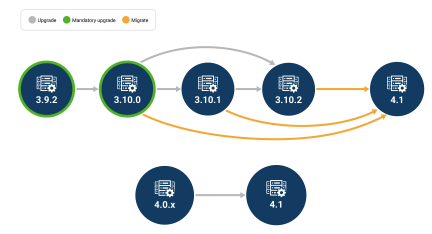
Existing OME 3.10 customers first migrate to OME 4.1, and then upgrade to OME 4.3.2.
Upgrade from 4.0.0, 4.0.1, or 4.1 version to OpenManage Enterprise 4.2
Online upgrade method, managed through the appliance web interface. See updating the console and plugins section of the OpenManage Enterprise User guide for detailed steps.
Offline upgrade (only for disconnected sites where the OpenManage Enterprise appliance is unable to access Dell.com to perform Online method) from OpenManage Enterprise 4.0 or 4.0.1 or 4.1 to version 4.2 Download upgrade files
Migrate from 3.10.x version to OpenManage Enterprise 4.1
Migration to OpenManage Enterprise version 4.2 from older 3.10.x versions is not supported. First install OpenManage Enterprise 4.1 as a new appliance then follow the instructions to migrate data from previous version OpenManage Enterprise 3.10.x. Once migrated to 4.1 use standard upgrade method to move to the latest version.
You must be on OpenManage Enterprise version 3.10.x to "migrate" to OpenManage Enterprise 4.1.
You must be on OpenManage Enterprise version 3.10.x to "migrate" to OpenManage Enterprise 4.1.
For Migration OpenManage Enterprise 4.1.0 for VMware ESXi Download the OVF image
For Migration OpenManage Enterprise 4.1.0 for Microsoft Hyper-V Download the VHD image
For Migration OpenManage Enterprise 4.1.0 for KVM Download the KVM image
January 2025
Tech note
June 2022
Thirty-one page white paper
December 2023
Five-page DfD Tech Note
November 2021
Nine page white paper
October 2020
Twelve page white paper
June 2020
Seven page white paper
January 2019
Twenty-two page white paper
April 2022
Five-page tech note
October 2020
Twelve page white paper
July 2020
Fourteen page white paper
March 2020
Thirty-two page white paper
July 2019
Thirty-nine page white paper
July 2019
Fourteen page white paper
July 2019
Twenty-eight page white paper
September 2018
Thirty-one page white paper
September 2019
Twenty-nine page white paper
July 2024
Five-page DfD Tech Note
January 2019
Twenty-three page white paper
February 2025
Tech note
June 2022
Blog
May 2022.
Twenty-five page white paper
August 2021
Fifteen page white paper
November 2020
Nineteen page white paper
November 2023
Four-page DfD Tech Note
December 2023
Sixteen page White Paper
December 2019
Ten page white paper
For Migration OpenManage Enterprise 4.1.0 for KVM Download the KVM image
Upgrade from any previous version to OpenManage Enterprise 3.10.
Upgrading to OpenManage Enterprise 3.10 directly from OpenManage Enterprise 3.9, 3.8.x, 3.7.x, 3.6.x, 3.5.x, 3.4.x, 3.3.x, 3.2.x, OpenManage Enterprise 3.1, OpenManage Enterprise 3.0, or OpenManage Enterprise Tech Release (1.0) directly is not supported.
-
Upgrade from OpenManage Enterprise 3.9 but first upgrade to version 3.9.2 before considering an upgrade to 3.10.
-
3.9->3.9.2->3.10
-
-
OpenManage Enterprise versions 3.7.x or 3.8.x must first be upgraded to version 3.9, then to 3.9.2, before considering an upgrade to 3.10.
-
3.7.x->3.9->3.9.2->3.10
-
3.8.x->3.9->3.9.2->3.10
-
-
OpenManage Enterprise versions earlier than version 3.7 must first be updated to version 3.9, then to 3.9.2, before considering an upgrade to 3.10.
-
3.6.x->3.8->3.9->3.9.2->3.10
-
3.5.x->3.7->3.9->3.9.2->3.10
-
3.4.x->3.6.1->3.8->3.9->3.9.2->3.10
-
3.3.x->3.5->3.7->3.9->3.9.2->3.10
-
3.2.x->3.4->3.6.1->3.8->3.9->3.9.2->3.10
-
3.1.x->3.3.1->3.5->3.7->3.9->3.9.2->3.10
-
OpenManage Enterprise - Tech Release version should be first upgraded to OpenManage Enterprise version 3.1.
Resources for OpenManage Enterprise
Dev Ops
OpenManage Enterprise GitHub repository includes examples of how to use the OpenManage Enterprise, OMEM API for python, Ansible, and PowerShell.
Documentation
See OpenManage Enterprise Documentation for all the latest documentation including user guide, compatibility matrix, and security configuration guide.
Windows Server 2025 Support Update for OpenManage Enterprise
January 2025
Tech note
The tech note details the updates in OpenManage Enterprise (OME) version 4.2, which now supports Microsoft Windows Server 2025. Key enhancements include server discovery, hardware driver updates, and virtual machine management for Windows Server 2025 Hyper-V environments.
Read the tech note.
Read the tech note.
OpenManage Enterprise Scale and Performance
June 2022
Thirty-one page white paper
This technical whitepaper provides an overview of the scalability, reliability, and performance of Dell OpenManage Enterprise. It provides the best practices to achieve optimal performance in a scaled and non‐scaled environment. The goal of this whitepaper is to provide the information that you require to achieve optimal performance, as demonstrated by our test results.
Read the white paper.
Read the white paper.
License Management and Deployment Functionality
December 2023
Five-page DfD Tech Note
This technical white paper provides information of this feature for customers who have purchased. After Point-of-Sale (APOS) OpenManage Enterprise Advanced/Advanced+ or iDRAC enterprise/Data center licenses and must deploy licenses to target iDRACs. OpenManage Enterprise (OpenManage Enterprise) can now seamlessly interface with Dell's online license portal to tie and install these licenses to specific servers, which accelerate and streamlines the license deployment process.
Read the white paper.
Read the white paper.
OpenManage Enterprise Appliance Share Configuration
November 2021
Nine page white paper
Learn how to configure the OpenManage Enterprise appliance to use HTTPS or CIFS for the Appliance Share and associated benefits.
Read the white paper.
Read the white paper.
Server-Initiated Discovery with OpenManage Enterprise 3.4
October 2020
Twelve page white paper
What if servers in your data center could announce their presence and be automatically managed with OpenManage Enterprise? With the Server-Initiated Discovery feature in OpenManage Enterprise 3.4, servers can automatically notify OpenManage Enterprise of their presence and get discovered by OpenManage Enterprise.
Read the white paper.
Read the white paper.
Upgrading OpenManage Enterprise Appliance
August 2019
Nineteen page white paper
Nineteen page white paper
This technical white paper provides a step-by-step procedure to upgrade the OpenManage Enterprise appliance version for online and offline sites.
Read the white paper.
Read the white paper.
Boost data center staff productivity with OpenManage Enterprise
June 2020
Seven page white paper
This Principled Technologies white paper presents time-and-effort measurements of key capabilities of the OpenManage Enterprise systems management console. This helps IT admins free up time and reduce the potential for error and downtime.
Read the white paper.
Read the white paper.
Define Custom Groups and Reports in Dell OpenManage Enterprise.
January 2019
Twenty-two page white paper
This technical white paper provides information about using the query builder feature to manage your Query Groups and Reports in managing your data center.
Read the white paper.
Read the white paper.
Improve Operational Efficiency Through OpenManage Enterprise Server Drift Management.
April 2022
Five-page tech note
This Direct from Development (DfD) tech note describes how capabilities in Dell’s OpenManage Enterprise server management appliance facilitate the simplification of drift management. Giving visibility of issues while simultaneously reduces the time and effort to resolve.
Read the tech note.
Read the tech note.
Server-Initiated Discovery with OpenManage Enterprise 3.4
October 2020
Twelve page white paper
What if servers in your data center could announce their presence and are automatically managed by OpenManage Enterprise? With the Server-Initiated Discovery feature in OpenManage Enterprise 3.4, servers can automatically notify OpenManage Enterprise of their presence and get discovered by OpenManage Enterprise.
Read the white paper.
Read the white paper.
Windows Driver Updates with OpenManage Enterprise 3.4
July 2020
Fourteen page white paper
This technical white paper provides information about managing Windows operating system driver inventory and updates using OpenManage Enterprise 3.4 console.
Read the white paper.
Read the white paper.
Deployment and Migration of Boot from SAN Configuration using Dell OpenManage Enterprise version 3.3.1
March 2020
Thirty-two page white paper
This technical whitepaper illustrates deployment of the boot from SAN configurations on servers and the migration of these deployed configurations to identical servers using OpenManage Enterprise.
Read the white paper.
Read the white paper.
Chassis, Sled, and IOA Template Cloning using Dell OpenManage Enterprise version 3.2
July 2019
Thirty-nine page white paper
This technical white paper describes the process of cloning a complete chassis configuration to a newly procured chassis using OpenManage Enterprise.
Read the white paper.
Read the white paper.
Auto-Deploy Provisioning on Servers or Chassis Using Dell OpenManage Enterprise 3.2.
July 2019
Fourteen page white paper
This Dell technical white paper describes the process of auto deploying configurations on not-yet discovered server or chassis using OpenManage Enterprise.
Read the white paper.
Read the white paper.
Remote script execution with Dell OpenManage Enterprise
July 2019
Twenty-eight page white paper
This technical white paper describes the Remote Script Execution feature of OpenManage Enterprise. It gives an overview of the feature along with a use case to enable and use the feature as a System Administrator.
Read the white paper.
Read the white paper.
Creating firmware baselines and catalogs by using Dell OpenManage Enterprise
September 2018
Thirty-one page white paper
This technical white paper provides information about creating firmware catalogs, creating firmware baselines, and then managing them. A brief procedure is provided about viewing the Firmware Baseline Compliance Report, and then upgrading the firmware version.
Read the white paper.
Read the white paper.
Updating Firmware using OpenManage Enterprise APIs
September 2019
Twenty-nine page white paper
This document shows the workflow and the APIs involved in the firmware update process for OpenManage Enterprise v3.0, v3.1, v3.2, and OpenManage Enterprise - Modular Edition v1.0 and v1.00.10.
Read the white paper.
Read the white paper.
A Beginner's Guide to working with Dell OpenManage Enterprise API and Postman
July 2024
Five-page DfD Tech Note
To help kickstart your journey into interfacing with the OpenManage Enterprise API, this document provides examples of using REST API calls to perform common server management tasks, and highlights a few useful resources. The document covers the basic steps needed to set up and configure Postman to access the OpenManage Enterprise REST API, including using credentials with Postman for authentication. Then to help you get familiar with features, it contains a selection of OpenManage Enterprise GET and POST API calls examples being used in Postman.
Read the white paper.
Read the white paper.
End to End Automation with REST API in Dell OpenManage Enterprise 3.0
January 2019
Twenty-three page white paper
This technical paper describes the uses of REST API use in Dell OpenManage Enterprise 3.0 for Systems Management.
Read the white paper.
Read the white paper.
Custom Access Roles with OpenManage Enterprise
February 2025
Tech note
The tech note explains the new feature in OpenManage Enterprise version 4.3.1, which allows administrators to create custom access roles, enhancing security by restricting functionality based on user roles and integrating with existing RBAC and SBAC systems.
Read the tech note.
Read the tech note.
OpenManage Enterprise: Security Built In
June 2022
Blog
This blog has commented on some of the key methods and features Dell uses to keep OpenManage Enterprise secure, so that customers can use it with confidence.
Read the blog.
Read the blog.
Dell OpenManage Enterprise 3.9 - Security Configuration Guide
May 2022.
Twenty-five page white paper
This paper contains information about specific security features of OpenManage Enterprise, and how to enable, disable, and configure each feature.
Read the white paper.
Read the white paper.
Scope-Based Access Control with OpenManage Enterprise 3.6.
August 2021
Fifteen page white paper
OpenManage Enterprise has integrated Role-Based Access Control, with three integrated roles - Administrator, Device Manager, and Viewer. Each role differs in the privileges that the role has. In OpenManage Enterprise 3.6 and later, Scope-Based Access Control is implemented. This feature enables an Administrator to restrict the scope of a Device Manager user to one or more groups. Read on to understand how SBAC can be enforced with OpenManage Enterprise and what a scope restricted user sees.
Read the white paper.
Read the white paper.
Dell OpenManage Enterprise Login with PingFederate
November 2020
Nineteen page white paper
This technical white paper provides information about configuring OpenManage Enterprise (OME) and PingFederate to enable logging into OpenManage Enterprise using PingFederate.
Read the white paper.
Read the white paper.
iDRAC Credential Management in OpenManage Enterprise Overview
November 2023
Four-page DfD Tech Note
This white paper provides a technical overview about configuring OpenManage Enterprise (OME) and iDRAC credentials. These credentials are required for OpenManage Enterprise for server management tasks. This feature offers customers support for either internal OpenManage Enterprise iDRAC password rotation or iDRAC credential retrieval from CyberArk Central Credential Provider, an external third-party credential provider solution.
Read the white paper.
Read the white paper.
iDRAC Credential Management in OpenManage Enterprise
December 2023
Sixteen page White Paper
This technical white paper provides detailed information about configuring OpenManage Enterprise (OME) and iDRAC credentials.OpenManage Enterprise version 4.1 or higher offers enhanced password management features for managing Dell iDRACs. This feature enables greater security by allowing automated password rotation which can be scheduled and managed internally or using CyberArk integration.
Read the white paper.
Read the white paper.
Multihoming on OpenManage Enterprise 3.3.1
December 2019
Ten page white paper
This white paper describes the multihoming implementation for OpenManage Enterprise 3.3.1.
Read the white paper.
Read the white paper.
Videos
Dell OpenManage Enterprise Support Tutorial Collection
Playlist of OpenManage Enterprise videos from deployment, migrate discovery, alert management, catalogs and firmware updates, log reading, troubleshooting, and more.
Last updated on 22 November 2023
Dell OpenManage Enterprise Glass Board Overview
OpenManage Enterprise is a simple-to-use, one-to-many systems management console.
May 2022
Dell OpenManage Enterprise Quick Insight Overview
Video shows casing commonly used features of OpenManage Enterprise.
October 2024
Dell OpenManage Enterprise Security Features
Dell OpenManage Enterprise systems management console has integrated security features to protect your data in an ever-changing environment.
November 2021
OpenManage Enterprise Boosts Data Center staff productivity
Increase data center staff's productivity by using OpenManage Enterprise.
June 2020
OpenManage Enterprise Console Tech Talk
OpenManage Enterprise console simplifies management by providing powerful automation capabilities, enabling admins to extend their span of control and use of time.
August 2019
OpenManage Enterprise Overview
OpenManage Enterprise empowers IT pros with intelligent automation that delivers real-time efficiencies and cost savings.
March 2019
Discovering devices
How to discover devices in OpenManage Enterprise.
February 2019
Active Directory services integration
How to add Active Directory services to OpenManage Enterprise.
February 2019
Lightweight Directory Access Protocol integration
How to integrate Lightweight Directory Access Protocol (LDAP) in OpenManage Enterprise.
May 2019
Viewing Device Details
Demonstrates the process of viewing various device details by using OpenManage Enterprise - Tech Release.
January 2018
Email alert policy
Demonstrates the process of creating an email alert policy in OpenManage Enterprise - Tech Release.
January 2018
Firmware baseline
Demonstrates the process of creating a firmware baseline and viewing the noncompliant attributes in OpenManage Enterprise - Tech Release.
January 2018
Support Community
Release History
New Features in OpenManage Enterprise 4.4
- Full lifecycle management support for the latest Dell PowerEdge 17th generation servers with iDRAC10
- OME 4.3.2 already supports discovery, onboarding, health, alerts, firmware updates, remote commands, and license management with iDRAC10. OME 4.4 extends this support for full lifecycle management.
- Pre-enable support for vSphere 9.0
- Deployment of OME VM in the hypervisor of vSphere 9.0
- Alert reception from Sonic and InfiniBand Switches with pre-installed MIBs
- Signed OME images so customers can verify that the images they are installing are from Dell
New Features in OpenManage Enterprise 4.3.2
- Support for the latest Dell PowerEdge 17th generation of servers based on iDRAC10
- OME 4.3.2 supports discovery, onboarding, health, alerts, firmware updates, remote commands, and license management with iDRAC10
- OME 4.3.2 does not support the full lifecycle management (as in configuration compliance) with iDRAC10. This will be available in the next release of OME.
- OME Advanced and Advanced Plus licenses for iDRAC10 are now available for purchase and shipment both at Point-of-Sale and After Point-of-Sale.
- OME 4.3.2 does not support the license features of OME at this point. This will be available in the next release of OME.
- However, we strongly recommend that customers purchase Point-of-Sale licenses directly from the factory for ease-of-deployment. This will allow customers to start using the full lifecycle management when they upgrade to the next release of OME without needing to spend time deploying APOS licenses.
- New OME license SKUs for iDRAC10
- 634-CSGW, OpenManage Enterprise Advanced, Point of Sale (POS) that is comes pre-deployed on servers directly from the factory
- 634-CSGT, OpenManage Enterprise Advanced, After Point of Sale (APOS) - must be deployed by customer using OME license management feature
- 634-CSGX, OpenManage Enterprise Advanced Plus, Point of Sale (POS) that is comes pre-deployed on servers directly from factory
- 634-CSGV, OpenManage Enterprise Advanced Plus, After Point of Sale (APOS) - must be deployed by customer using OME license management feature
- 634-CSGS, OpenManage Enterprise Advanced Plus Upgrade, After Point of Sale (APOS) - must be deployed by customer using OME license management feature
- There is no change to OME license SKUs for iDRAC8 and iDRAC9.
- Custom Roles for OME users
- Customers can now create multiple custom roles (in addition to the pre-built Admin, Device Manager and View Only roles). They can then assign new or existing users to one of the custom roles.
- As an example, some customers want to have different users assigned for Firmware Updates and Configuration Compliance. This can now be accomplished with OME 4.3.2.
- Streamlined support for PLDM Firmware Updates
- The Platform Level Data Model (PLDM) for firmware updates is a standard developed by the Distributed Management Task Force (DMTF) to facilitate the management and updating of firmware across various devices. It also tries to reduce the reboot of servers. However, the need for reboot of the server is only determined by iDRAC after the update has been applied to the component. OME 4.3.2 manages such firmware updates in a graceful way.
- Support for new platforms 17G, XC, XE, VxRail platforms, and VSAN Ready Nodes (See the OME 4.3.x Support Matrix for details): https://www.dell.com/support/home/product-support/product/dell-openmanage-enterprise/docs )
New Features in OpenManage Enterprise 4.2
-
Support for OME Virtual Appliance to be deployed in new Microsoft Windows 2025 Hyper-V hypervisor
- Pre-enablement of support for Windows Systems Center 2025
- Pre-enablement of support for Windows 2025
- Discover devices with these OS
- Support for SUSE 15 SP6, Ubuntu 24.04.4, RHEL 9.4
- Discover devices with these OS
- Enhanced security for customers using Dell License Manager (DLM) functionality in OM
- DLM functionality in OME 4.1 with only work until October 31, 2024
- Customers who want managed licenses starting November 01, 2024 must upgrade to OME 4.2
- Support for new XE, XR, XC, XE and VxRail platforms, VSAN Ready Nodes
Migration from OpenManage Enterprise 3.10.x to OpenManage Enterprise 4 requires the use of a certificate. This can be the default, self-signed certificate, or a full certificate chain that includes the root certificate. For more details, see Troubleshooting Certificate Chain Issues Required for OpenManage Enterprise Migration.
New Features in OpenManage Enterprise 4.1
OpenManage Enterprise 4.1 and associated plugins include the Dell License Manager (DLM) functionality. This allows customers to access their Dell license vault and bind/upgrade the systems management licenses to specific servers directly from OpenManage Enterprise. It also includes enhancements to template deployment and extensive security improvements.
Note: OpenManage Enterprise 4.1 replaces OpenManage Enterprise 4.0 and OpenManage Enterprise 4.0.1 for all future downloads. OpenManage Enterprise versions 4.0 and OpenManage Enterprise 4.0.1 were removed from Dell download sites.
Note: OpenManage Enterprise 4.1 replaces OpenManage Enterprise 4.0 and OpenManage Enterprise 4.0.1 for all future downloads. OpenManage Enterprise versions 4.0 and OpenManage Enterprise 4.0.1 were removed from Dell download sites.
Supported since 4.0:
New Features in OpenManage Enterprise 3.10.1
-
Support for customers who use CyberArk Credential Provider software. OpenManage Enterprise can now access iDRAC passwords from the CyberArk vault.
- OpenManage Enterprise can now create a new set of encrypted credentials to access iDRAC, and also regularly rotate them automatically.
- Local Multi-Factor Authentication (MFA) with RSA SecurID
-
Provide default install of OPENMANAGE ENTERPRISE-Services plug-in and CloudIQ plug-in with OpenManage Enterprise
-
Other security features
-
TLS 1.3
-
Secure Boot (i.e.Pre-boot environment is protected and only allows OS distribution provided signed binaries to run at startup of the appliance)
-
Removed SMBv1
-
-
>Platforms
-
Support new platforms
-
New PowerEdge servers
-
New XR/XE/XC/VxRail platforms
-
-
New Features in OpenManage Enterprise 3.10.1
- OpenManage Enterprise 3.10.1 includes support for the following.
- Allow users to select whether to manage devices (such as iDRAC) access to the OpenManage Enterprise appliance's internal share using IP or FQDN
This section covers two separate releases (1) OpenManage Enterprise 3.9.2 and (2) OpenManage Enterprise 3.10 and the associated plugins.
- OpenManage Enterprise 3.9.2 includes support for the following, in addition to quality improvements
- Increased the maximum number of user accounts from 64 to 1,000 (local or AD or LDAP)
- Send email (test email or genuine traps) when SMTP port is configured as 587 (in addition to SMTP port 465)
- OpenManage Enterprise 3.10 is a major release of OpenManage Enterprise and the associated plugins, with a list of supported features included below.
- Securely backup OpenManage Enterprise and all plugins to a shared drive and restore. This feature allows an admin to backup and restores all user-created or generated content on the appliance, settings, accounts, groups, reports, device inventory, templates, jobs, schedules, and so forth
- Create a backup manually; or perform automated daily or weekly backups.
- Forwarded alerts now contain the device IP address (instead of OpenManage Enterprise IP address) when forwarding to a syslog server or forwarding SNMP traps
- The new Warranty section in the Device Details page provides a quick view of device warranty status, and number of days left
- Enable users to access iDRAC virtual console without requiring iDRAC credentials
- Email configuration supports Connection Encryption types for STARTLS or SSL or TLS
- More details on the Device Details page for Device Discovery Information (iDRAC account the system was discovered with, Discovery range and Protocol used for discovery)
- Download firmware update packages using HTTPS as integrated share for iDRAC8 or 13G servers
- Chassis alerts are processed through the Alert Policy even if one or more Alert Categories are cleared while creating the Alert Policy
- Forwarded alerts in normalized format now have proper Warning or Critical severity and not "Information"
- Send email (test email or genuine traps) when SMTP port is configured as 587 (in addition to SMTP port 465) - Supported in OpenManage Enterprise 3.9.2 also
- Increased the maximum number of user accounts from 64 to 1,000 (local or AD or LDAP) - Supported in OpenManage Enterprise 3.9.2 also
- During OpenManage Enterprise product upgrade, select and upgrade all plugins conveniently and simultaneously (instead of upgrading one plug-in at a time). This results in faster upgrade times
- Added support for Dell PowerEdge 16th generation servers
- Removed support for Dell PowerEdge 11th generation servers
- Support new plugins for Microsoft Systems Center
- Lifecycle management plug-in for Microsoft Endpoint Configuration Manager and Systems Center Virtual Machine Manager (SCVMM)
- Monitoring plug-in for Systems Center Operations Manager (SCOM)
- Discover non-Dell servers with Redfish protocol (primarily for Power Manager plug-in to track power and thermals)
- HPE servers with iLO5
- Lenovo servers with XCC
See the OpenManage Enterprise Release Notes for the complete list of enhancements and limitations, fixed issues, and known issues.
New Features in OpenManage Enterprise 3.8.4, 3.8.3, 3.8.2, 3.8.1 and 3.8
See the OpenManage Enterprise Release Notes for the complete list of enhancements and limitations, fixed issues, and known issues.
New Features in OpenManage Enterprise 3.7 and 3.6.x
Improvements in OpenManage 3.7 and 3.6
See the OpenManage Enterprise Version 3.7 Release Notes for the complete list of enhancements and limitations, fixed issues, and known issues.
OpenManage Enterprise 3.6.1 replaced OpenManage Enterprise 3.6.
New Features in OpenManage Enterprise 3.6.1 and 3.6
Improvements
See the OpenManage Enterprise 3.6.1 Release Notes for the complete list of enhancements and limitations, fixed issues, and known issues.
New Features in OpenManage Enterprise 3.5
- Two new plugins - OpenManage Enterprise SupportAssist Enterprise plug-in and OpenManage Enterprise Update Manager plug-in - are supported with this release.
- For catalogs on a Network Share (NFS, CIFS, HTTP, or HTTPS), OpenManage Enterprise can download DUPs from directly from Dell.com; downloading DUPs manually or using DRM is not longer required.
- Log in to OpenManage Enterprise using authorized client identity access tokens issued by OpenID Connect providers: Keycloak and PingFederate (The user type must be configured as part of the client policy management on the OIDC provider).
Improvements
- Configuration compliance report supports advanced filters, sorting and selection across pages, and includes IP addresses. Advanced filters also allow viewing noncompliant devices.
- The warranty report now includes device names.
- OpenManage Enterprise previously supported discovery with a single IPv6 address. Discovery expanded to support an IPv6 range.
See the OpenManage Enterprise 3.5 Release Notes for the complete list of enhancements and limitations, fixed issues, and known issues.
New Features in OpenManage Enterprise 3.4.1
- For third-party MIBS, the ability to select specific actions to be taken depending on the type of alert received
Improvements
- Warranty data is refreshed once per week by default
- Firmware compliance status of components that are not present in the catalog as unknown
- Improved security with the removal of less secure CBC and AES 128 ciphers for HTTPS
See the Dell EMC OpenManage Enterprise Version 3.4.1 Release Notes | Dell US for the complete list of enhancements and limitations, fixed issues, and known issues.
New Features in OpenManage Enterprise 3.4
- Server initiated discovery: Decrease deployment time and prevent costly human errors by automating and securely discovering and onboarding PowerEdge servers
- Template deployment, editing, and identity management enhancements: Simplify and streamline deployment by automating virtual ID pools and otherwise expanding template capabilities and associated editing
- Unified systems management experiences across PowerEdge rack servers and MX chassis at scale using single integrated interface
- Pool-based profile management
- Reserved or migrating profiles (by device)
- Automated modular component discovery
- In-band driver compliance and update: Simplify system maintenance by tracking or updating firmware and Windows drivers.
Improvements
- Improved appliance upgrade process to reduce downtime
- Support for SNMP discovery of OS10 IOM switches in PowerEdge MX7000 infrastructure
- Collect device warranty information from Dell.com and feed into OpenManage Enterprise with the newly integrated V5 API
- Enriched configuration and deployment manageability:
- Ability to gather configuration inventory information when creating a baseline
- Enhanced device grid sorting for IP addresses
- Improved alert policy automation scheduling and filtering - ability to add time range without entering an end date
- Enhanced I/O pool usage grid UI sorting and network setting
- Added a sample import file for automated deployment
- Enhanced security against vertical privilege escalation by invalidating old user session upon privilege change
See the Dell EMC OpenManage Enterprise Version 3.4 Release Notes | Dell US for the complete list of enhancements and limitations, fixed issues, and known issues.
New Features in OpenManage Enterprise 3.3.1
- Multihoming networks help to isolate internal and external networks using OpenManage Enterprise Read more >
- Simplify operation tasks without manually switching networks
- Enhance security with the isolation of data traffic
Improvements
- Improved appliance upgrade process to reduce downtime
- Support for SNMP discovery of OS10 IOM switches in PowerEdge MX7000 infrastructure
- Collect device warranty information from Dell.com and feed into OpenManage Enterprise with the newly integrated V5 API
- Enriched configuration and deployment manageability:
- Ability to gather configuration inventory information when creating a baseline
- Enhanced device grid sorting for IP addresses
- Improved alert policy automation scheduling and filtering - ability to add time range without entering an end date
- Enhanced I/O pool usage grid UI sorting and network setting
- Added a sample import file for automated deployment
- Enhanced security against vertical privilege escalation by invalidating old user session upon privilege change
See the OpenManage Enterprise 3.3.1 Release Notes for the complete list of enhancements and limitations, fixed issues, and known issues.
New Features in OpenManage Enterprise 3.2.1
- Fetch warranty information when OpenManage Enterprise configured with proxy settings
- Alert notification pushes to OpenManage Mobile from OpenManage Enterprise without setting up a proxy
- Intel XXV710 NICs are listed on the Device Firmware Compliance Page
Improvements
- Improved appliance upgrade process to reduce downtime
- VLAN Import from OpenManage Enterprise-Modular Edition increases efficiency
- VLAN propagation without reboot improves uptime
- Support for Quasi Attributes enables granular device control
- Support for Secure Attributes to do 1: Many credentials updates
- Improved Identity management reduces the chances for operator error
See the Dell EMC OpenManage Enterprise Version 3.2.1 Release Notes | Dell US for the complete list of enhancements and limitations, fixed issues, and known issues.
New Features in OpenManage Enterprise 3.2
- Extend management capabilities with an intuitive integrated OpenManage Enterprise Power Manager plug-in architecture
- Decrease deployment time while preventing costly errors and downtime with autodeployment: Ability to designate an existing template to configure servers and chassis that are yet to be discovered
- Support for discovery and monitoring of PowerVault MD and ME storage devices
- Extend support for the latest versions of KVM, ESXi, and Hyper-V
- Support for programmatic appliance deployment on VMware ESXi version 6.5 or later (OVF form factor only)
- Faster login with AD accounts
- Unified management by onboarding servers and MX7000 chassis enables both alert receptions and sets the community string
- Support for multiple device management URLs (if available, such as iDRAC, VxRail manager, XC Prism, and so forth)
Improvements
- Maximize IT efficiency with editable templates to manage, deploy and monitor server, chassis, and IOA
- Streamline a series of remote management tasks into a single batch, run immediately or schedule for later
- Maintain up-to-date repositories from the OpenManage Enterprise interface
- Identify newly available updates on-demand, or schedule a search on Dell.com
- Better grouping and systems labeling ability with enhanced customizable filtering, sorting and selecting across pages
- Locate root causes and gain immediate insights for remediation with detailed log information
- Reduce potential duplicate effort with new alert settings that enable viewing of only the unacknowledged alerts in the alert log display
- An improved process for tracking users who acknowledge alerts
- Enhanced efficiency with new filtering and display options on the custom report builder
- Streamline a series of remote management tasks into a single batch, run immediately or schedule for later with the enhanced remote script execution. Run up to 100 individual RACADM, IPMI, or SSH commands in a single batch
- Improvements to Warranty - settings are uniformly reflected in the home widget, warranty report, and dashboard
- Streamline firmware update process with the ability to schedule automatic updating of the firmware catalogs
- Enhanced Firmware compliance report to show only components that have updates in critical or warning status
See the Dell EMC OpenManage Enterprise Version 3.2 Release Notes | Dell US for the complete list of enhancements and limitations, fixed issues, and known issues.
New Features in OpenManage Enterprise 3.1
- Ability to forward audit logs for remote monitoring through Syslog servers
- Support for the latest 14th generation PowerEdge servers
Improvements
- Availability of additional alert categories for creating alert policies
- Enhanced SMB security settings to support the server message block signing
- Use of secured CIFS network share for firmware updates, and improvements and issue fixes during a firmware update job
New Features in OpenManage Enterprise 3.0
- Support for discovery and inventory of MX7000 chassis - as a stand-alone chassis and as a lead chassis in a Multi-Chassis Management (MCM) group
- Support for configuration compliance and remediation of MX7000 chassis
- Ability to assign virtual identities to servers and perform stateless deployment, and support for VLAN management
- Ability to monitor devices and remediate tasks in OpenManage Mobile by integrating with OpenManage Enterprise
Improvements
- REST API services for network configuration, identity pool creation, device template configuration, and profile management
- Support of additional remote tokens for remote script execution.
- Support of alert policies for devices not discovered in OpenManage Enterprise.
Affected Products
Dell EMC OpenManage EnterpriseProducts
OpenManage Enterprise SupportAssist, OpenManage Essentials, OpenManage Enterprise Power ManagerArticle Properties
Article Number: 000175879
Article Type: How To
Last Modified: 03 Dec 2025
Version: 64
Find answers to your questions from other Dell users
Support Services
Check if your device is covered by Support Services.