Dell 無線 DW58XXe 4G LTE WWAN 模組卡無法看到 4G
Summary: 在 3G 網路關機後,將 DW58XXe WWAN 卡從 3G 切換為 4G 的步驟。
This article applies to
This article does not apply to
This article is not tied to any specific product.
Not all product versions are identified in this article.
Symptoms
您可能無法連線至 WWAN 行動網路,或從 3G 交換至 4G 網路。您也可能會在 Windows 內收到「無服務」錯誤訊息。
Cause
3G 和 4G 網路使用不同的存取點名稱 (APN),且必須在 Windows 中手動選取。隨著網際網路服務供應商 (ISP) 即將淘汰 3G 網路,這種情況更為常見。
Resolution
單一裝置/手動變更:
將 Windows 和 WWAN 驅動程式更新至最新版本,然後設定新的 4G APN。
- 如果您有 Dell DW5811e、DW5820e 或 DW5821e 卡,請造訪 Dell.com/Support/Drivers 以更新至最新的 Snapdragon 驅動程式
- 前往 網路 &; 網際網路設定 > 行動 > 進階選項 (圖 1),以建立新的 APN。
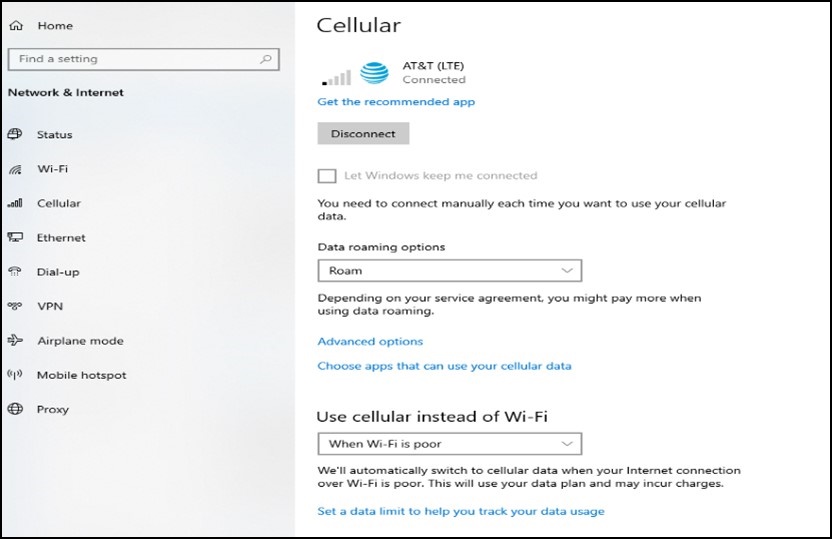
圖 1 - 前往新增 APN 並輸入您的 APN 資訊 (圖 2)。
- APN 資訊可從您的 ISP 取得。
- APN 類型必須為「網際網路與附加」。

圖 2
- 請確定已勾選「套用至設定檔」。
- 按一下「儲存」。
注意:Dell DW5808e 模組 使用者必須為電腦重建映像,或升級至 Windows 10 版本 1903 以上的 Windows 版本。也應安裝最新的 DW5808e 驅動程式。在這些模組上設定 APN 時,可能沒有「網際網路與附加」選項,但新版本的 Windows 可讓電腦在無 3G 路由表的情況下找到正確的韌體。
大量/自動化:
如果企業使用者必須在您的網路中設定多個 APN,他們可以檢閱以下文章。
Affected Products
G Series, Alienware, Inspiron, Latitude, Vostro, XPS, Mobile WorkstationsArticle Properties
Article Number: 000197488
Article Type: Solution
Last Modified: 25 Jul 2025
Version: 11
Find answers to your questions from other Dell users
Support Services
Check if your device is covered by Support Services.