Data Domain ESRS geçidine Data Domain ekleme/kaydetme
Summary: Özet: Bu belgede, ESRS geçidine Data Domain Sistemi kaydetme/ekleme adımları ayrıntılı olarak açıklanmaktadır.
This article applies to
This article does not apply to
This article is not tied to any specific product.
Not all product versions are identified in this article.
Instructions
CLI:
Aygıt, ESRS geçidine kaydedildi.
GUI:

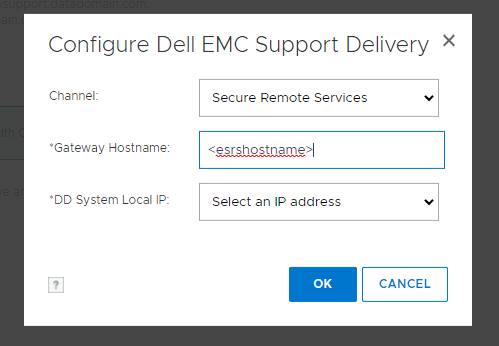
Bu işlem sırasında herhangi bir hatayla karşılaşırsanız lütfen hatayı kaydedin ve Destek ile bir Servis İsteği açın.
- sysadmin olarak Data Domain Sistemine ssh/putty
- Mevcut yapılandırmayı kontrol edin.
- # support notification method show
- # support connectemc config show
- DD'yi ESRS'ye kaydedin
- # support connectemc device register <DDR IP> esrs-gateway <the ESRS GW hostname>
- Servis Bağlantısı kullanıcı adı ve parolası istenir. Müşterinin destek kimlik bilgileri kullanılabilir. (Dell destek sitesi görüntülenirken kullanılanla aynı kimlik bilgileri)
- Örnek çıktı:
- # support connectemc device register <DDR IP> esrs-gateway <the ESRS GW hostname>
# support connectemc device register 10.10.10.10 esrs-gateway myesrsgw01
Enter Service Link username: admin
Enter Service Link password: <nothing displayed as you type>
Enter Service Link username: admin
Enter Service Link password: <nothing displayed as you type>
Aygıt, ESRS geçidine kaydedildi.
- Kayıt işlemi başarılı olduktan sonra yapılandırmayı tekrar kontrol edin ve bildirim yöntemini connectemc olarak ayarlayın.
- # support connectemc config show
- Örnek çıktı:
- # support connectemc config show
# support connectemc config show
ConnectEMC Configuration:
ESRS gateway IP/hostname: myesrsgw01
Registered device IP(s): 10.10.10.10
ConnectEMC Configuration:
ESRS gateway IP/hostname: myesrsgw01
Registered device IP(s): 10.10.10.10
-
- # support notification method set connectemc
- # support notification method show
- Bağlantıyı test edin
- # support connectemc test
- Örnek çıktı:
- # support connectemc test
# support connectemc test
Sending test message through ConnectEMC...
Test message successfully sent through ConnectEMC.
Sending test message through ConnectEMC...
Test message successfully sent through ConnectEMC.
GUI:
- Maintenance > Support > Configure Channel (Bakım > Destek > Kanalı Yapılandır)
- "Secure Remote Services" (Güvenli Uzak Hizmetler) öğesini seçin
- ESRS ana bilgisayar adını girin ve bir DD IP'si seçin
- Servis Bağlantısı kimlik bilgilerini girin (Dell destek sitesi görüntülenirken kullanılanla aynı kimlik bilgileri)
- Kayıt tamamlandı
Bu işlem sırasında herhangi bir hatayla karşılaşırsanız lütfen hatayı kaydedin ve Destek ile bir Servis İsteği açın.
Affected Products
Data DomainArticle Properties
Article Number: 000197719
Article Type: How To
Last Modified: 01 Dec 2025
Version: 7
Find answers to your questions from other Dell users
Support Services
Check if your device is covered by Support Services.