从休眠和关机模式恢复后,Dell Universal Dock UD22 到外部显示器无显示
Summary: 系统从休眠和关机模式恢复后,从 Dell Universal Dock UD22 到外部显示器无任何显示
This article applies to
This article does not apply to
This article is not tied to any specific product.
Not all product versions are identified in this article.
Symptoms
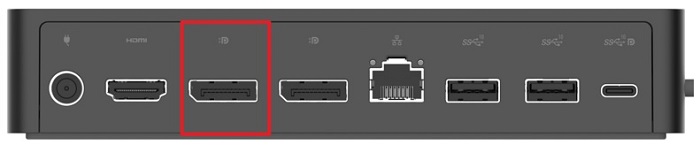
Dell Universal Dock UD22 无法使用 DisplayPort (DP) 向特定外部 MST 显示器显示图像。当显示器连接到端口 1 并且显示器配置了 MST 时,会出现此问题。以这种方式配置时,计算机从休眠 (S4) 和关机 (S5) 模式恢复后,症状会出现。
Cause
Dell Universal Dock UD22 不支持启用 MST 的显示器。
Resolution
不要更换任何硬件。
这是预期行为。指导用户在显示器的屏上显示 (OSD) 中禁用 MST(图 1)。
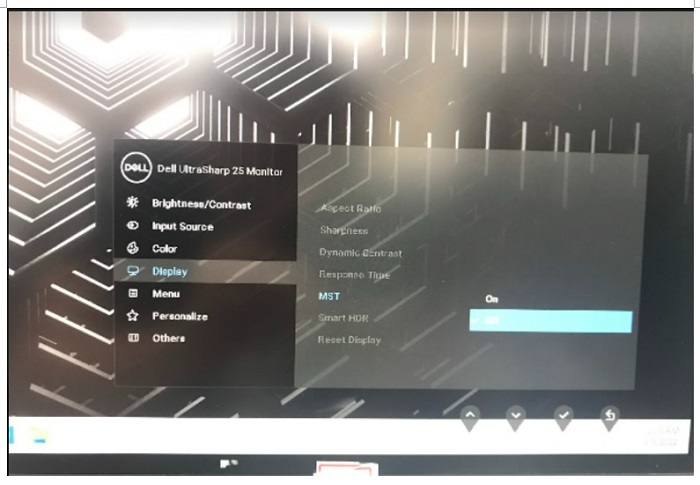
这是预期行为。指导用户在显示器的屏上显示 (OSD) 中禁用 MST(图 1)。
图 1 — 在显示器的屏幕显示菜单中禁用 MST。
Affected Products
Dell Universal Dock UD22Article Properties
Article Number: 000199952
Article Type: Solution
Last Modified: 17 Apr 2025
Version: 4
Find answers to your questions from other Dell users
Support Services
Check if your device is covered by Support Services.