Instalace aplikace Dell Pair s nainstalovaným antivirem AVG Antivirus má zpožděnou odezvu
Summary: Tento článek obsahuje informace a řešení opožděné reakce instalace aplikace Dell Pair, když je nainstalovaný AVG Antivirus.
This article applies to
This article does not apply to
This article is not tied to any specific product.
Not all product versions are identified in this article.
Symptoms
Dotčené produkty:
- Dell Pair
Dotčené platformy:
- Latitude 7320
- Latitude 7420
- Latitude 7520
- Latitude 7330
- Latitude 7430
- Latitude 7530
- Latitude 9330
- Latitude 9430
- Precision 5470
- Precision 5570
- Precision 5770
- Precision 7670
- Precision 7770
- XPS 9315
- XPS 9320
- XPS 9520
- Dell Pro 13 Premium
Dotčené operační systémy:
- Windows 10 build verze 10.0.19041 a novější
- Windows 11
Uživatel se může setkat se zpožděnou odezvou instalace aplikace Dell Pair, pokud je na počítači nainstalován program AVG Antivirus.
Poznámka: Zpoždění je přibližně jedna až dvě minuty a jakmile instalace pokračuje, nedochází k žádným poruchám.
Pozadí aplikace Dell Pair
Software Dell Pair podporuje následující funkce:
- Zjišťování zařízení Dell, jako je myš a klávesnice, pokud jsou v dosahu detekce a párování pomocí technologie Bluetooth.
- Párování zařízení prostřednictvím technologie Bluetooth.
Cause
AVG antivirus způsobuje zpoždění instalace.
Resolution
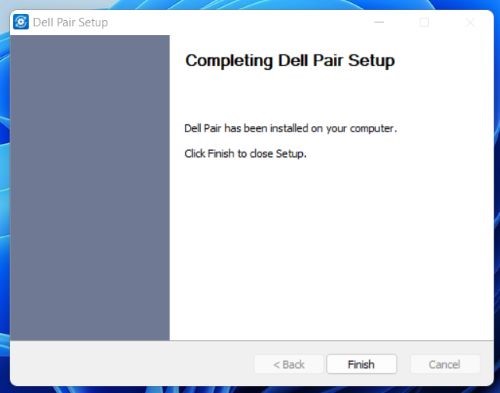
Když je v počítači nainstalovaný antivirový program AVG, musí uživatel počkat, dokud se nezobrazí zpráva o dokončení instalace aplikace Dell Pair.
Affected Products
Dell Pair, Dell Pro 13 Premium PA13250, Latitude 7320, Latitude 7330, Latitude 9330, Latitude 7420, Latitude 7430, Latitude 9430, Latitude 7520, Latitude 7530, Precision 5470, Precision 5570, Precision 7670, Precision 5770, Precision 7770
, XPS 13 9315, XPS 13 Plus 9320, XPS 15 9520
...
Article Properties
Article Number: 000204223
Article Type: Solution
Last Modified: 24 Apr 2025
Version: 7
Find answers to your questions from other Dell users
Support Services
Check if your device is covered by Support Services.