PowerFlex: Run Script on Host (aka OS Patching) Feature Explained
Summary: The feature is used to run user-provided scripts on servers hosting MDM or SDS components. The feature can be used for any purpose external to the PowerFlex system, such as running a set of Linux shell commands, patching an operating system, and more. ...
This article applies to
This article does not apply to
This article is not tied to any specific product.
Not all product versions are identified in this article.
Instructions
UI - Pre-PFMP (PowerFlex 4.x)
Prerequisites
Mandatory - the main script is located in /opt/emc/scaleio/lia/bin/ directory with execution permissions.
- Script name must be patch_script
Optional - the validation script is located in /opt/emc/scaleio/lia/bin/ directory with execution permissions.
- Script name must be verification_script
> The feature is supported on Linux only (RHEL and SLES).
> The feature checks if the exit code is 0 (Zero) at the end of execution.
> Exit codes and script run can be found in the LIA logs.
> It is the customer's responsibility to test the patch_script and verification_script before running the process using Gateway.
> Feature location: Maintain → System Logs and Analysis → Run Script on Hosts.


Steps and Flows
Running script on:
1. Entire System - All PowerFlex Nodes
By default, the script is running on the first host’s Protection Domain (PD) then moves to the second, and so on.
In parallel on different Protection Domains disabled - by default, the checkbox is cleared.
In parallel on different Protection Domains enabled - by selecting this option, the patch_script will run in parallel on all PDs.
PDs that do not have MDMs are first, and Cluster Nodes are last.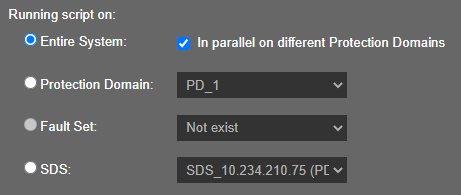
2. Protection Domain - a specific PD
PDs that do not have MDMs is first, and MDM cluster nodes are last.
3. Fault Set - a specific FS.
FSs that do not have MDMs are first, and MDM cluster nodes are last.
4. SDS - a single SDS node
Running configuration:
1. Stop the process on script failure.
1.1 Stop process on script failure enabled - by default, the checkbox is checked.
The whole run will fail and stop, once the patch_script (and verification_script if selected) exit with any other code than 0 (Zero).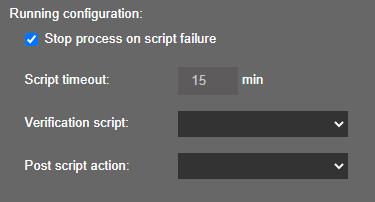
1.2 Stop process on script failure disabled.
In case the patch_script fails, the execution of that node will fail and the system will move to the next node and run the patch_script on that node.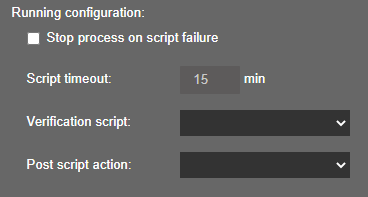
2. Script timeout - How much time to wait for the patch_script to finish?
Running the script has a configurable timeout, which is chosen by the user.
By default configured to 15 minutes → due to a bug, the timeout is hard coded to 15 minutes, in versions older than PowerFlex 3.6.
The whole run will fail and stop, once the script run is timed out.
3. Verification script - Do you want to run the verification_script after the patch_script was run?
3.1 Run - patch_script will run and once it is done, the verification_script will run, depending on if the patch_script post-action was to reboot or not (section #4).
3.2 Do not Run - patch_script will run and once it is done, the whole run will stop and finish as successfully.
4. Post script action - Do you want to reboot the node after the patch_script is ran?
4.1 Reboot - after patch_script is finished running and exited with code 0 (Zero), the node will reboot, and stop or continue depending on if the verification_script was chosen to run or not (section #3).
If Gateway is on a node to be rebooted, it will not reboot, the operation succeeds, and a pop-up that reminds us to reboot it manually will be shown.
4.2 Do not reboot - after patch_script finished running and exited with code 0 (Zero), the node will not reboot, and stop or continue depending on if the verification_script was chosen to run or not (section #3).
Run Script on Hosts:
Press "Run Script on Hosts" --> Validate phase starts.
This phase sends a request to each of the node's LIA to verify the existence of the patch_script and verification_script (if selected) files under /opt/emc/scaleio/lia/bin/.
The code logic selects a random list of nodes to run on (according to the mentioned conditions).
Start execution phase:
Press the "Start execution phase" button.
1. Gateway makes the following verifications:
a. Check that there is no failed capacity.
b. Check the valid spare capacity.
c. Check valid cluster state.
d. Check that no other SDS is in maintenance mode.
2. Enter the SDS into maintenance mode.
3. Run the patch_script - after a successful run, the file is deleted and a backup file of it is created on the same directory.
With the name backup_patch_script
4. Reboot host (if selected)
5. Run verification_script (if selected) - after a successful run, the file is deleted and a backup file of it is created on the same directory with the name backup_verification_script.
6. Exit the SDS from maintenance mode.
7. Operation completed successfully.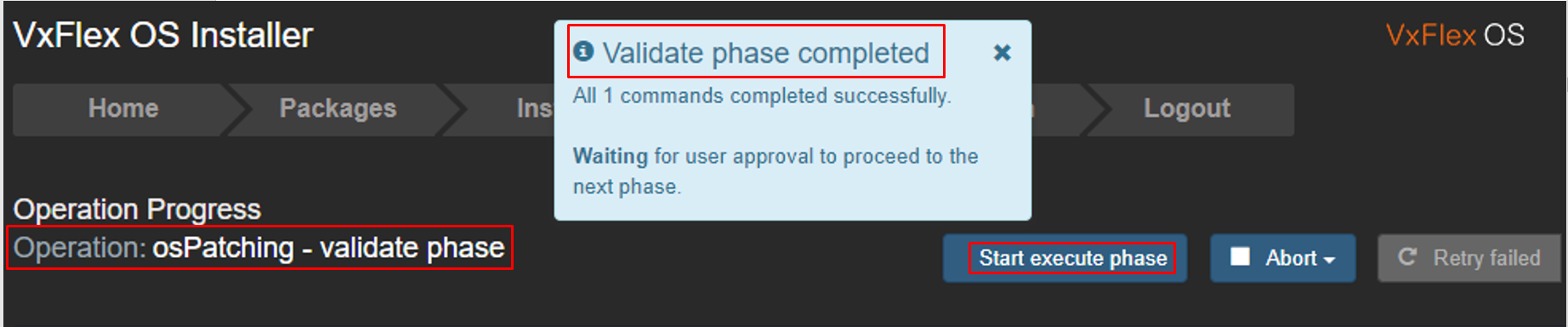
RESTAPI - Post-PFMP (PowerFlex 4.x)
- Run a patch script on all or some of the system nodes, with an optional reboot and an optional verification script. The operation has some level of parallelism.
- The script files should be stored in the node's folder: /opt/emc/scaleio/lia/bin Alternatively, they can be uploaded by the GW to the node. The scripts can be either taken from a GW local folder or downloaded from HTTP/HTTPS share.
- A list of SdsIds and/or mdmIds can be provided, to explicitly choose the nodes to run on.
- The filenames are hard coded and cannot be changed: patch_script and verification_script
REST Command
- /im/types/Configuration/actions/liaRunOsPatching
Required Parameters
- Either one of the following parameters is mandatory: pdIds/fsIds/sdsIds/mdmIds / executeOnAllSdss / executeOnAllMdms
pdIds- run on all nodes that are part of the following Protection Domains (PD Ids), in decimal formatfsIds- run on all nodes that are part of the following Fault Sets (FS Ids), in decimal formatsdsIds- run on all SDSs listed by Ids, in decimal formatmdmIds- run on all MDMs listed by Ids, in decimal formatexecuteOnAllSdss- run on all SDSs (true/false)executeOnAllMdms- run on all MDMs (true/false)
Optional Parameters
isRebootRequired- should each node reboot after running the patch script (values: true/false)isVerificationScriptRequired- should the verification script run on each node (values: true/false)isRunningInParallelOnPds- should the operation run in a parallel way on nodes that belong to different PDs (values: true/false)isStopProcessingOnScriptFailure- should the entire operation stop in case of a script failure (values: true/false)TimeoutMs- timeout for running the patch script in millisecondsisUploadFileNeeded- Should GW upload scripts to the nodes (values: true/false)
The following fields are relevant when isUploadFileNeeded is 'true':
patchScriptFilePath- either the local folder name or an http/https URL of the patch scriptverificationScriptFilePath- either the local folder name or an http/https URL of the verification scriptmaintenanceModeType- Maintenance Mode type (values: IMM/PMM)verificationScriptTimeoutSec- verification script timeout in secondsrebootTimeoutSec- node reboot timeout in seconds
Note that before running the liaRunOsPatching command, you should first log in and get the system configuration, see the example below.
Command Example
*token variable contains the Keycloak token that was returned from /auth/login or from /api/gatewayLogin.
**<ip-address> - IP Address of an http server containing the scripts to run
Get the json of a system configuration, which will be the payload of the patch command (must replace liaPassword and mdmPassword manually from null to some string).
Insert the output of this command (with fixed passwords) into the config.json file:
curl -s -X POST -k -H "Content-Type: application/json" -d '{ "mdmIps":["1.2.3.4","5.6,7,8"], "mdmUser":"<mdm_username>", "mdmPassword":"<mdm_password>", "securityConfiguration":{ "allowNonSecureCommunicationWithMdm":"true", "allowNonSecureCommunicationWithLia":"true", "disableNonMgmtComponentsAuth":"false" } }' -H "Authorization: Bearer ${token}" https://<m&o-ip-address>/im/types/Configuration/instances
Run the patch command:
curl -v -k -X -i POST -H "Content-Type:application/json" -H "Authorization: Bearer ${token}"
"https:/<m&o-ip-address>/im/types/Configuration/actions/liaRunOsPatching?executeOnAllSdss=true &isRebootRequired=true&isVerificationScriptRequired=true&patchScriptFilePath=https://<ip-address>/patch_script&verificationScriptFilePath=https://<ip-address>/verification_script&maintenanceModeType=IMM&rebootTimeoutSec=30" -d @config.json
Additional Information
Logs
Gateway:
- /opt/emc/scaleio/gateway/logs/scaleio.log
- /opt/emc/scaleio/gateway/logs/scaleio-trace.log
LIA:
/opt/emc/scaleio/lia/logs/trc.x
Tip - Special switch to keep the script in the node when troubleshooting or testing:
- Edit file /opt/emc/scaleio/gateway/webapps/ROOT/WEB-INF/classes/gatewayInternal.properties
- Find the field "ospatching.delete.scripts=false"
- Change to true for troubleshooting (Default is false)
Affected Products
PowerFlex rack, ScaleIOArticle Properties
Article Number: 000206981
Article Type: How To
Last Modified: 23 Sept 2025
Version: 4
Find answers to your questions from other Dell users
Support Services
Check if your device is covered by Support Services.