Latitude 7320 Touchpad Becomes Unresponsive in the Upper Corners
Summary: This article provides information about the touchpad unresponsiveness in the upper left and upper right corners.
This article applies to
This article does not apply to
This article is not tied to any specific product.
Not all product versions are identified in this article.
Symptoms
Affected Platforms:
- Latitude 7320
Latitude 7320 users have reported that the touchpad becomes unresponsive when touched in the upper left or upper right corner. Users may also experience the cursor become suppressed when the finger slides in the upper left or upper right corner of the touchpad.
Cause
For ease of use and prevent accidental touch of the touchpad while typing, a guard has been implemented in the upper left and upper right corners.
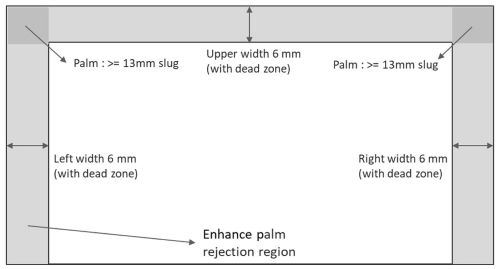
Figure 1: Touchpad dead zone
Resolution
This is the expected behavior of the touchpad. The touchpad is working as designed.
Affected Products
Latitude 7320Article Properties
Article Number: 000212753
Article Type: Solution
Last Modified: 22 Apr 2025
Version: 4
Find answers to your questions from other Dell users
Support Services
Check if your device is covered by Support Services.