Não é possível ligar o headset Alienware Wireless Gaming AW720H, AW725H ou AW920H na chegada
Summary: Este artigo fornece informações sobre como ligar o headset gamer Alienware sem fio na chegada.
This article applies to
This article does not apply to
This article is not tied to any specific product.
Not all product versions are identified in this article.
Symptoms
Os usuários do headset gamer Alienware sem fio podem relatar que não conseguem ligar o headset na chegada.
Modelos afetados:
- Headset gamer sem fio Alienware Dual Mode AW720H
- Headset gamer Alienware Tri-Mode sem fio — AW725H
- Alienware Tri-Mode Wireless Gaming Headset AW920H
Cause
O headset está no modo de envio para proteger a bateria contra ativação acidental durante o transporte.
Resolution
Verifique se o computador está ligado. Siga a etapa abaixo para conectar o headset usando o cabo de carregamento. Isso encerrará o modo de envio e o headset será ligado.
Para carregar o headset, conecte a extremidade USB-C do cabo USB-A para USB-C à porta USB-C do headset. Conecte a outra extremidade à porta USB do computador (Figura 1 para AW720H e Figura 2 para AW920H).

(Figura 1: Headset gamer sem fio Alienware Dual Mode (AW720H) de carregamento
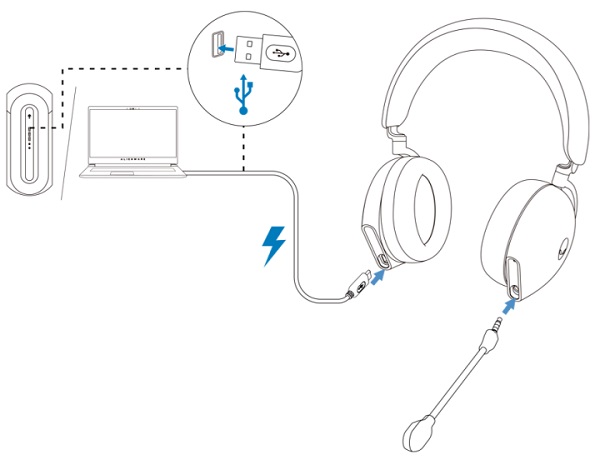
(Figura 2. Carregamento do headset gamer Alienware Tri-Mode sem fio (AW920H)
Nota: Consulte o Manual do usuário para obter mais informações.
Affected Products
Alienware Tri-Mode Wireless Gaming Headset AW725H, Alienware Tri-Mode Wireless Gaming Headset AW920H, Alienware Dual Mode Wireless Gaming Headset AW720HProducts
Alienware, Inspiron Desktop, OptiPlex, Vostro, XPS, G Series, G Series, Alienware, Inspiron, Latitude, Vostro, XPS, XPS Tablets, Fixed Workstations, Mobile WorkstationsArticle Properties
Article Number: 000213964
Article Type: Solution
Last Modified: 19 Apr 2025
Version: 7
Find answers to your questions from other Dell users
Support Services
Check if your device is covered by Support Services.