PowerProtect:Linuxでファイル レベルのリストア中にファイル システムのマウント エラーが発生する
Summary: PowerProtect Data Managerファイル システムのファイル レベルのリストアがマウント ステージで失敗します。
This article applies to
This article does not apply to
This article is not tied to any specific product.
Not all product versions are identified in this article.
Symptoms
Linuxでのファイル システムのファイル レベル リストアのマウントに失敗します。
潜在的なエラー コード:
ARA0002失敗:エージェントの問題により、FILE_SYSTEM資産 /ホームをリストアできません。
注:上記の資産は、資産の選択
に応じて変化します続きを読む:
マウント操作中の一般的なエラー:コピー更新の取得に失敗しました

潜在的なエラー コード:
ARA0002失敗:エージェントの問題により、FILE_SYSTEM資産 /ホームをリストアできません。
注:上記の資産は、資産の選択
に応じて変化します続きを読む:
マウント操作中の一般的なエラー:コピー更新の取得に失敗しました
Cause
Linux 用のバニラ・マシン・デプロイメントでは、デフォルトで ::1 が /etc/hosts ファイルに存在します。
IPV6が有効な場合、PowerProtect Data ManagerエージェントがローカルRESTサーバーと通信するときに、 pingを実行しても 、必要な127.0.0.1が返されません。
IPV6が有効な場合、PowerProtect Data ManagerエージェントがローカルRESTサーバーと通信するときに、 pingを実行しても 、必要な127.0.0.1が返されません。
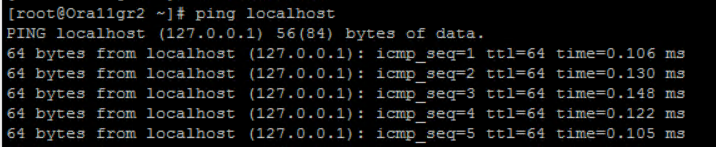
製品の現在の要件は、 ping localhost への応答を 127.0.0.1 にすることです。
この例では、 ::1
例を送信していました。
# ping localhost
PING localhost(localhost (::1)) 56 data bytes
64 bytes from localhost (::1): icmp_seq=1 ttl=64 time=0.053 ms
64 bytes from localhost (::1): icmp_seq=2 ttl=64 time=0.042 ms
64 bytes from localhost (::1): icmp_seq=3 ttl=64 time=0.039 ms
Resolution
1.VI/VIMを使用して、リストアの宛先VM上の /etc/hosts ファイルを編集します。
# vi /etc/hosts
2.::1 エントリをコメントアウトし、変更したファイルを保存します。
変更前:

変更後:
3。ping localhostを再度実行すると、::1ではなく127.0.0.1が返されるはずです。
# vi /etc/hosts
2.::1 エントリをコメントアウトし、変更したファイルを保存します。
変更前:
変更後:
3。ping localhostを再度実行すると、::1ではなく127.0.0.1が返されるはずです。
Article Properties
Article Number: 000219300
Article Type: Solution
Last Modified: 26 Feb 2024
Version: 2
Find answers to your questions from other Dell users
Support Services
Check if your device is covered by Support Services.