PowerProtect: Linux에서 파일 레벨 복원 중 파일 시스템 마운트 오류가 발생함
Summary: PowerProtect Data Manager 파일 시스템 파일 레벨 복원이 마운트 단계에서 실패합니다.
This article applies to
This article does not apply to
This article is not tied to any specific product.
Not all product versions are identified in this article.
Symptoms
파일 시스템 파일 레벨 복원이 Linux에서 마운트되지 않습니다.
잠재적 오류 코드:
ARA0002실패: 에이전트 문제로 인해 자산 /홈FILE_SYSTEM 복원할 수 없습니다.
참고: 위의 자산은 자산 선택
에 따라 변경됩니다.자세히보기 :
마운트 작업 중 일반 오류: 복제본 업데이트를 가져오지 못했습니다.

잠재적 오류 코드:
ARA0002실패: 에이전트 문제로 인해 자산 /홈FILE_SYSTEM 복원할 수 없습니다.
참고: 위의 자산은 자산 선택
에 따라 변경됩니다.자세히보기 :
마운트 작업 중 일반 오류: 복제본 업데이트를 가져오지 못했습니다.
Cause
Linux용 바닐라 머신 배포에서 기본적으로 ::1 은 /etc/hosts 파일에 있습니다.
IPV6가 활성화된 경우 PowerProtect Data Manager 에이전트가 로컬 REST 서버와 통신할 때 localhost 를 ping하면 필요한 127.0.0.1이 반환되지 않습니다.
IPV6가 활성화된 경우 PowerProtect Data Manager 에이전트가 로컬 REST 서버와 통신할 때 localhost 를 ping하면 필요한 127.0.0.1이 반환되지 않습니다.
제품의 현재 요구 사항은 ping localhost 에 대한 응답이 127.0.0.1이어야 한다는 것입니다.
이 경우 ::1
Example을 보냈습니다.
# ping localhost
PING localhost(localhost (::1)) 56 data bytes
64 bytes from localhost (::1): icmp_seq=1 ttl=64 time=0.053 ms
64 bytes from localhost (::1): icmp_seq=2 ttl=64 time=0.042 ms
64 bytes from localhost (::1): icmp_seq=3 ttl=64 time=0.039 ms
Resolution
1. VI/VIM을 사용하여 복원할 대상 VM에서 /etc/hosts 파일을 편집합니다.
# vi /etc/hosts
2. ::1 항목을 주석 처리하고 변경된 파일을 저장합니다.
전:

후:
3. pinglocalhost를 다시 수행하면 ::1이 아닌 127.0.0.1이 반환되어야 합니다.
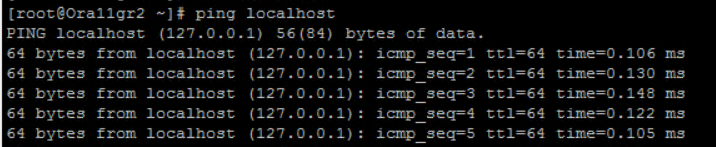
# vi /etc/hosts
2. ::1 항목을 주석 처리하고 변경된 파일을 저장합니다.
전:
후:
3. pinglocalhost를 다시 수행하면 ::1이 아닌 127.0.0.1이 반환되어야 합니다.
Article Properties
Article Number: 000219300
Article Type: Solution
Last Modified: 26 Feb 2024
Version: 2
Find answers to your questions from other Dell users
Support Services
Check if your device is covered by Support Services.