PowerProtect:在 Linux 上的檔案層級還原期間遇到檔案系統掛接錯誤
Summary: PowerProtect Data Manager 檔案系統檔案層級還原在掛接階段失敗。
This article applies to
This article does not apply to
This article is not tied to any specific product.
Not all product versions are identified in this article.
Symptoms
檔案系統檔案層級還原無法掛接至 Linux。
潛在錯誤代碼:
ARA0002故障:由於代理程式問題,無法還原FILE_SYSTEM資產 /home。
注意:上述資產會根據資產選擇
而變化閱讀更多:
掛載操作期間的一般錯誤:獲取副本更新失敗

潛在錯誤代碼:
ARA0002故障:由於代理程式問題,無法還原FILE_SYSTEM資產 /home。
注意:上述資產會根據資產選擇
而變化閱讀更多:
掛載操作期間的一般錯誤:獲取副本更新失敗
Cause
在 Linux 的原版機器部署中,預設情況下 ::1 存在於 /etc/hosts 檔中。
啟用 IPV6 後,當 PowerProtect Data Manager 代理程式與本機 REST 伺服器通訊時,ping localhost 不會傳回所需的 127.0.0.1。
啟用 IPV6 後,當 PowerProtect Data Manager 代理程式與本機 REST 伺服器通訊時,ping localhost 不會傳回所需的 127.0.0.1。
產品目前的要求是對 ping localhost 的回應應為 127.0.0.1。
在本例中,它傳送的是 ::1
範例:
# ping localhost
PING localhost(localhost (::1)) 56 data bytes
64 bytes from localhost (::1): icmp_seq=1 ttl=64 time=0.053 ms
64 bytes from localhost (::1): icmp_seq=2 ttl=64 time=0.042 ms
64 bytes from localhost (::1): icmp_seq=3 ttl=64 time=0.039 ms
Resolution
1.使用 VI/VIM 編輯目的地虛擬機器上的 /etc/hosts 檔案以進行還原。
# vi /etc/hosts
2.註釋掉 ::1 條目並保存更改的檔。
之前:

之後:
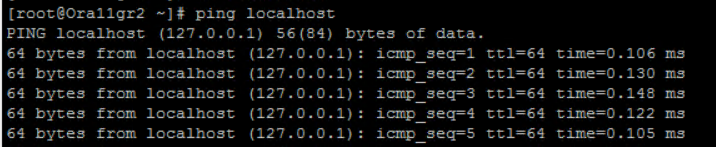
3.再次執行 ping localhost ,您應該看到返回的是 127.0.0.1 ,而不是 ::1。
# vi /etc/hosts
2.註釋掉 ::1 條目並保存更改的檔。
之前:
之後:
3.再次執行 ping localhost ,您應該看到返回的是 127.0.0.1 ,而不是 ::1。
Article Properties
Article Number: 000219300
Article Type: Solution
Last Modified: 26 Feb 2024
Version: 2
Find answers to your questions from other Dell users
Support Services
Check if your device is covered by Support Services.