PowerVault ME5:LDAP 認證的使用者未顯示控制器 B 效能圖表
Summary: 使用 LDAP 驗證並透過控制器 B 登入 PowerVault Manager 時,效能圖表會報告訊息「無法載入圖表資料」。 使用 LDAP 登入資料登入控制器 A,或以本機管理層級使用者身分登入控制器 B 時,即可看到效能資料。
This article applies to
This article does not apply to
This article is not tied to any specific product.
Not all product versions are identified in this article.
Symptoms
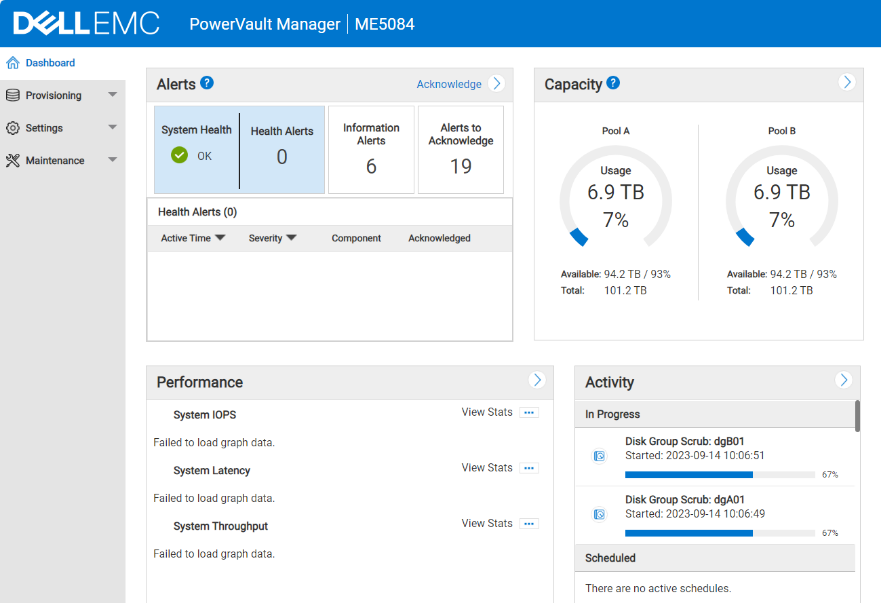
圖 1 - 無法載入圖形數據。
LDAP 使用者登入控制器 B 時,會出現此問題。 LDAP 使用者在控制器 B 上顯示「無法載入圖形資料」,但在使用相同的登入資料時會在控制器 A 上載入效能圖形。
除了使用者使用本機管理使用者帳戶登入控制器 B 之外,請登出,然後使用 LDAP 登入資料登入控制器 B。 隨即會顯示效能圖表,但會在控制器 B 的 180 分鐘 (LDAP 逾時) 後停止運作。 登入控制器 A 時,此行為不會顯現
Cause
使用 LDAP 認證透過控制器 B 管理 IP 位址登入時,PowerVault Manager 中不會顯示效能圖表。呼叫指標相關的 API 時,遠端管理控制器 (MC) 連線失敗。
Resolution
若要檢視效能圖表,請使用 LDAP 登入資料登入控制器 A,或使用本機 ME 管理層級帳戶登入資料登入控制器 B。
若要解決此問題,請升級至控制器韌體版本 ME5.1.2.1.0:
Affected Products
PowerVault ME5012, PowerVault ME5024, PowerVault ME5084Article Properties
Article Number: 000220981
Article Type: Solution
Last Modified: 19 May 2026
Version: 4
Find answers to your questions from other Dell users
Support Services
Check if your device is covered by Support Services.