Błąd zdalnej aktualizacji systemu BIOS w notebooku Dell Latitude
Summary: Opcja Aktualizacja systemu BIOS — zdalna z menu jednorazowego rozruchu F12 na komputerze Latitude nie może połączyć się z siecią bezprzewodową po ponownym zobrazowaniu systemu operacyjnego. ...
This article applies to
This article does not apply to
This article is not tied to any specific product.
Not all product versions are identified in this article.
Symptoms
Notebook Latitude, którego dotyczy problem, nie może korzystać z opcji Aktualizacja systemu BIOS Flash — zdalna z menu jednorazowego rozruchu F12. Notebook Latitude nie może przejść do środowiska BIOSConnect i wyświetla komunikat o błędzie "Unable to connect Wireless. Skonfiguruj połączenie przewodowe za pomocą kabla Ethernet". Dzieje się tak wtedy, gdy oryginalny obraz systemu operacyjnego został ponownie zobrazowany lub dysk twardy został ponownie sformatowany.
Dotyczy platform:
- Latitude 3310
- Latitude 3320
- Latitude 3330
- Latitude 3340
- Latitude 3400
- Latitude 3410
- Latitude 3420
- Latitude 3430
- Latitude 3440
- Latitude 3500
- Latitude 3510
- Latitude 3520
- Latitude 3530
- Latitude 3540
- Latitude 5300
- Latitude 5300 2 w 1
- Latitude 5310
- Latitude 5310 2 w 1
- Latitude 5320
- Latitude 5340
- Latitude 5400
- Latitude 5410
- Latitude 5411
- Latitude 5420
- Latitude 5421
- Latitude 5430
- Latitude 5431
- Latitude 5440
- Latitude 5491
- Latitude 5500
- Latitude 5511
- Latitude 5520
- Latitude 5521
- Latitude 5530
- Latitude 5540
- Latitude 5591
- Latitude 7300
- Latitude 7310
- Latitude 7320
- Latitude 7330
- Latitude 7340
- Latitude 7400
- Latitude 7410
- Latitude 7420
- Latitude 7430
- Latitude 7440
- Latitude 7520
- Latitude 7530
- Latitude 7640
- Latitude 9410
- Latitude 9420
- Latitude 9430
- Latitude 9510
- Latitude 9520
Cause
Format dysku powoduje usunięcie pliku odzyskiwania systemu BIOS (RCV). Usunięcie pliku RCV powoduje awarię funkcji sieci bezprzewodowej w funkcji BIOSConnect.
Resolution
Pobierz i zainstaluj najnowszą aktualizację systemu BIOS z witryny pomocy technicznej firmy Dell. Więcej informacji można znaleźć w podręczniku aktualizacji systemu BIOS. Zainstalowanie pliku BIOS z witryny pomocy technicznej firmy Dell powoduje ponowne utworzenie pliku RCV, ponownie włączając funkcję sieci bezprzewodowej z poziomu funkcji BIOSConnect.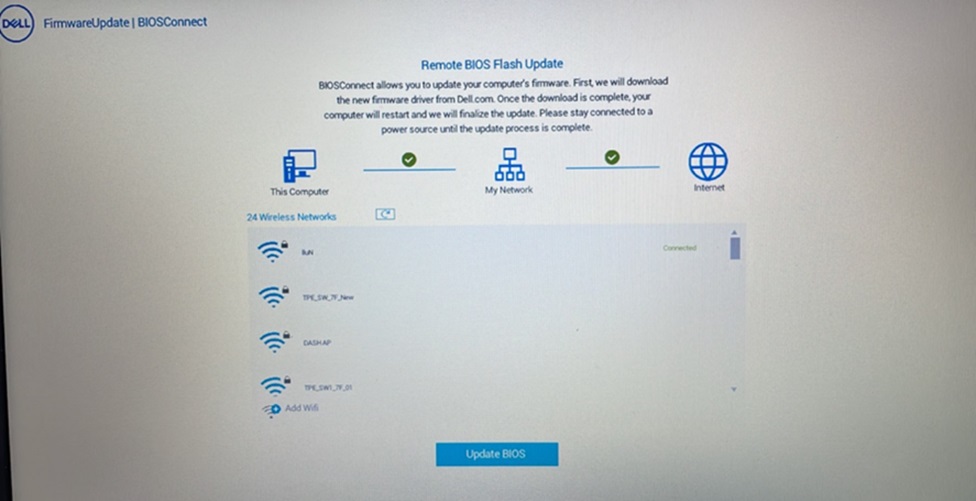
Affected Products
Latitude 3310, Latitude 3320, Latitude 3330, Latitude 3340, Latitude 5300 2-in-1, Latitude 5300, Latitude 5310 2-in-1, Latitude 5310, Latitude 5320, Latitude 5340, Latitude 7300, Latitude 7310, Latitude 7320, Latitude 7330, Latitude 7340
, Latitude 3400, Latitude 3410, Latitude 3420, Latitude 3430, Latitude 3440, Latitude 5400, Latitude 5410, Latitude 5411, Latitude 5421, Latitude 5431, Latitude 5440, Latitude 5491, Latitude 7400, Latitude 7410, Latitude 7420, Latitude 7430, Latitude 7440, Latitude 9410, Latitude 9420, Latitude 9430, Latitude 3500, Latitude 3510, Latitude 3520, Latitude 3530, Latitude 3540, Latitude 5500, Latitude 5511, Latitude 5520, Latitude 5521, Latitude 5530, Latitude 5540, Latitude 5591, Latitude 7520, Latitude 7530, Latitude 9510, Latitude 9520, Latitude 7640, Latitude 5420, Latitude 5430
...
Article Properties
Article Number: 000223087
Article Type: Solution
Last Modified: 13 Nov 2025
Version: 5
Find answers to your questions from other Dell users
Support Services
Check if your device is covered by Support Services.