Intune kan inte distribuera Dell Optimizer version 4.2.2 när den laddas ner från Microsoft Store
Summary: Information om att Intune inte distribuerar Dell Optimizer version 4.2.2 om det laddas ner från Microsoft Store.
This article applies to
This article does not apply to
This article is not tied to any specific product.
Not all product versions are identified in this article.
Symptoms
Appen har inget giltigt senaste paketversionsfel
Intune visar ett felmeddelande, "Den valda appen har inte en giltig senaste paketversion" (bild 1).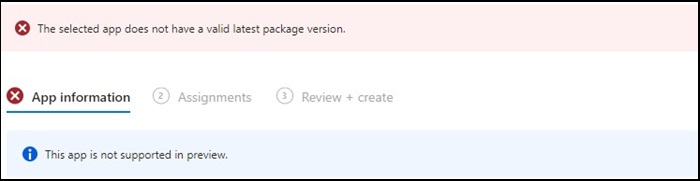
Figur 1
Obs! Endast tillgängligt på utvalda Dell Latitude-, Precision-, OptiPlex- och Rugged-datorer.
Cause
Dell Optimizer klarade inte Intune-verifieringen som kräver att appar installeras på all maskinvara (Dell och icke-Dell).
Resolution
Manuell distribution av Dell Optimizer
Som en tillfällig lösning kan IT-administratören prova följande för att manuellt distribuera Dell Optimizer via Intune.
- Hämta installationsprogrammet för Dell Optimizer på Dell.com
- Följ instruktionerna nedan:
- Installera programvaran med det här kommandot:
Install command: Dell-Optimizer-Application_xxxxx_WIN_x.x.x.x_A00.EXE /passthrough /silent /InstallDotNet=true /FACTORY=TRUE

Obs! Om du vill avinstallera använder du följande kommando:
Uninstall command: Dell-Optimizer-Application_xxxxx_WIN_x.x.x.x_A00.EXE /passthrough /silent /remove
Affected Products
Alienware, Inspiron, OptiPlex, Vostro, XPS, G Series, G Series, Alienware, Inspiron, Latitude, Vostro, XPS, Fixed Workstations, Mobile WorkstationsArticle Properties
Article Number: 000224821
Article Type: Solution
Last Modified: 17 Jul 2025
Version: 7
Find answers to your questions from other Dell users
Support Services
Check if your device is covered by Support Services.