Jaké jsou události systému Windows přidružené k výsledkům skóre zabezpečení
Summary: Tento článek obsahuje příklady protokolu událostí systému Windows po dokončení posouzení zabezpečení nástroje Dell Trusted Device.
This article applies to
This article does not apply to
This article is not tied to any specific product.
Not all product versions are identified in this article.
Instructions
Dotčené produkty:
- Dell Trusted Device
Dotčené platformy:
- OptiPlex
- Latitude
- Pracovní stanice Precision
- XPS
Obsah:
- Události systému Windows přidružené k výsledkům skóre zabezpečení
- Atributy systému BIOS používané v IoAs
Události systému Windows přidružené k výsledkům skóre zabezpečení
Podrobnosti o událostech systému Windows
V následující části jsou uvedeny některé relevantní příklady protokolu událostí systému Windows:
- Skóre zabezpečení
- Ověření systému BIOS
- Indikátory útoku
- Ověření ME
Skóre zabezpečení
Modul plug-in skóre zabezpečení vygeneruje událost pokaždé, když se hodnocení skóre zabezpečení aktualizuje. Události vyhodnocení skóre zabezpečení zapsané do protokolu událostí aplikací Dell mají zdroj s názvem Důvěryhodné zařízení | Posouzení zabezpečení.
Dění
Níže jsou uvedeny příklady událostí vygenerovaných pro posouzení skóre zabezpečení.
Výsledek: ÚSPĚŠNĚ (příklad)
Event ID: 13
Level: Informational
Dell Trusted Device has completed a security scan of the system with service tag xxxxxxx at 9/28/2020 2:56:08 PM.
Result: PASSED

Score: 100

Risk Areas Scanned:
(Passed: 7, Warning: 0, Fail: 0)
- Antivirus solution detected and enabled: PASS
- BIOS Admin Password set: PASS
- BIOS Verification: PASS
- Disk Encryption: PASS
- Firewall solution detected and enabled: PASS
- Indicators of Attack detected: PASS
- TPM enabled: PASS
Výsledek: PASSED, s varováními (příklad)
Event ID: 14
Level: Warning
Dell Trusted Device has completed a security scan of the system with service tag xxxxxxx at 9/28/2020 2:56:08 PM.
Result: PASSED, with warnings

Score: 100

Risk Areas Scanned:
(Passed: 6, Warning: 1, Fail: 0)
- Antivirus solution detected and enabled: PASS
- BIOS Admin Password set: PASS
- BIOS Verification: PASS
- Disk Encryption: WARNING
- Firewall solution detected and enabled: PASS
- Indicators of Attack detected: PASS
- TPM enabled: PASS
Výsledek: Selhání (příklad).
Event ID: 15
Level: Error
Dell Trusted Device has completed a security scan of the system with service tag xxxxxxx at 9/28/2020 5:05:22 PM.
Result: FAILED

Score: 71

Risk Areas Scanned:
(Passed: 4, Warning: 1, Fail: 2)
- Antivirus solution detected and enabled: PASS
- BIOS Admin Password set: PASS
- BIOS Verification: PASS
- Disk Encryption: WARNING
- Firewall solution detected and enabled: PASS
- Indicators of Attack detected: FAIL
- TPM enabled: FAIL
Ověření systému BIOS
Pokud je ověření systému BIOS dokončeno a proběhne úspěšně, zapíše se do protokolu událostí aplikací Dell záznam na úrovni informací s výsledkem. Nelze-li zpracování nástroje BIOS Verification z nějakého důvodu dokončit, zapíše se do protokolu událostí systému Windows položka na úrovni chyby (nebo varování) s popisem chyby. Položka zapsaná do protokolu událostí systému Windows má zdroj s názvem Dell Trusted Device | Intel BIOS Verification.
Dění
ID události 4 označuje níže uvedené typy chyb:
Ověření se nezdařilo
BIOS Verification failed and have a Fail evaluation.
Event ID: 4
Level: Error

BIOS Verification : 1 (Failed Result)
[Displays the complete Json Payload.]
Detekce neoprávněného zásahu:
BIOS Verification failed and have a tampering detected error
Event ID: 4
Level: Error
BIOS Verification : 2 (Tampered Result)
[Displays the complete Json Payload.]
ID události 2 označuje následující typy chyb:
Chyba ovladače
BIOS Verification failed and have a driver error.
Event ID: 2
Level: Error
BIOS Verification : 8 (Driver Error).
See log file for more information
Chyba připojení k síti
BIOS Verification failed and have a network connection error
Event ID: 2
Level: Error
BIOS Verification : 13 (Network Connectivity Error)
See log file for more information
Nepodporovaná platforma
BIOS Verification failed and have a platform unsupported error
Event ID: 2
Level: Error
BIOS Verification : 11 (Platform Not Currently Supported)
See log file for more information
Unknown Error
BIOS Verification failed and have an unknown error
Event ID: 2
Level: Error

BIOS Verification : 3 (Unknown Error).
See log file for more information
Interní chyba serveru
BIOS Verification failed and have an internal error
Event ID: 2
Level: Error
BIOS Verification : 6 (Internal Error).
See log file for more information
Chyba neplatných dat systému BIOS
BIOS Verification failed and have an invalid bios data error
Event ID: 2
Level: Error
BIOS Verification : 9 (Invalid BIOS Data Error).
See log file for more information
Indikátory útoku
Události generované modulem plug-in Indicators of Attack (IoA) jsou určeny k hlášení změn stavu v řetězcích hrozeb IoA.
- Události IoA zapsané do protokolu událostí systému Windows mají zdroj s názvem Dell Trusted Device | Události systému BIOS a IoA.
- Události IoA zapsané do protokolu událostí aplikací Dell mají zdroj s názvem Důvěryhodné zařízení | Události systému BIOS a IoA.
Dění
Modul plug-in IoA vygeneruje následující události. Ty mohou mít mírně proměnlivý obsah, například <<typ>> útoku a <<relevantní změny>> atributů, v závislosti na příslušném řetězci hrozeb. Proměnná content je při zápisu události nahrazena skutečným obsahem.
Aktuální definice ID události jsou svázány s aktuálním stavem hrozby:
- 10 znamená, že kritéria řetězce nebyla splněna.
- 11 znamená, že kritéria řetězce splnila úroveň pro částečný útok.
- 12 znamená, že kritéria řetězce byla zcela splněna.
Byl zjištěn částečný útok
When a partial attack is detected, the following event is written:
Event ID: 11
Level: Warning
A partial Indicator of Attack was detected (Category: <<Attack Type>>) based on the following events:
<<Relevant Attribute Changes>>
Částečný útok eskaluje do plného útoku:
When a partial attack escalates to a full attack, the following event is written:
Event ID: 12
Level: Error
A partial Indicator of Attack has escalated (Category: <<Attack Type>>) based on the following events:
<<Relevant Attribute Changes>>
Částečný útok vymazán
When a partial attack is cleared, the following event is written:
Event ID: 10
Level: Information
A partial Indicator of Attack has been cleared (Category: <<Attack Type>>).
Plný útok
When a threat chain goes from clear to detecting a full attack, the following event is written:
Event ID: 12
Level: Error
An Indicator of Attack was detected (Category: <<Attack Type>>) based on the following events:
<<Relevant Attribute Changes>>
Plný útok byl snížen na částečný
When a full attack is reduced to a partial attack, the following event is written:
Event ID: 11
Level: Warning
An Indicator of Attack has been reduced (Category: <<Attack Type>>) based on the following events:
<<Relevant Attribute Changes>>
Celý útok vymazán
When a full attack is cleared, the following event is written:
Event ID: 10
Level: Information
An Indicator of Attack has been cleared (Category: <<Attack Type>>).
Ověření ME
ME Verification zpracovává proces ověření ME. Pokud je ověření ME dokončeno a proběhne úspěšně, do protokolu událostí aplikací Dell se zapíše záznam na úrovni informací s výsledkem. Pokud zpracování ME Verification nelze z jakéhokoli důvodu dokončit, zapíše se do protokolu událostí systému Windows i do protokolu událostí aplikací Dell záznam na úrovni chyby (nebo varování) s popisem selhání:
- Položka zapsaná do protokolu událostí systému Windows má zdroj s názvem Dell Trusted Device | Ověření Intel ME.
- Položka zapsaná do protokolu událostí aplikace Dell má zdroj s názvem Důvěryhodné zařízení | Ověření Intel ME.
Dění
Zásuvný modul ME Verification Plugin vygeneruje následující události:
Aktuální definice ID událostí jsou svázány s úrovní protokolování:
- 18 označuje, že se jedná o typ zadávání informací.
- 19 označuje, že se jedná o typ položky Warning.
- 20 označuje, že se jedná o typ položky Error.
Ověření proběhlo úspěšně
ME Verification succeeded and have a Pass evaluation
Event ID: 18
Level: Information
Dell Trusted Device has completed an Intel ME Verification scan of the system with service tag G1CCLQ2 at 4/28/2021 2:56:08 PM.
Result: PASSED
Ověření se nezdařilo
ME Verification failed and have a Fail evaluation
Event ID: 20
Level: Error
Dell Trusted Device has completed an Intel ME Verification scan of the system with service tag G1CCLQ2 at 4/28/2021 2:56:08 PM.
Result: FAILED
Chyba ovladače
ME Verification failed and have a driver error
Event ID: 20
Level: Error
Dell Trusted Device has completed an Intel ME Verification scan of the system with service tag G1CCLQ2 at 4/28/2021 2:56:08 PM.
Result:Error. A driver error has occurred
Chyba připojení k síti
ME Verification failed and have a network connection error
Event ID: 20
Level: Error
Dell Trusted Device has completed an Intel ME Verification scan of the system with service tag G1CCLQ2 at 4/28/2021 2:56:08 PM.
Result:Error. A network connection error occurred
Nepodporovaná platforma
ME Verification failed and have a platform unsupported error
Event ID: 20
Level: Error
Dell Trusted Device has completed an Intel ME Verification scan of the system with service tag G1CCLQ2 at 4/28/2021 2:56:08 PM.
Result:Error. Platform not currently supported
Interní chyba serveru
Event ID: 20
Level: Error
Dell Trusted Device has completed an Intel ME Verification scan of the system with service tag G1CCLQ2 at 4/28/2021 2:56:08 PM.
Result:Error. An internal error occurred within the server
Detekce neoprávněného zásahu:
ME Verification failed and have a tampering detected error
Event ID: 20
Level: Error
Dell Trusted Device has completed an Intel ME Verification scan of the system with service tag G1CCLQ2 at 4/28/2021 2:56:08 PM.
Result:Error. Tampering has been detected
Unknown Error
ME Verification failed and have an unknown error
Event ID: 20
Level: Error
Dell Trusted Device has completed an Intel ME Verification scan of the system with service tag G1CCLQ2 at 4/28/2021 2:56:08 PM.
Result:Error. An unknown error has occurred
Neplatný parametr
ME Verification issues a warning about invalid parameter
Event ID: 19
Level: Warning
Dell Trusted Device has completed an Intel ME Verification scan of the system with service tag G1CCLQ2 at 4/28/2021 2:56:08 PM.
Result:Warning. The parameter is invalid
Atributy systému BIOS používané v IoAs
Poznámka:
- Snímky obrazovky představují příklady a nemusí přímo odrážet přesný atribut systému BIOS pro konkrétní platformu.
- Tento graf je dynamický, protože se vytvářejí další IoA.
| IoAs (IoA) | Snímek obrazovky z prostředí BIOS |
|---|---|
| Zabezpečené spouštění |  |
| AttemptLegacyBoot |  |
| Bootlist |  |
| UEFIBootPathSecurity |  |
| AutoOSThresholdRecovery |  |
| AllowBiosDowngrade | 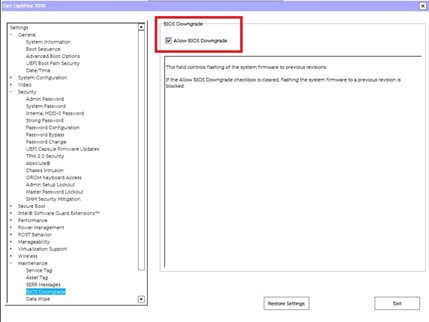 |
| Aktualizace firmwaru kapsle | 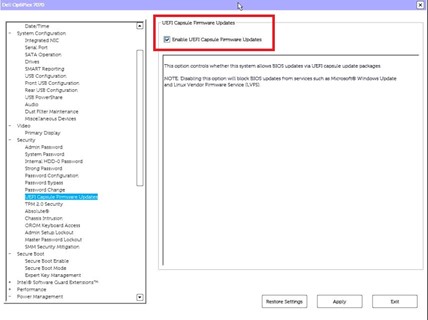 |
| BiosAutoRecovery | 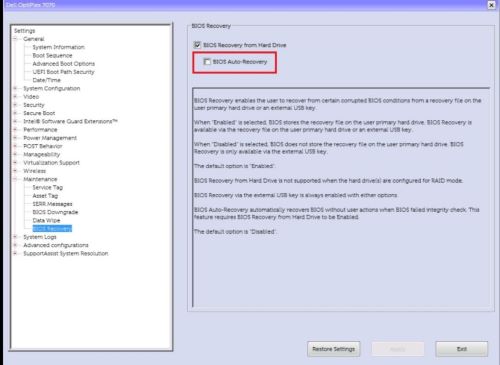 |
| TPMActivation |  |
| TPM |  |
| TPMClear |  |
| TPMPpiClearOverride |  |
| Funkce AutoOn |  |
| Funkce WakeOnLan | 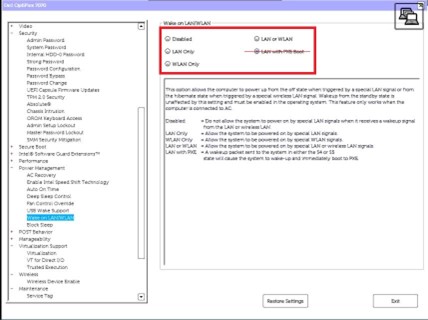 |
| Funkce RemoteWipeInternalDrives | 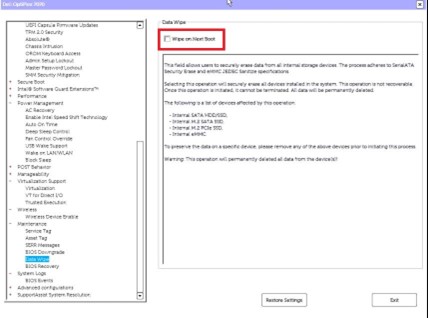 |
| Funkce USBWake |  |
| Funkce WakeOnDock |  |
| TPMRemoteActivation | bude určeno |
| AdminPwMinLen |  |
| PwdMinLen | bude určeno |
| StrongPassword | 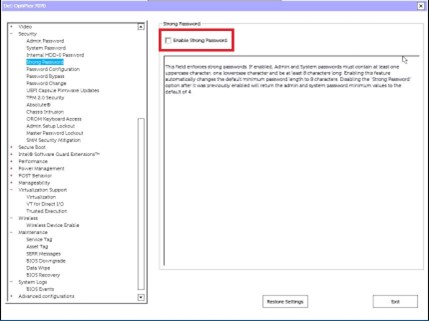 |
| AdminSetupLockout | 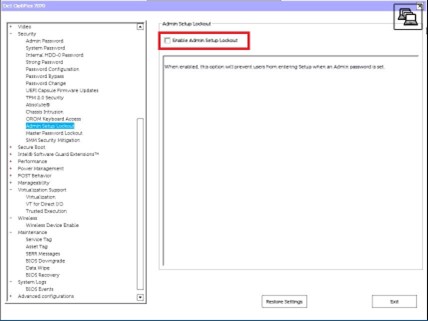 |
| BIOSAdminPwd | bude určeno |
| Vymazat BIOSLog | bude určeno |
| Vymaže protokol PowerLog | bude určeno |
| Protokol ClearThermalLog | bude určeno |
| ClearChassisIntrusionWarning |  |
| Vymazat položku DellRMTLog | bude určeno |
| ChassisIntrusionReporting | 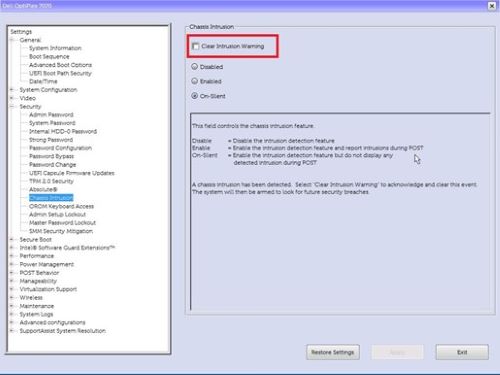 |
| Vniknutí do šasi | Není k dispozici |
| Mikrofon | 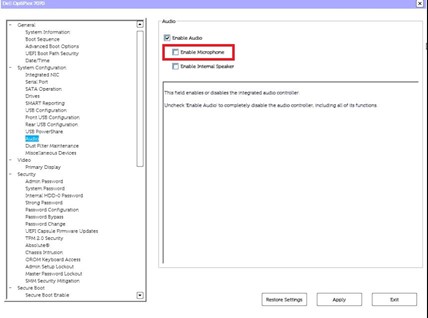 |
Chcete-li kontaktovat podporu, přečtěte si článek Telefonní čísla mezinárodní podpory Dell Data Security.
Přejděte na portál TechDirect a vygenerujte online žádost o technickou podporu.
Další informace a zdroje získáte na fóru komunity Dell Security.
Additional Information
Affected Products
OptiPlex, XPS, Latitude, XPS, XPS Tablets, Fixed Workstations, Mobile Workstations, Dell Trusted DeviceArticle Properties
Article Number: 000233967
Article Type: How To
Last Modified: 09 Oct 2024
Version: 2
Find answers to your questions from other Dell users
Support Services
Check if your device is covered by Support Services.