PowerFlex 4.x – Slik fjerner og legger du til en ressursgruppe på nytt ved hjelp av PFMP
Summary: Fjerne og legge til en ressursgruppe på nytt.
This article applies to
This article does not apply to
This article is not tied to any specific product.
Not all product versions are identified in this article.
Instructions
1) Før du gjør dette, åpne ressursgruppen, gå for å se alle innstillinger:
Klikk livssyklus ->ressursgruppe -> velg ressursgruppe -> klikk vis alle innstillinger.
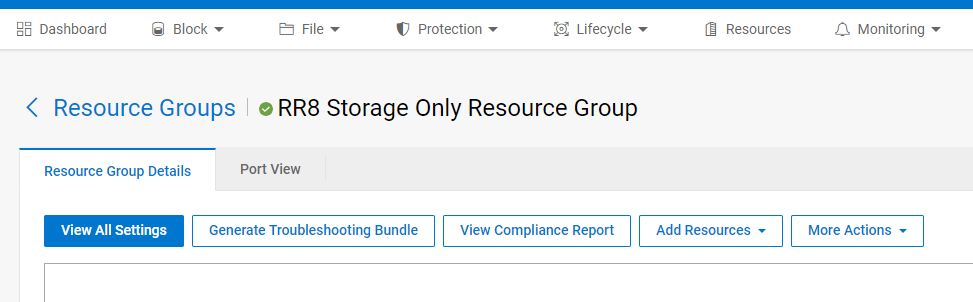
Ta skjermbilder av følgende:
- Registrere nettverkstilordninger (inkl. VLAN)
- Navn på tjeneste
- Serviceinformasjon
- Type nettverksautomatisering (fullstendig/delvis)
- Påloggingsinformasjon
- Node IP-adresser
2) Klikk på Flere handlinger i service, og klikk på Fjern ressursgruppe.
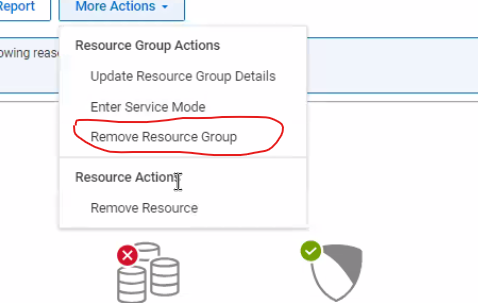
3) Sett fjerning type å fjerne (ikke velg slette)


4) Når du fjerner servicepermisjonsnoder i administrert tilstand.

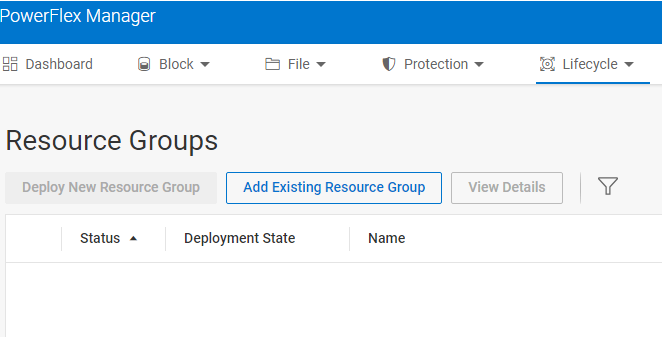
5) Hvis du vil legge til ressursgruppen på nytt, velger du livssyklus og legger deretter til den eksisterende ressursgruppen.... Skriv inn detaljene som er registrert før du fjerner tjenesten.
Affected Products
PowerFlex rack, VxFlex Ready Nodes, PowerFlex custom node, PowerFlex appliance connectivity, PowerFlex appliance R650, PowerFlex appliance R6525, PowerFlex appliance R660, PowerFlex appliance R6625, Powerflex appliance R750, PowerFlex appliance R760
, PowerFlex appliance R7625, PowerFlex appliance R640, PowerFlex appliance R740XD, PowerFlex appliance R7525, PowerFlex appliance R840
...
Article Properties
Article Number: 000237096
Article Type: How To
Last Modified: 25 Apr 2025
Version: 4
Find answers to your questions from other Dell users
Support Services
Check if your device is covered by Support Services.