PowerFlex 4.x — 如何使用 PFMP 删除和重新添加资源组
Summary: 删除并重新添加资源组。
This article applies to
This article does not apply to
This article is not tied to any specific product.
Not all product versions are identified in this article.
Instructions
1) 在执行此作之前,请打开资源组,转到“查看所有设置”:
单击 生命周期 ->资源组 -> 选择 资源组 -> 单击 查看所有设置。

截取以下各项的屏幕截图:
- 捕获网络映射(包括 VLAN)
- 服务名称
- 服务详细信息
- 网络自动化类型(全部/部分)
- 凭据
- 节点 IP
2) 在 服务中,单击 更多作,然后单击 删除资源组。
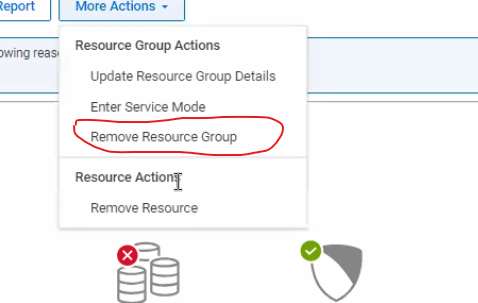
3) 将 删除类型 设置为 删除 (请勿选择 删除)


4) 删除服务时,使节点保持 托管 状态。

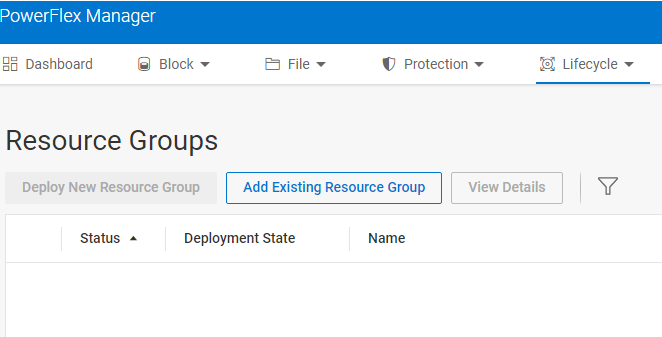
5) 要重新添加资源组,请选择 生命周期,然后 添加现有资源组...。输入 在删除服务之前捕获的详细信息。
Affected Products
PowerFlex rack, VxFlex Ready Nodes, PowerFlex custom node, PowerFlex appliance connectivity, PowerFlex appliance R650, PowerFlex appliance R6525, PowerFlex appliance R660, PowerFlex appliance R6625, Powerflex appliance R750, PowerFlex appliance R760
, PowerFlex appliance R7625, PowerFlex appliance R640, PowerFlex appliance R740XD, PowerFlex appliance R7525, PowerFlex appliance R840
...
Article Properties
Article Number: 000237096
Article Type: How To
Last Modified: 25 Apr 2025
Version: 4
Find answers to your questions from other Dell users
Support Services
Check if your device is covered by Support Services.