正确持拿和使用戴尔 DA305 适配器和戴尔 Pro 七合一 USB-C Travel Hub DA310
Summary: 以下文章提供有关正确处理和使用 Dell DA305 适配器和 Dell Pro 7 合 1 USB-C Travel Hub DA310 的信息。
This article applies to
This article does not apply to
This article is not tied to any specific product.
Not all product versions are identified in this article.
Symptoms
受影响的产品:
- 戴尔六合一 USB-C 多端口适配器 — DA305
- 戴尔 Pro 七合一 USB-C 旅行集线器 DA310
受影响的平台:
- Alienware 笔记本电脑
- Inspiron 灵越笔记本电脑
- Latitude 笔记本电脑
- Precision 移动工作站
- Vostro 成就笔记本电脑
- XPS 笔记本电脑
- Dell Plus 笔记本电脑
- 戴尔 Pro 笔记本电脑
- Dell Pro Max 笔记本电脑
- 戴尔 Pro Plus 笔记本电脑
- 戴尔 Pro Premium 笔记本电脑
- 戴尔 Pro Rugged 笔记本电脑
- G 系列笔记本电脑
不正确地处理 DA305 适配器和 Dell Pro 7 合 1 USB-C Travel Hub DA310 的 USB-C 线缆可能会导致以下故障。
- 适配器在连接到笔记本电脑时不会检测到坞站和 USB 设备。
- USB设备在连接到笔记本电脑时显示部分或间歇性功能。
- 适配器网络(以太网)端口可能无法正常工作。
- 适配器视频端口无法正常工作或仅部分工作。
- 通过适配器连接的 USB 设备无法正常工作。
- USB-C 线缆的任何移动都会影响端口的功能。
- USB-C 线缆或 USB-C 插头出现明显损坏。
Cause
不正确地将 USB-C 线缆插入笔记本电脑上的端口或从其间插入可能会导致 USB-C 线缆损坏。
Resolution
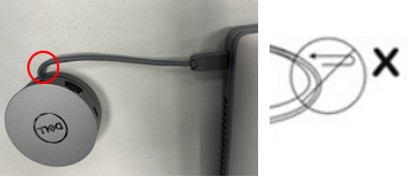
正确处理适配器的做法是将适配器插入移动设备,适配器支撑在同一表面上,并且不要弯曲或扭曲 USB-C 线缆。

提醒:确保 USB-C 连接器已完全就位。
注意:过度弯曲和扭曲可能会损坏 USB-C 线缆或缩短设备的使用寿命和耐用性。
提醒:
- 请勿扭曲 USB-C 线缆
- 请勿以锐角弯曲 USB-C 接头处的 USB-C 线缆


Affected Products
G Series, Alienware, Dell Plus, Dell Pro, Dell Pro Max, Dell Pro Plus, Dell Pro Premium, Inspiron, Latitude, Dell Pro Rugged, Vostro, XPS, Mobile Workstations, Dell 6-in-1 USB-C Multiport Adapter - DA305, Dell Pro 7-in-1 USB-C Travel Hub DA310Article Properties
Article Number: 000239803
Article Type: Solution
Last Modified: 13 May 2025
Version: 8
Find answers to your questions from other Dell users
Support Services
Check if your device is covered by Support Services.