Data Protection Advisor (DPA): Emailed report attachments have a filename of "null"
Summary: After upgrading Data Protection Advisor (DPA) to 19.10, the emailed Scheduled Reports are received with an attachment with a filename of "null."
This article applies to
This article does not apply to
This article is not tied to any specific product.
Not all product versions are identified in this article.
Symptoms
After upgrading Data Protection Advisor (DPA) to 19.10, the emailed Scheduled Reports are received with an attachment with a filename of "null."
The observed filenames are:
null.csv
null.pdf
null.html
Below is a screenshot an example of the issue.
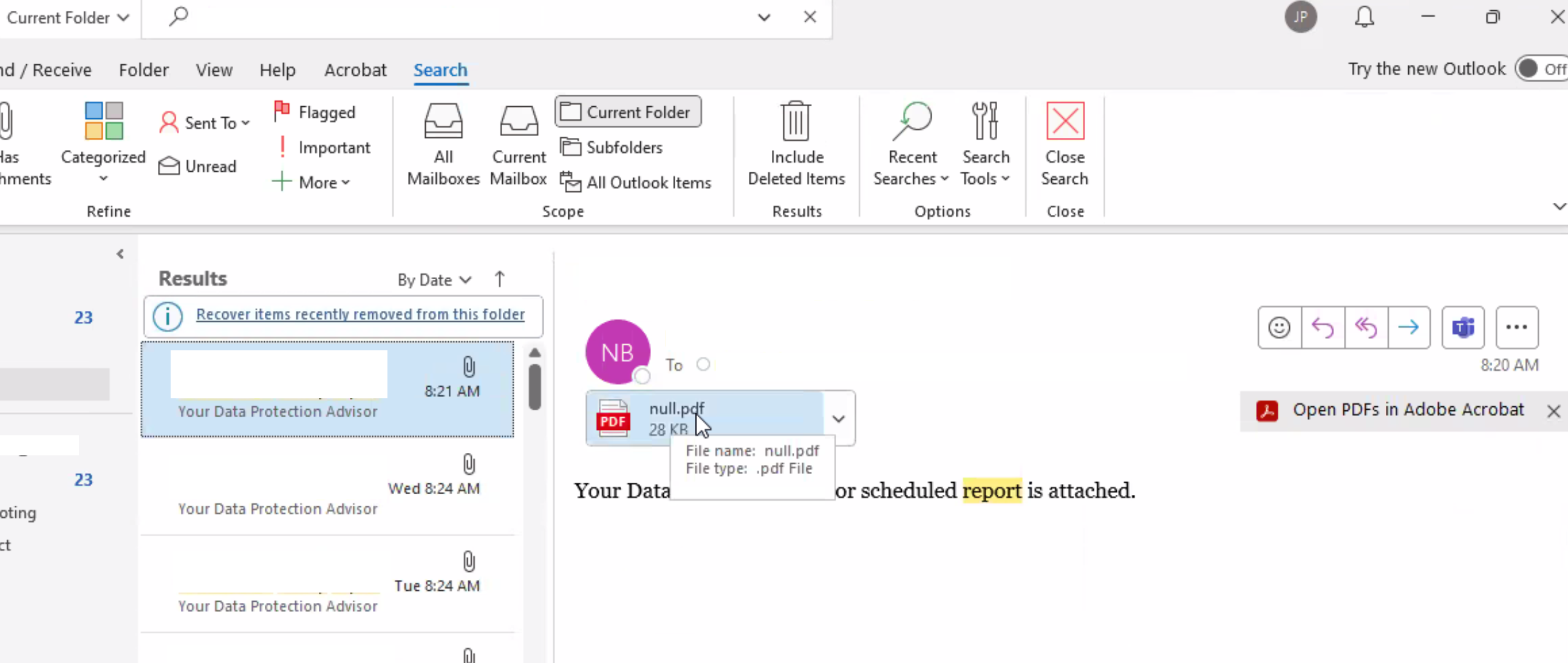
DPA scheduled reports created in version 19.9 and earlier may not have the filename field enabled for email attachments.
Cause
This is a known Bug/Defect in Data Protection Advisor.
For new DPA 19.10 scheduled reports, it is mandatory to provide a filename. For older preexisting reports, this field was not mandatory and was commonly left blank. In these cases, the reports would arrive with a default value of "DPA_ScheduledReport."
Resolution
Resolved in Data Protection Advisor 19.12
Note the DPA 19.12 version is planned for release in early 2025.
The latest DPA patch builds are available from the Dell Support site or from Dell Technical Support.
A workaround is available for this issue.
Open the DPA UI and navigate to the custom templates (reports). Modify all of the preexisting scheduled reports and add a file name for each.
Please contact Dell Technical Support for further details or information.
Article Properties
Article Number: 000250894
Article Type: Solution
Last Modified: 21 Nov 2024
Version: 1
Find answers to your questions from other Dell users
Support Services
Check if your device is covered by Support Services.