PowerFlex: Reinitialisieren der Replikation nach Replikationsunterbrechung
Summary: Die Replikationskonsistenzgruppe kann aus verschiedenen Gründen gelöscht werden und die Replikation zwischen Quell- und Zielstandorten wird beendet. Allen Fällen gemein ist das Ende der Journalkapazität. ...
This article applies to
This article does not apply to
This article is not tied to any specific product.
Not all product versions are identified in this article.
Symptoms
In der Befehlszeile finden Sie Warnmeldungen mit der Meldung "Volumes in beschädigten Replikationskonsistenzgruppen".
# scli --query_all_replication_pairs
query_all_replication_pairs returned 0 Replication Pairs.
WARNING: The System contains 2 volumes in broken replication consistency groups

# scli --query_all_replication_consistency_groups
Protection Domain aef4ce8300000000 Name: RHEL7-PD
WARNING: The Protection Domain contains 2 volumes in broken replication consistency groups
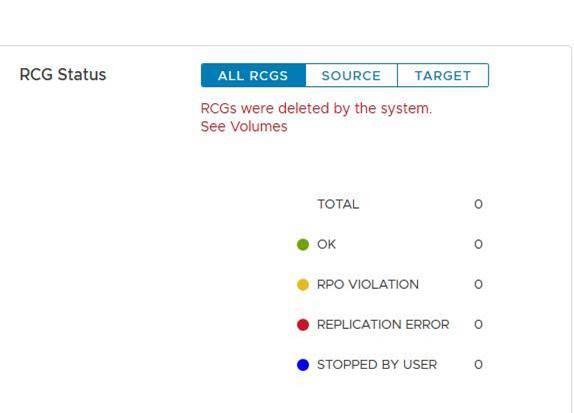
Auf der Benutzeroberfläche wird für den Status der Replikationskonsistenzgruppen (Replication Consistency Groups, RCGs) der folgende Fehler angezeigt: "RCGs wurden vom System gelöscht".
Der Zweck dieser Protokolldateien besteht darin, eine reibungslose Neuinitialisierung der Replikation zwischen den Standorten zu ermöglichen. Die Protokolldateien werden verwendet, um den Replikationsprozess schnell neu zu starten, nachdem die Ursache der Unterbrechung behoben wurde.
Cause
Beispiele für Gründe, die zu einem Replikationsbruch führen können:
a. Langer Netzwerkausfall zwischen Quell- und Zielstandorten
b. Plötzlicher Kapazitätsabfall am Quell- oder Zielstandort – z. B. in einem DU-Szenario (Data Unavailable)
Sobald die Replikation unterbrochen ist, löscht der MDM automatisch alle Replikationskonsistenzgruppen (RCGs) zwischen dem Quellstandort und dem Zielstandort. Außerdem werden Replikationsprotokolldateien erzeugt, die alle Informationen im Zusammenhang mit den gelöschten RCGs enthalten.
Resolution
ein. Suchen Sie die automatisch generierten Replikationsunterbrechungsprotokolldateien unter dem primären MDM mit dem folgenden Format:
Automatisch DeletedOnEndOfJournalCapacityRplCg_<RCG_ID>_<RCG_name>
Beispiel:
# cd /opt/emc/scaleio/mdm/logs
# ls -l AutoDelete*
-rw-r--r-- 1 root root 953 Apr 14 12:15 AutoDeletedOnEndOfJournalCapacityRplCg_4ca1bc9600000000_Rep_Beta1
b. Überprüfen Sie, ob das Problem, das dazu geführt hat, dass die Replikation unterbrochen wurde, behoben ist.
c. Initialisieren Sie die Replikation mit einer der folgenden beiden Methoden erneut: Mithilfe von Skript oder manuell.
Verwenden des Skripts:
-
Erzeugen Sie eine Datei mit allen relevanten Befehlen aus den automatisch generierten Protokolldateien, um die Replikation neu zu initialisieren
Beispiel:
for i in `ls /opt/emc/scaleio/mdm/logs/AutoDeletedOnEndOfJournalCapacity*`;do sed -e '1,/Recreation CLIs/d' $i >> full_replication_restore_$(date +%s); done -
Überprüfen Sie, ob die Datei erfolgreich erstellt wurde und ihr Inhalt
Beispiel:
[root@112AX-7 logs]# cat full_replication_restore_1587387678 scli --add_replication_consistency_group --replication_consistency_group_name rcg_sanity --destination_system_object_id 416af83800000000 --protection_domain_id b3dd0a5900000000 --remote_protection_domain_id 4ff0744e00000000 --rpo 60 --target_volume_access_mode no_access scli --add_replication_pair --replication_consistency_group_name rcg_sanity --source_volume_id 0da61f0d00000003 --destination_volume_id 1981bbaf00000005 --copy_type full scli --add_replication_consistency_group --replication_consistency_group_name rcg_SANITY2 --destination_system_object_id 416af83800000000 --protection_domain_id b3dd0a5900000000 --remote_protection_domain_id 4ff0744e00000000 --rpo 60 --target_volume_access_mode no_access scli --add_replication_pair --replication_consistency_group_name rcg_SANITY2 --source_volume_id 0da61f2500000000 --destination_volume_id 1981bbb000000006 --copy_type full scli --add_replication_consistency_group --replication_consistency_group_name rcg_sanity3 --destination_system_object_id 416af83800000000 --protection_domain_id b3dd0a5900000000 --remote_protection_domain_id 4ff0744e00000000 --rpo 60 --target_volume_access_mode no_access scli --add_replication_pair --replication_consistency_group_name rcg_sanity3 --source_volume_id 0da61f2600000001 --destination_volume_id 1981bbb100000007 --copy_type full [root@112AX-7 logs]# -
Machen Sie die erzeugte Datei ausführbar, melden Sie sich dann als Administrator beim primären MDM an und führen Sie die erstellte Datei aus.
Beispiel:
# scli --login --username admin --password xxxxxxxxxx Logged in. User role is SuperUser. System ID is xxxxxxxxxxxxxxx # # chmod +x full_replication_restore_1587387678 ; ./full_replication_restore_1587387678 Successfully created Replication Consistency Group rcg_sanity. Object ID 357a6c4f00000001 Successfully created the Pair, ID = a1f1819900000001 Successfully created Replication Consistency Group rcg_SANITY2. Object ID 357a6c5300000003 Successfully created the Pair, ID = a1f1819a00000002 Successfully created Replication Consistency Group rcg_sanity3. Object ID 357a6c5500000005 Successfully created the Pair, ID = a1f1819b00000003 - Überprüfen Sie, ob die Replikation erfolgreich erstellt wurde, indem Sie Folgendes ausführen:
-
scli --query_all_replication_consistency_groups
scli --query_all_replication_pairs
-
Manuell:
-
Überprüfen Sie, ob jede RCG, die automatisch gelöscht wurde, über eine automatisch erzeugte Protokolldatei verfügt:
Beispiel:
# ls /opt/emc/scaleio/mdm/logs/AutoDeletedOnEndOfJournalCapacity* /opt/emc/scaleio/mdm/logs/AutoDeletedOnEndOfJournalCapacityRplCg_357a454600000001_rcg_sanity /opt/emc/scaleio/mdm/logs/AutoDeletedOnEndOfJournalCapacityRplCg_357a6c4b00000002_rcg_SANITY2 /opt/emc/scaleio/mdm/logs/AutoDeletedOnEndOfJournalCapacityRplCg_357a6c4c00000003_rcg_sanity3 -
Wiederholen Sie die nächsten Schritte für jede Datei in der Liste unter Schritt 1 oben
a. Überprüfen Sie, ob die CLI-Befehle erzeugt wurden, und überprüfen Sie, ob die relevanten Informationen unter "Recreation CLIs" enthalten sind.Beispiel:
#cat AutoDeletedOnEndOfJournalCapacityRplCg_357a6c4900000001_rcg_sanity

REPLICATION CONSISTENCY GROUP
LocalId:357a6c4900000001
RemoteId:4ca1e3ab00000001
Name:rcg_sanity
PeerMdmId:416af83800000000
RpoSeconds:60
Direction:LOCAL_TO_REMOTE
DRState:NONE
DeletionDecisionTime:20/04 08:37:35
DeletionReason:AUTOMATIC_ON_END_OF_CAPACITY
FailureDomainId:b3dd0a5900000000
RemoteFailureDomainId:4ff0744e00000000
PAIR 0
LocalId:a1f1819600000001
RemoteId:2dfad1c100000001
LocalVolumeId:0da61f0d00000003
LocalVolumeName:test1
RemoteVolumeId:1981bbaf00000005
RemoteVolumeName:test1
Recreation CLIs:
scli --add_replication_consistency_group --replication_consistency_group_name rcg_sanity --destination_system_object_id 416af83800000000 --protection_domain_id b3dd0a5900000000 --remote_protection_domain_id 4ff0744e00000000 --rpo 60 --target_volume_access_mode no_access
scli --add_replication_pair --replication_consistency_group_name rcg_sanity --source_volume_id 0da61f0d00000003 --destination_volume_id 1981bbaf00000005 --copy_type full
b. Führen Sie alle Befehle aus, die im Abschnitt "Recreation CLIs" angezeigt werden
Beispiel:
# scli --add_replication_consistency_group --replication_consistency_group_name rcg_sanity --destination_system_object_id 416af83800000000 --protection_domain_id b3dd0a5900000000 --remote_protection_domain_id 4ff0744e00000000 --rpo 60 --target_volume_access_mode no_access Successfully created Replication Consistency Group rcg_sanity. Object ID 357a6c4f00000001 [root@112AX-7 logs]# scli --add_replication_pair --replication_consistency_group_name rcg_sanity --source_volume_id 0da61f0d00000003 --destination_volume_id 1981bbaf00000005 --copy_type full Successfully created the Pair, ID = a1f1819900000001 [root@112AX-7 logs]# -
Überprüfen Sie, ob die Replikation erfolgreich erstellt wurde, indem Sie Folgendes ausführen:
-
scli --query_all_replication_consistency_groups

scli --query_all_replication_pairs
-
Affected Products
PowerFlex rack, ScaleIO, PowerFlex SoftwareArticle Properties
Article Number: 000260985
Article Type: Solution
Last Modified: 03 Jul 2025
Version: 3
Find answers to your questions from other Dell users
Support Services
Check if your device is covered by Support Services.