PowerFlex:レプリケーション中断後のレプリケーションの再初期化
Summary: レプリケーション コンシステンシー グループがさまざまな理由で削除され、ソース サイトとターゲット サイト間のレプリケーションが停止することがあります。すべてのケースに共通する根拠は、ジャーナル容量の上限です。
This article applies to
This article does not apply to
This article is not tied to any specific product.
Not all product versions are identified in this article.
Symptoms
コマンド ラインから、「ボリュームが破損したレプリケーション コンシステンシー グループのボリューム」という警告メッセージを確認できます。
# scli --query_all_replication_pairs
query_all_replication_pairs returned 0 Replication Pairs.
WARNING: The System contains 2 volumes in broken replication consistency groups

# scli --query_all_replication_consistency_groups
Protection Domain aef4ce8300000000 Name: RHEL7-PD
WARNING: The Protection Domain contains 2 volumes in broken replication consistency groups
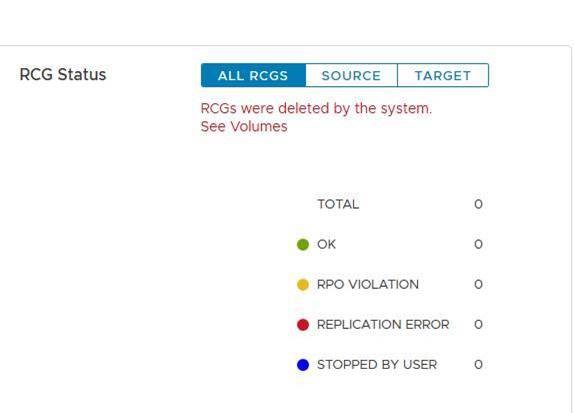
ユーザー インターフェイスで、レプリケーション コンシステンシー グループ(RCG)のステータスに「RCGがシステムによって削除されました」というエラーが表示されます。
これらのログ ファイルの目的は、サイト間のレプリケーションをスムーズに再初期化できるようにすることです。ログ ファイルは、中断の原因が解決された後、レプリケーション プロセスを迅速に再開するために使用されます。
Cause
レプリケーションが中断する原因の例:
a。ソース サイトとターゲット サイト間の長いネットワーク障害
イ.ソース サイトまたはターゲット サイトの容量の突然の減少 - たとえば、データ使用不可(DU)シナリオ
レプリケーションが破損すると、MDMはソース サイトとターゲット サイト間のすべてのレプリケーション コンシステンシー グループ(RCG)を自動的に削除します。また、削除されたRCGに関連するすべての情報を保持するレプリケーション ログ ファイルが生成されます。
Resolution
ある。プライマリーMDMの下にある自動生成されたレプリケーション中断ログ ファイルを、次の形式で見つけます。
自動DeletedOnEndOfJournalCapacityRplCg_<RCG_ID>_<RCG_name>
Example:
# cd /opt/emc/scaleio/mdm/logs
# ls -l AutoDelete*
-rw-r--r-- 1 root root 953 Apr 14 12:15 AutoDeletedOnEndOfJournalCapacityRplCg_4ca1bc9600000000_Rep_Beta1
b.レプリケーションの破損の原因となった問題が修正されたことを確認します。
c. 次の 2 つの 方法のいずれかを使用して 、レプリケーションを再初期化します。スクリプトを使用するか、手動で行います。
スクリプトの使用:
-
レプリケーションを再初期化するために、自動生成されたログ ファイルから関連するすべてのコマンドを含む1つのファイルを生成します
Example:
for i in `ls /opt/emc/scaleio/mdm/logs/AutoDeletedOnEndOfJournalCapacity*`;do sed -e '1,/Recreation CLIs/d' $i >> full_replication_restore_$(date +%s); done -
ファイルが正常に作成され、その内容を検証する
Example:
[root@112AX-7 logs]# cat full_replication_restore_1587387678 scli --add_replication_consistency_group --replication_consistency_group_name rcg_sanity --destination_system_object_id 416af83800000000 --protection_domain_id b3dd0a5900000000 --remote_protection_domain_id 4ff0744e00000000 --rpo 60 --target_volume_access_mode no_access scli --add_replication_pair --replication_consistency_group_name rcg_sanity --source_volume_id 0da61f0d00000003 --destination_volume_id 1981bbaf00000005 --copy_type full scli --add_replication_consistency_group --replication_consistency_group_name rcg_SANITY2 --destination_system_object_id 416af83800000000 --protection_domain_id b3dd0a5900000000 --remote_protection_domain_id 4ff0744e00000000 --rpo 60 --target_volume_access_mode no_access scli --add_replication_pair --replication_consistency_group_name rcg_SANITY2 --source_volume_id 0da61f2500000000 --destination_volume_id 1981bbb000000006 --copy_type full scli --add_replication_consistency_group --replication_consistency_group_name rcg_sanity3 --destination_system_object_id 416af83800000000 --protection_domain_id b3dd0a5900000000 --remote_protection_domain_id 4ff0744e00000000 --rpo 60 --target_volume_access_mode no_access scli --add_replication_pair --replication_consistency_group_name rcg_sanity3 --source_volume_id 0da61f2600000001 --destination_volume_id 1981bbb100000007 --copy_type full [root@112AX-7 logs]# -
生成されたファイルを実行可能にし、プライマリーMDMにadminとしてログインして、作成されたファイルを実行します。
Example:
# scli --login --username admin --password xxxxxxxxxx Logged in. User role is SuperUser. System ID is xxxxxxxxxxxxxxx # # chmod +x full_replication_restore_1587387678 ; ./full_replication_restore_1587387678 Successfully created Replication Consistency Group rcg_sanity. Object ID 357a6c4f00000001 Successfully created the Pair, ID = a1f1819900000001 Successfully created Replication Consistency Group rcg_SANITY2. Object ID 357a6c5300000003 Successfully created the Pair, ID = a1f1819a00000002 Successfully created Replication Consistency Group rcg_sanity3. Object ID 357a6c5500000005 Successfully created the Pair, ID = a1f1819b00000003 - 次のコマンドを実行して、レプリケーションが正常に作成されたことを確認します。
-
scli --query_all_replication_consistency_groups
scli --query_all_replication_pairs
-
手動:
-
自動削除された各RCGに自動生成されたログ ファイルがあることを確認します。
Example:
# ls /opt/emc/scaleio/mdm/logs/AutoDeletedOnEndOfJournalCapacity* /opt/emc/scaleio/mdm/logs/AutoDeletedOnEndOfJournalCapacityRplCg_357a454600000001_rcg_sanity /opt/emc/scaleio/mdm/logs/AutoDeletedOnEndOfJournalCapacityRplCg_357a6c4b00000002_rcg_SANITY2 /opt/emc/scaleio/mdm/logs/AutoDeletedOnEndOfJournalCapacityRplCg_357a6c4c00000003_rcg_sanity3 -
上記の手順 1 のリスト内の各ファイルについて、次の手順を繰り返します
。CLI コマンドが生成されたことを確認し、再作成 CLI の下に関連情報があることを確認しますExample:
#cat AutoDeletedOnEndOfJournalCapacityRplCg_357a6c4900000001_rcg_sanity

REPLICATION CONSISTENCY GROUP
LocalId:357a6c4900000001
RemoteId:4ca1e3ab00000001
Name:rcg_sanity
PeerMdmId:416af83800000000
RpoSeconds:60
Direction:LOCAL_TO_REMOTE
DRState:NONE
DeletionDecisionTime:20/04 08:37:35
DeletionReason:AUTOMATIC_ON_END_OF_CAPACITY
FailureDomainId:b3dd0a5900000000
RemoteFailureDomainId:4ff0744e00000000
PAIR 0
LocalId:a1f1819600000001
RemoteId:2dfad1c100000001
LocalVolumeId:0da61f0d00000003
LocalVolumeName:test1
RemoteVolumeId:1981bbaf00000005
RemoteVolumeName:test1
Recreation CLIs:
scli --add_replication_consistency_group --replication_consistency_group_name rcg_sanity --destination_system_object_id 416af83800000000 --protection_domain_id b3dd0a5900000000 --remote_protection_domain_id 4ff0744e00000000 --rpo 60 --target_volume_access_mode no_access
scli --add_replication_pair --replication_consistency_group_name rcg_sanity --source_volume_id 0da61f0d00000003 --destination_volume_id 1981bbaf00000005 --copy_type full
b.「再作成 CLI」セクションに表示されるすべてのコマンドを実行します
Example:
# scli --add_replication_consistency_group --replication_consistency_group_name rcg_sanity --destination_system_object_id 416af83800000000 --protection_domain_id b3dd0a5900000000 --remote_protection_domain_id 4ff0744e00000000 --rpo 60 --target_volume_access_mode no_access Successfully created Replication Consistency Group rcg_sanity. Object ID 357a6c4f00000001 [root@112AX-7 logs]# scli --add_replication_pair --replication_consistency_group_name rcg_sanity --source_volume_id 0da61f0d00000003 --destination_volume_id 1981bbaf00000005 --copy_type full Successfully created the Pair, ID = a1f1819900000001 [root@112AX-7 logs]# -
次のコマンドを実行して、レプリケーションが正常に作成されたことを確認します。
-
scli --query_all_replication_consistency_groups

scli --query_all_replication_pairs
-
Affected Products
PowerFlex rack, ScaleIO, PowerFlex SoftwareArticle Properties
Article Number: 000260985
Article Type: Solution
Last Modified: 03 Jul 2025
Version: 3
Find answers to your questions from other Dell users
Support Services
Check if your device is covered by Support Services.