PowerFlex: 복제 중단 후 복제 다시 초기화
Summary: 복제 정합성 보장 그룹은 다양한 이유로 삭제될 수 있으며 소스 사이트와 타겟 사이트 간의 복제가 중지됩니다. 모든 케이스의 공통점은 저널 용량의 끝입니다.
This article applies to
This article does not apply to
This article is not tied to any specific product.
Not all product versions are identified in this article.
Symptoms
명령줄에서 "손상된 복제 정합성 보장 그룹의 볼륨"이라는 경고 메시지를 확인할 수 있습니다.
# scli --query_all_replication_pairs
query_all_replication_pairs returned 0 Replication Pairs.
WARNING: The System contains 2 volumes in broken replication consistency groups

# scli --query_all_replication_consistency_groups
Protection Domain aef4ce8300000000 Name: RHEL7-PD
WARNING: The Protection Domain contains 2 volumes in broken replication consistency groups
사용자 인터페이스에서 RCG(Replication Consistency Group) 상태에 'RCGs were deleted by the system' 오류가 표시됩니다.
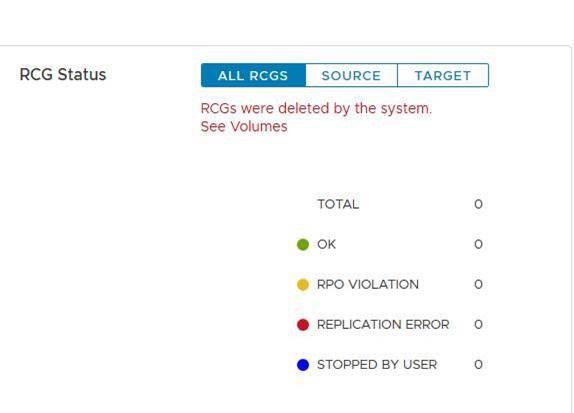
이러한 로그 파일의 목적은 사이트 간 복제를 원활하게 다시 초기화하는 것입니다. 이 로그 파일은 중단의 원인이 해결된 후 복제 프로세스를 신속하게 재시작하는 데 사용됩니다.
Cause
복제가 중단될 수 있는 이유의 예:
a. 소스 사이트와 타겟 사이트
간의 긴 네트워크 장애비. 소스 또는 타겟 사이트의 갑작스러운 용량 감소 - 예: DU(Data Unavailable) 시나리오
복제가 중단되면 MDM은 소스 사이트와 타겟 사이트 간의 모든 RCG(Replication Consistency Group)를 자동으로 삭제합니다. 그리고 삭제된 RCG와 관련된 모든 정보가 들어 있는 복제 로그 파일을 생성합니다.
Resolution
a. 다음 형식으로 운영 MDM에서 자동 생성 복제 중단 로그 파일을 찾습니다.
자동 DeletedOnEndOfJournalCapacityRplCg_<RCG_ID>_<RCG_name>
예:
# cd /opt/emc/scaleio/mdm/logs
# ls -l AutoDelete*
-rw-r--r-- 1 root root 953 Apr 14 12:15 AutoDeletedOnEndOfJournalCapacityRplCg_4ca1bc9600000000_Rep_Beta1
b. 복제 중단의 원인이 된 문제가 해결되었는지 확인합니다.
c. 다음 두 가지 방법 중 하나를 사용하여 복제를 다시 초기화합니다. 스크립트 또는 수동 사용.
스크립트 사용:
-
복제를 다시 초기화하기 위해 자동 생성된 로그 파일에서 모든 관련 명령이 포함된 하나의 파일을 생성합니다.
예:
for i in `ls /opt/emc/scaleio/mdm/logs/AutoDeletedOnEndOfJournalCapacity*`;do sed -e '1,/Recreation CLIs/d' $i >> full_replication_restore_$(date +%s); done -
파일이 성공적으로 생성되었고 해당 콘텐츠를 검증합니다.
예:
[root@112AX-7 logs]# cat full_replication_restore_1587387678 scli --add_replication_consistency_group --replication_consistency_group_name rcg_sanity --destination_system_object_id 416af83800000000 --protection_domain_id b3dd0a5900000000 --remote_protection_domain_id 4ff0744e00000000 --rpo 60 --target_volume_access_mode no_access scli --add_replication_pair --replication_consistency_group_name rcg_sanity --source_volume_id 0da61f0d00000003 --destination_volume_id 1981bbaf00000005 --copy_type full scli --add_replication_consistency_group --replication_consistency_group_name rcg_SANITY2 --destination_system_object_id 416af83800000000 --protection_domain_id b3dd0a5900000000 --remote_protection_domain_id 4ff0744e00000000 --rpo 60 --target_volume_access_mode no_access scli --add_replication_pair --replication_consistency_group_name rcg_SANITY2 --source_volume_id 0da61f2500000000 --destination_volume_id 1981bbb000000006 --copy_type full scli --add_replication_consistency_group --replication_consistency_group_name rcg_sanity3 --destination_system_object_id 416af83800000000 --protection_domain_id b3dd0a5900000000 --remote_protection_domain_id 4ff0744e00000000 --rpo 60 --target_volume_access_mode no_access scli --add_replication_pair --replication_consistency_group_name rcg_sanity3 --source_volume_id 0da61f2600000001 --destination_volume_id 1981bbb100000007 --copy_type full [root@112AX-7 logs]# -
생성된 파일을 실행 파일로 만든 다음 운영 MDM에 admin으로 로그인하고 생성된 파일을 실행합니다.
예:
# scli --login --username admin --password xxxxxxxxxx Logged in. User role is SuperUser. System ID is xxxxxxxxxxxxxxx # # chmod +x full_replication_restore_1587387678 ; ./full_replication_restore_1587387678 Successfully created Replication Consistency Group rcg_sanity. Object ID 357a6c4f00000001 Successfully created the Pair, ID = a1f1819900000001 Successfully created Replication Consistency Group rcg_SANITY2. Object ID 357a6c5300000003 Successfully created the Pair, ID = a1f1819a00000002 Successfully created Replication Consistency Group rcg_sanity3. Object ID 357a6c5500000005 Successfully created the Pair, ID = a1f1819b00000003 - 다음을 실행하여 복제가 성공적으로 생성되었는지 확인합니다.
-
scli --query_all_replication_consistency_groups
scli --query_all_replication_pairs
-
수동으로:
-
자동 삭제된 각 RCG에 자동 생성된 로그 파일이 있는지 확인합니다.
예:
# ls /opt/emc/scaleio/mdm/logs/AutoDeletedOnEndOfJournalCapacity* /opt/emc/scaleio/mdm/logs/AutoDeletedOnEndOfJournalCapacityRplCg_357a454600000001_rcg_sanity /opt/emc/scaleio/mdm/logs/AutoDeletedOnEndOfJournalCapacityRplCg_357a6c4b00000002_rcg_SANITY2 /opt/emc/scaleio/mdm/logs/AutoDeletedOnEndOfJournalCapacityRplCg_357a6c4c00000003_rcg_sanity3 -
위의
1단계에서 목록의 각 파일에 대해 다음 단계를 반복합니다. CLI 명령이 생성되었는지 확인하고 레크리에이션 CLI에 관련 정보가 있는지 확인합니다.예:
#cat AutoDeletedOnEndOfJournalCapacityRplCg_357a6c4900000001_rcg_sanity

REPLICATION CONSISTENCY GROUP
LocalId:357a6c4900000001
RemoteId:4ca1e3ab00000001
Name:rcg_sanity
PeerMdmId:416af83800000000
RpoSeconds:60
Direction:LOCAL_TO_REMOTE
DRState:NONE
DeletionDecisionTime:20/04 08:37:35
DeletionReason:AUTOMATIC_ON_END_OF_CAPACITY
FailureDomainId:b3dd0a5900000000
RemoteFailureDomainId:4ff0744e00000000
PAIR 0
LocalId:a1f1819600000001
RemoteId:2dfad1c100000001
LocalVolumeId:0da61f0d00000003
LocalVolumeName:test1
RemoteVolumeId:1981bbaf00000005
RemoteVolumeName:test1
Recreation CLIs:
scli --add_replication_consistency_group --replication_consistency_group_name rcg_sanity --destination_system_object_id 416af83800000000 --protection_domain_id b3dd0a5900000000 --remote_protection_domain_id 4ff0744e00000000 --rpo 60 --target_volume_access_mode no_access
scli --add_replication_pair --replication_consistency_group_name rcg_sanity --source_volume_id 0da61f0d00000003 --destination_volume_id 1981bbaf00000005 --copy_type full
b. "Recreation CLIs" 섹션 아래에 나타나는 모든 명령을 실행합니다.
예:
# scli --add_replication_consistency_group --replication_consistency_group_name rcg_sanity --destination_system_object_id 416af83800000000 --protection_domain_id b3dd0a5900000000 --remote_protection_domain_id 4ff0744e00000000 --rpo 60 --target_volume_access_mode no_access Successfully created Replication Consistency Group rcg_sanity. Object ID 357a6c4f00000001 [root@112AX-7 logs]# scli --add_replication_pair --replication_consistency_group_name rcg_sanity --source_volume_id 0da61f0d00000003 --destination_volume_id 1981bbaf00000005 --copy_type full Successfully created the Pair, ID = a1f1819900000001 [root@112AX-7 logs]# -
다음을 실행하여 복제가 성공적으로 생성되었는지 확인합니다.
-
scli --query_all_replication_consistency_groups

scli --query_all_replication_pairs
-
Affected Products
PowerFlex rack, ScaleIO, PowerFlex SoftwareArticle Properties
Article Number: 000260985
Article Type: Solution
Last Modified: 03 Jul 2025
Version: 3
Find answers to your questions from other Dell users
Support Services
Check if your device is covered by Support Services.