PowerFlex: Replicatie opnieuw initialiseren na replicatieonderbreking
Summary: De replicatieconsistentiegroep kan om verschillende redenen worden verwijderd en de replicatie tussen bron- en doelsites stopt. De gemeenschappelijke basis voor alle gevallen is het einde van de Journaalcapaciteit. ...
This article applies to
This article does not apply to
This article is not tied to any specific product.
Not all product versions are identified in this article.
Symptoms
Op de opdrachtregel kunnen we waarschuwingsberichten vinden met de melding "volumes in broken replication consistency groups".
# scli --query_all_replication_pairs
query_all_replication_pairs returned 0 Replication Pairs.
WARNING: The System contains 2 volumes in broken replication consistency groups

# scli --query_all_replication_consistency_groups
Protection Domain aef4ce8300000000 Name: RHEL7-PD
WARNING: The Protection Domain contains 2 volumes in broken replication consistency groups
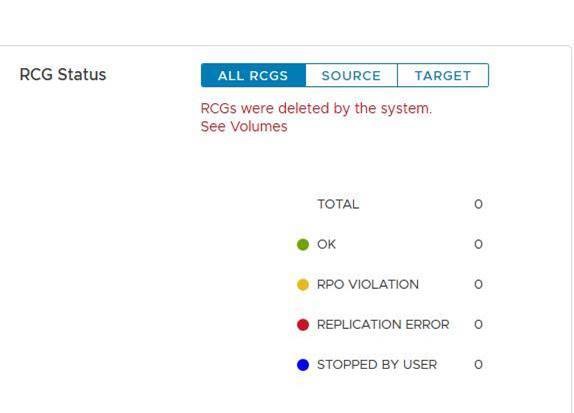
In de gebruikersinterface geeft de status Replication Consistency Groups (RCG's) de volgende foutmelding 'RCG's zijn verwijderd door het systeem'.
Het doel van deze logbestanden is om een soepele herinitialisatie van de replicatie tussen de sites mogelijk te maken. De logbestanden worden gebruikt om het replicatieproces snel opnieuw te starten nadat de oorzaak van de breuk is opgelost.
Cause
Voorbeelden van redenen die replicatieonderbrekingen kunnen veroorzaken:
a. Lange netwerkstoring tussen bron- en doelsites
b. Plotselinge afname van de capaciteit op de bron- of doellocaties, bijvoorbeeld in een scenario met niet beschikbare data (DU)
Zodra de replicatie is verbroken, verwijdert de MDM automatisch alle replicatieconsistentiegroepen (RCG's) tussen de bron- en doelsites. En het genereert replicatielogbestanden die alle informatie met betrekking tot de verwijderde RCG's bevatten.
Resolution
een. Zoek de logboekbestanden voor het automatisch genereren van replicatieonderbrekingen onder de primaire MDM met de volgende indeling -
Auto-DeletedOnEndOfJournalCapacityRplCg_<RCG_ID>_<RCG_name>
Voorbeeld:
# cd /opt/emc/scaleio/mdm/logs
# ls -l AutoDelete*
-rw-r--r-- 1 root root 953 Apr 14 12:15 AutoDeletedOnEndOfJournalCapacityRplCg_4ca1bc9600000000_Rep_Beta1
b. Controleer of het probleem dat ervoor zorgde dat de replicatie werd verbroken, is opgelost.
c. Replicatie opnieuw initialiseren met een van de volgende twee methoden: Met behulp van script of handmatig.
Script gebruiken:
-
Genereer één bestand met alle relevante opdrachten uit de automatisch gegenereerde logboekbestanden om de replicatie opnieuw te initialiseren
Voorbeeld:
for i in `ls /opt/emc/scaleio/mdm/logs/AutoDeletedOnEndOfJournalCapacity*`;do sed -e '1,/Recreation CLIs/d' $i >> full_replication_restore_$(date +%s); done -
Valideren dat het bestand is gemaakt en de inhoud ervan
Voorbeeld:
[root@112AX-7 logs]# cat full_replication_restore_1587387678 scli --add_replication_consistency_group --replication_consistency_group_name rcg_sanity --destination_system_object_id 416af83800000000 --protection_domain_id b3dd0a5900000000 --remote_protection_domain_id 4ff0744e00000000 --rpo 60 --target_volume_access_mode no_access scli --add_replication_pair --replication_consistency_group_name rcg_sanity --source_volume_id 0da61f0d00000003 --destination_volume_id 1981bbaf00000005 --copy_type full scli --add_replication_consistency_group --replication_consistency_group_name rcg_SANITY2 --destination_system_object_id 416af83800000000 --protection_domain_id b3dd0a5900000000 --remote_protection_domain_id 4ff0744e00000000 --rpo 60 --target_volume_access_mode no_access scli --add_replication_pair --replication_consistency_group_name rcg_SANITY2 --source_volume_id 0da61f2500000000 --destination_volume_id 1981bbb000000006 --copy_type full scli --add_replication_consistency_group --replication_consistency_group_name rcg_sanity3 --destination_system_object_id 416af83800000000 --protection_domain_id b3dd0a5900000000 --remote_protection_domain_id 4ff0744e00000000 --rpo 60 --target_volume_access_mode no_access scli --add_replication_pair --replication_consistency_group_name rcg_sanity3 --source_volume_id 0da61f2600000001 --destination_volume_id 1981bbb100000007 --copy_type full [root@112AX-7 logs]# -
Maak het gegenereerde bestand uitvoerbaar, log dan in als admin bij de primaire MDM en voer het gemaakte bestand uit.
Voorbeeld:
# scli --login --username admin --password xxxxxxxxxx Logged in. User role is SuperUser. System ID is xxxxxxxxxxxxxxx # # chmod +x full_replication_restore_1587387678 ; ./full_replication_restore_1587387678 Successfully created Replication Consistency Group rcg_sanity. Object ID 357a6c4f00000001 Successfully created the Pair, ID = a1f1819900000001 Successfully created Replication Consistency Group rcg_SANITY2. Object ID 357a6c5300000003 Successfully created the Pair, ID = a1f1819a00000002 Successfully created Replication Consistency Group rcg_sanity3. Object ID 357a6c5500000005 Successfully created the Pair, ID = a1f1819b00000003 - Bevestig dat de replicatie is gemaakt door het uitvoeren van
-
scli --query_all_replication_consistency_groups
scli --query_all_replication_pairs
-
Handmatig:
-
Controleer of elke RCG die automatisch is verwijderd, een automatisch gegenereerd logbestand heeft:
Voorbeeld:
# ls /opt/emc/scaleio/mdm/logs/AutoDeletedOnEndOfJournalCapacity* /opt/emc/scaleio/mdm/logs/AutoDeletedOnEndOfJournalCapacityRplCg_357a454600000001_rcg_sanity /opt/emc/scaleio/mdm/logs/AutoDeletedOnEndOfJournalCapacityRplCg_357a6c4b00000002_rcg_SANITY2 /opt/emc/scaleio/mdm/logs/AutoDeletedOnEndOfJournalCapacityRplCg_357a6c4c00000003_rcg_sanity3 -
Herhaal de volgende stappen voor elk bestand in de lijst bij stap 1 boven
a. Controleer of de CLI-opdrachten zijn gegenereerd en controleer of de CLI beschikt over de relevante informatie onder CLI's voor recreatieVoorbeeld:
#cat AutoDeletedOnEndOfJournalCapacityRplCg_357a6c4900000001_rcg_sanity

REPLICATION CONSISTENCY GROUP
LocalId:357a6c4900000001
RemoteId:4ca1e3ab00000001
Name:rcg_sanity
PeerMdmId:416af83800000000
RpoSeconds:60
Direction:LOCAL_TO_REMOTE
DRState:NONE
DeletionDecisionTime:20/04 08:37:35
DeletionReason:AUTOMATIC_ON_END_OF_CAPACITY
FailureDomainId:b3dd0a5900000000
RemoteFailureDomainId:4ff0744e00000000
PAIR 0
LocalId:a1f1819600000001
RemoteId:2dfad1c100000001
LocalVolumeId:0da61f0d00000003
LocalVolumeName:test1
RemoteVolumeId:1981bbaf00000005
RemoteVolumeName:test1
Recreation CLIs:
scli --add_replication_consistency_group --replication_consistency_group_name rcg_sanity --destination_system_object_id 416af83800000000 --protection_domain_id b3dd0a5900000000 --remote_protection_domain_id 4ff0744e00000000 --rpo 60 --target_volume_access_mode no_access
scli --add_replication_pair --replication_consistency_group_name rcg_sanity --source_volume_id 0da61f0d00000003 --destination_volume_id 1981bbaf00000005 --copy_type full
b. Voer alle opdrachten uit die worden weergegeven in het gedeelte "Recreation CLI's"
Voorbeeld:
# scli --add_replication_consistency_group --replication_consistency_group_name rcg_sanity --destination_system_object_id 416af83800000000 --protection_domain_id b3dd0a5900000000 --remote_protection_domain_id 4ff0744e00000000 --rpo 60 --target_volume_access_mode no_access Successfully created Replication Consistency Group rcg_sanity. Object ID 357a6c4f00000001 [root@112AX-7 logs]# scli --add_replication_pair --replication_consistency_group_name rcg_sanity --source_volume_id 0da61f0d00000003 --destination_volume_id 1981bbaf00000005 --copy_type full Successfully created the Pair, ID = a1f1819900000001 [root@112AX-7 logs]# -
Bevestig dat de replicatie is gemaakt door het uitvoeren van
-
scli --query_all_replication_consistency_groups

scli --query_all_replication_pairs
-
Affected Products
PowerFlex rack, ScaleIO, PowerFlex SoftwareArticle Properties
Article Number: 000260985
Article Type: Solution
Last Modified: 03 Jul 2025
Version: 3
Find answers to your questions from other Dell users
Support Services
Check if your device is covered by Support Services.