PowerFlex: Çoğaltma Kesintisinden Sonra Çoğaltmayı Yeniden Başlatma
Summary: Çoğaltma tutarlılığı grubu çeşitli nedenlerle silinebilir ve kaynak ile hedef siteler arasındaki çoğaltma durur. Tüm davalar için ortak zemin, Dergi kapasitesinin sona ermesidir.
This article applies to
This article does not apply to
This article is not tied to any specific product.
Not all product versions are identified in this article.
Symptoms
Komut satırından "bozuk çoğaltma tutarlılık gruplarındaki birimler" uyarısı mesajlarını görebiliriz.
# scli --query_all_replication_pairs
query_all_replication_pairs returned 0 Replication Pairs.
WARNING: The System contains 2 volumes in broken replication consistency groups

# scli --query_all_replication_consistency_groups
Protection Domain aef4ce8300000000 Name: RHEL7-PD
WARNING: The Protection Domain contains 2 volumes in broken replication consistency groups
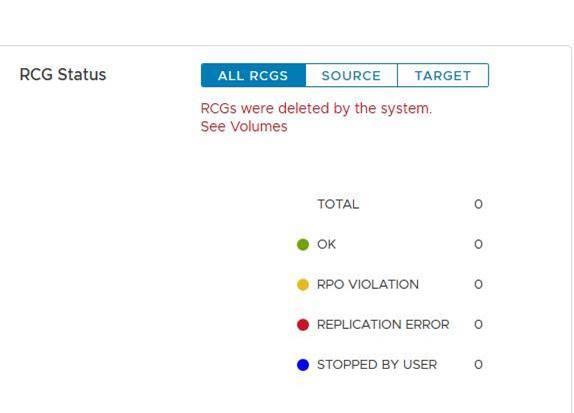
Kullanıcı arayüzünde Çoğaltma Tutarlılık Grupları (RCG'ler) durumunda "RCG'ler sistem tarafından silindi" hatası görünür.
Bu günlük dosyalarının amacı, siteler arasındaki çoğaltmanın sorunsuz bir şekilde yeniden başlatılmasını sağlamaktır. Günlük dosyaları, kesintinin nedeni çözüldükten sonra çoğaltma işlemini hızlı bir şekilde yeniden başlatmak için kullanılır.
Cause
Çoğaltmanın bozulmasına neden olabilecek nedenlere örnekler:
a. Kaynak ve hedef siteler
arasında uzun ağ hatasıb. Kaynak veya hedef sitelerde ani kapasite düşüşü - örneğin, Veri Yok (DU) senaryosunda
Çoğaltma bozulduğunda MDM, kaynak ve hedef siteler arasındaki tüm çoğaltma tutarlılık gruplarını (RCG'ler) otomatik olarak siler. Ayrıca, silinen RCG'lerle ilgili tüm bilgileri tutan çoğaltma günlüğü dosyaları oluşturur.
Resolution
a. Bir sonraki biçime sahip birincil MDM'nin altında otomatik oluşturulan çoğaltma molası günlük dosyalarını bulun:
Otomatik DeletedOnEndOfJournalCapacityRplCg_<RCG_ID>_<RCG_name>
Örneğin:
# cd /opt/emc/scaleio/mdm/logs
# ls -l AutoDelete*
-rw-r--r-- 1 root root 953 Apr 14 12:15 AutoDeletedOnEndOfJournalCapacityRplCg_4ca1bc9600000000_Rep_Beta1
b. Çoğaltmanın bozulmasına neden olan sorunun giderildiğini doğrulayın.
c. Aşağıdaki iki yöntemden birini kullanarak çoğaltmayı yeniden başlatın: Komut dosyasını kullanarak veya Manuel olarak.
Komut dosyası kullanarak:
-
Çoğaltmayı yeniden başlatmak için otomatik olarak oluşturulan günlük dosyalarından ilgili tüm komutları içeren bir dosya oluşturun
Örneğin:
for i in `ls /opt/emc/scaleio/mdm/logs/AutoDeletedOnEndOfJournalCapacity*`;do sed -e '1,/Recreation CLIs/d' $i >> full_replication_restore_$(date +%s); done -
Dosyanın başarıyla oluşturulduğunu ve içeriğini doğrulayın
Örneğin:
[root@112AX-7 logs]# cat full_replication_restore_1587387678 scli --add_replication_consistency_group --replication_consistency_group_name rcg_sanity --destination_system_object_id 416af83800000000 --protection_domain_id b3dd0a5900000000 --remote_protection_domain_id 4ff0744e00000000 --rpo 60 --target_volume_access_mode no_access scli --add_replication_pair --replication_consistency_group_name rcg_sanity --source_volume_id 0da61f0d00000003 --destination_volume_id 1981bbaf00000005 --copy_type full scli --add_replication_consistency_group --replication_consistency_group_name rcg_SANITY2 --destination_system_object_id 416af83800000000 --protection_domain_id b3dd0a5900000000 --remote_protection_domain_id 4ff0744e00000000 --rpo 60 --target_volume_access_mode no_access scli --add_replication_pair --replication_consistency_group_name rcg_SANITY2 --source_volume_id 0da61f2500000000 --destination_volume_id 1981bbb000000006 --copy_type full scli --add_replication_consistency_group --replication_consistency_group_name rcg_sanity3 --destination_system_object_id 416af83800000000 --protection_domain_id b3dd0a5900000000 --remote_protection_domain_id 4ff0744e00000000 --rpo 60 --target_volume_access_mode no_access scli --add_replication_pair --replication_consistency_group_name rcg_sanity3 --source_volume_id 0da61f2600000001 --destination_volume_id 1981bbb100000007 --copy_type full [root@112AX-7 logs]# -
Oluşturulan dosyayı yürütülebilir yapın, ardından birincil MDM'de yönetici olarak oturum açın ve oluşturulan dosyayı çalıştırın.
Örneğin:
# scli --login --username admin --password xxxxxxxxxx Logged in. User role is SuperUser. System ID is xxxxxxxxxxxxxxx # # chmod +x full_replication_restore_1587387678 ; ./full_replication_restore_1587387678 Successfully created Replication Consistency Group rcg_sanity. Object ID 357a6c4f00000001 Successfully created the Pair, ID = a1f1819900000001 Successfully created Replication Consistency Group rcg_SANITY2. Object ID 357a6c5300000003 Successfully created the Pair, ID = a1f1819a00000002 Successfully created Replication Consistency Group rcg_sanity3. Object ID 357a6c5500000005 Successfully created the Pair, ID = a1f1819b00000003 - Şu komutu çalıştırarak çoğaltmanın başarıyla oluşturulduğunu doğrulayın:
-
scli --query_all_replication_consistency_groups
scli --query_all_replication_pairs
-
Manuel olarak:
-
Otomatik olarak silinen her RCG'nin otomatik olarak oluşturulmuş bir günlük dosyası olup olmadığını kontrol edin:
Örneğin:
# ls /opt/emc/scaleio/mdm/logs/AutoDeletedOnEndOfJournalCapacity* /opt/emc/scaleio/mdm/logs/AutoDeletedOnEndOfJournalCapacityRplCg_357a454600000001_rcg_sanity /opt/emc/scaleio/mdm/logs/AutoDeletedOnEndOfJournalCapacityRplCg_357a6c4b00000002_rcg_SANITY2 /opt/emc/scaleio/mdm/logs/AutoDeletedOnEndOfJournalCapacityRplCg_357a6c4c00000003_rcg_sanity3 -
Yukarıdaki 1
. adımda listede yer alan her dosya için sonraki adımları a'dan başlayarak tekrarlayın. CLI komutlarının oluşturulduğundan emin olun ve komutların Rekreasyon CLI'leri altında ilgili bilgilere sahip olduğunu doğrulayınÖrneğin:
#cat AutoDeletedOnEndOfJournalCapacityRplCg_357a6c4900000001_rcg_sanity

REPLICATION CONSISTENCY GROUP
LocalId:357a6c4900000001
RemoteId:4ca1e3ab00000001
Name:rcg_sanity
PeerMdmId:416af83800000000
RpoSeconds:60
Direction:LOCAL_TO_REMOTE
DRState:NONE
DeletionDecisionTime:20/04 08:37:35
DeletionReason:AUTOMATIC_ON_END_OF_CAPACITY
FailureDomainId:b3dd0a5900000000
RemoteFailureDomainId:4ff0744e00000000
PAIR 0
LocalId:a1f1819600000001
RemoteId:2dfad1c100000001
LocalVolumeId:0da61f0d00000003
LocalVolumeName:test1
RemoteVolumeId:1981bbaf00000005
RemoteVolumeName:test1
Recreation CLIs:
scli --add_replication_consistency_group --replication_consistency_group_name rcg_sanity --destination_system_object_id 416af83800000000 --protection_domain_id b3dd0a5900000000 --remote_protection_domain_id 4ff0744e00000000 --rpo 60 --target_volume_access_mode no_access
scli --add_replication_pair --replication_consistency_group_name rcg_sanity --source_volume_id 0da61f0d00000003 --destination_volume_id 1981bbaf00000005 --copy_type full
b. "Recreation CLIs" bölümünde görünen tüm komutları çalıştırın
Örneğin:
# scli --add_replication_consistency_group --replication_consistency_group_name rcg_sanity --destination_system_object_id 416af83800000000 --protection_domain_id b3dd0a5900000000 --remote_protection_domain_id 4ff0744e00000000 --rpo 60 --target_volume_access_mode no_access Successfully created Replication Consistency Group rcg_sanity. Object ID 357a6c4f00000001 [root@112AX-7 logs]# scli --add_replication_pair --replication_consistency_group_name rcg_sanity --source_volume_id 0da61f0d00000003 --destination_volume_id 1981bbaf00000005 --copy_type full Successfully created the Pair, ID = a1f1819900000001 [root@112AX-7 logs]# -
Şu komutu çalıştırarak çoğaltmanın başarıyla oluşturulduğunu doğrulayın:
-
scli --query_all_replication_consistency_groups

scli --query_all_replication_pairs
-
Affected Products
PowerFlex rack, ScaleIO, PowerFlex SoftwareArticle Properties
Article Number: 000260985
Article Type: Solution
Last Modified: 03 Jul 2025
Version: 3
Find answers to your questions from other Dell users
Support Services
Check if your device is covered by Support Services.