ECS:如何瀏覽至 ECS GUI 上的「遷移」標籤
Summary: 如何瀏覽至 ECS GUI 上的「遷移」標籤
This article applies to
This article does not apply to
This article is not tied to any specific product.
Not all product versions are identified in this article.
Instructions
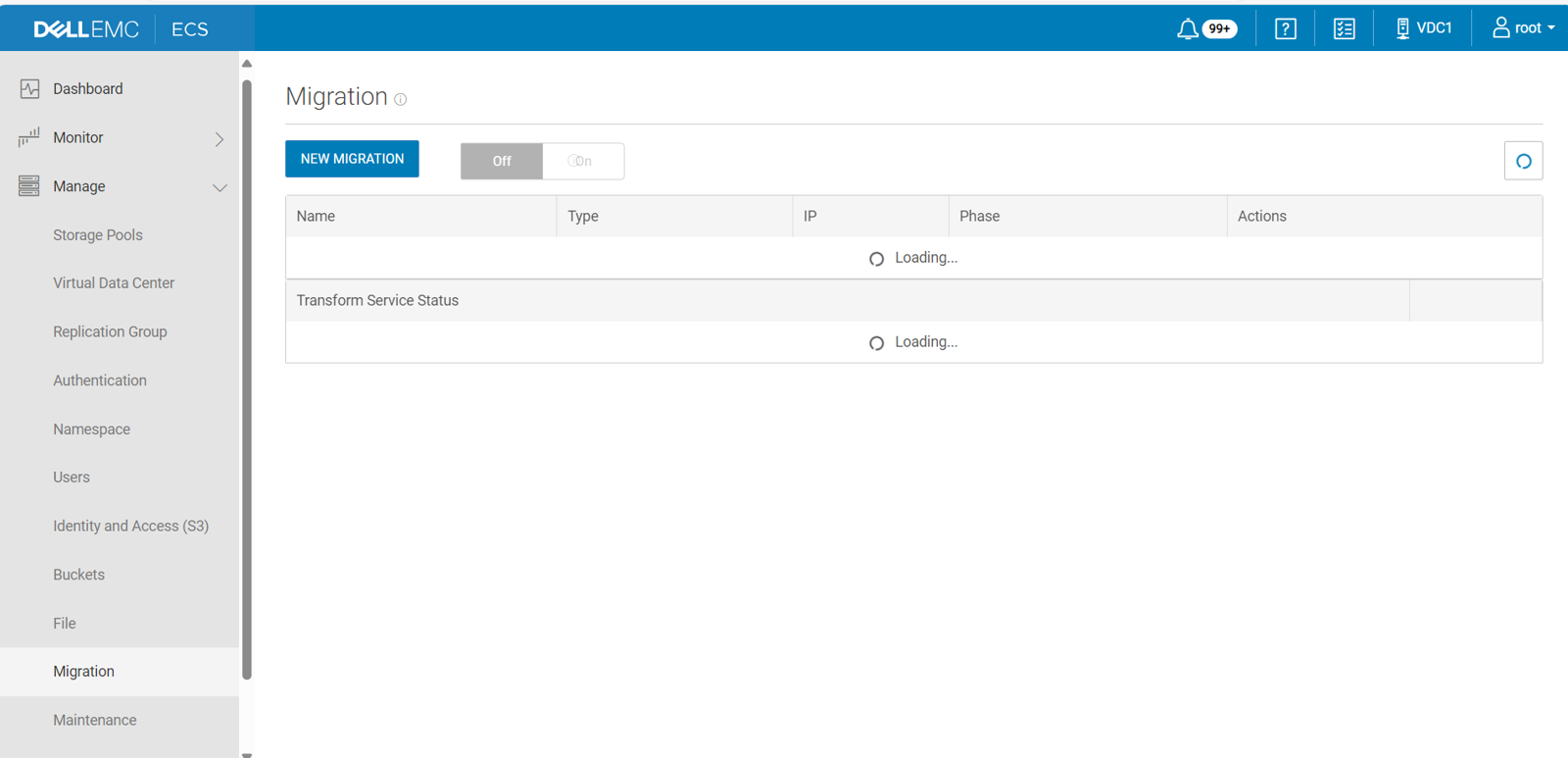
在 ECS 3.1.0.3 及更新版本中,ECS 入口網站包括選用的使用者介面,可協助將資料從 Centera 舊式儲存裝置轉換為 ECS。當您開啟遷移功能表時,該功能表會顯示在 ECS 入口網站的管理功能表上。
註:遷移功能表預設不會顯示,因為它僅供 EMC 專業服務人員使用。
若要在 ECS 入口網站中顯示「遷移」功能表,請執行下列步驟:
Ctrl + Alt + Shift + M.
註:如果在“管理”功能表打開時使用此命令序列打開“遷移”功能表,則可能必須關閉並重新打開“管理”功能表才能看到“遷移”選項。
Affected Products
ECSArticle Properties
Article Number: 000266553
Article Type: How To
Last Modified: 14 Feb 2025
Version: 2
Find answers to your questions from other Dell users
Support Services
Check if your device is covered by Support Services.