패키지 관리자를 통한 NetWorker Client 업그레이드가 실패하고 Waiting for Daemons 오류가 발생했습니다.
Summary: 이 문서에서는 NetWorker 패키지 관리자를 통해 Windows OS에서 NetWorker Client를 업그레이드하는 동안 발생하는 오류와 이에 대한 해결 방법을 다룹니다.
This article applies to
This article does not apply to
This article is not tied to any specific product.
Not all product versions are identified in this article.
Symptoms
Windows NetWorker 클라이언트 업그레이드가 실패하고 "waiting for daemons" 오류가 표시됨
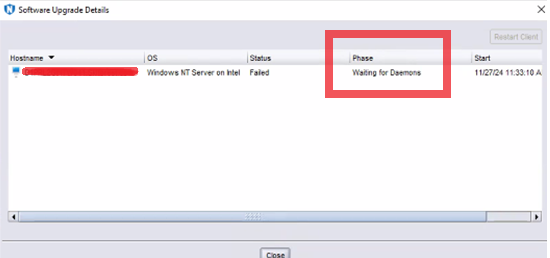
Cause
업그레이드가 수행된 후 NetWorker Client 서비스가 재시작되고, 시간 초과 전에 서비스가 실행되지 않으면 작업이 실패하고 이 오류가 발생합니다.
Resolution
- NetWorker Client 데스크탑에 로그인합니다.
- 제어판을 열고 프로그램\프로그램 및 기능으로 이동합니다. NetWorker 소프트웨어의 버전 열에 업그레이드된 버전이 반영되어 있는지 확인합니다.
- Services.msc를 열고 NetWorker Remote Exec Service가 실행 중인지 확인합니다. 서비스가 실행되고 있지 않은 경우 서비스를 시작해 보십시오.
서비스를 시작하지 못하는 경우 실패에 대한 자세한 내용은 다음을 확인합니다.
- 클라이언트의 daemon.raw 렌더링합니다.
- 기본 설치 경로: C:\Program Files\EMC NetWorker\nsr\logs\daemon.raw
- NetWorker: nsr_render_log 사용하여 .raw 로그 파일을 렌더링하는 방법
- 클라이언트에서 이벤트 뷰어 를 열고 응용 프로그램 이벤트 로그를 검토합니다.
- %LOCALAPPDATA%\Temp\NetWorker_YYYYMMDDHHmmSS_#에서 NetWorker 설치 로그를 검토합니다_NwClient.log
Affected Products
NetWorkerArticle Properties
Article Number: 000290990
Article Type: Solution
Last Modified: 04 Mar 2025
Version: 1
Find answers to your questions from other Dell users
Support Services
Check if your device is covered by Support Services.