透過套裝管理員升級 NetWorker 用戶端失敗,並顯示「等待精靈」錯誤
Summary: 本文處理透過 NetWorker 套裝管理員在 Windows 作業系統上升級 NetWorker 用戶端時遇到的錯誤,以及解決方案。
This article applies to
This article does not apply to
This article is not tied to any specific product.
Not all product versions are identified in this article.
Symptoms
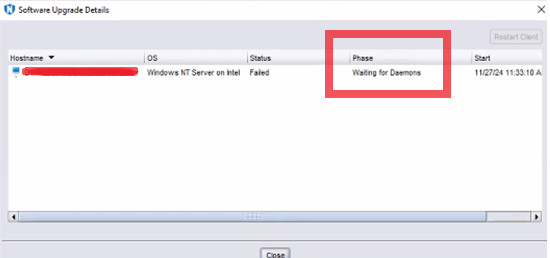
Windows NetWorker 用戶端升級失敗,並顯示錯誤「waiting for Daemons」
Cause
升級完成後,NetWorker 用戶端服務會重新啟動,如果服務未在逾時前啟動,則會失敗並顯示此錯誤。
Resolution
- 登入 NetWorker 用戶端的桌面。
- 開啟 「控制台」,然後前往「程式\程式和功能」。確認 NetWorker 軟體的「版本」欄反映出升級的版本。
- 開啟 Services.msc ,並確認 NetWorker Remote Exec 服務 正在 執行中。如果服務未運行,請嘗試啟動該服務。
如果服務無法啟動,請檢查以下內容以獲取有關失敗的詳細資訊:
- 呈現客戶端的daemon.raw:
- 預設安裝路徑:C:\Program Files\EMC NetWorker\nsr\logs\daemon.raw
- NetWorker:如何使用nsr_render_log呈現.raw紀錄檔
- 在用戶端上打開事件查看器 並查看 應用程式事件日誌。
- 檢閱 %LOCALAPPDATA%\Temp\NetWorker_YYYYMMDDHHmmSS_#下的 NetWorker 安裝記錄_NwClient.log
Affected Products
NetWorkerArticle Properties
Article Number: 000290990
Article Type: Solution
Last Modified: 04 Mar 2025
Version: 1
Find answers to your questions from other Dell users
Support Services
Check if your device is covered by Support Services.