PowerEdge: 16G AMD 기반 서버에는 활성화할 수 없는 CPPC 설정이 있습니다.
Summary: CPPC(Collaborative Processor Performance Control)에 대한 BIOS 설정은 활성화 시도 후에도 비활성화된 상태로 유지됩니다.
This article applies to
This article does not apply to
This article is not tied to any specific product.
Not all product versions are identified in this article.
Symptoms
BIOS 1.10.0 또는 1.11.0으로 업데이트하는 사용자는 CPPC의 BIOS 설정에서 새 옵션을 찾을 수 있습니다.
- 이 설정은 iDRAC 설정의 BIOS 설정 - 시스템 프로필 설정에서만 찾을 수 있습니다.
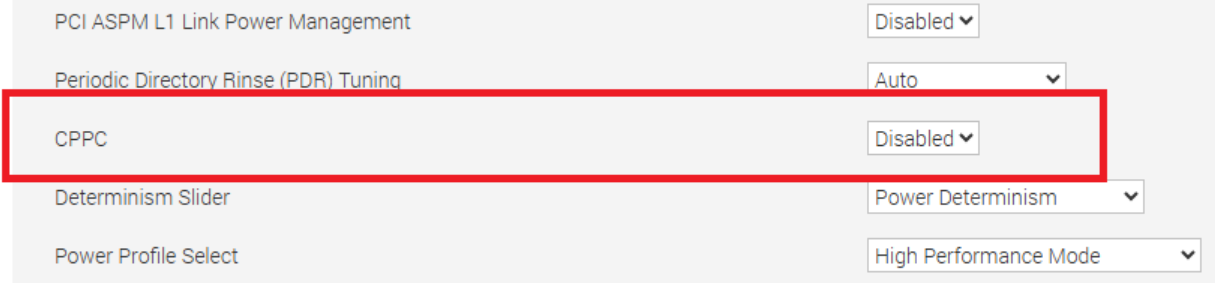
이 옵션을 Enabled로 설정하면 변경 사항을 저장하고 재부팅한 후 설정을 Disabled로 되돌립니다.
이 문제는 R6615, R6625, R7615 및 R7625에 적용됩니다.
Cause
BIOS가 ID 모듈이 있는 OEM 기반 시스템에 대한 설정을 의도치 않게 열었습니다.
Resolution
이 문제는 2025년 6월에 제공되는 BIOS 1.12.2에서 해결되었습니다. CPPC 옵션이 제거되었으며 표준 PowerEdge 서버에서 사용할 수 없습니다. CPPC 활성화가 필요한 PowerEdge 서버는 OS DBPM을 CPU 전원 관리 설정으로 사용해야 합니다. 이는 시스템 프로파일 설정에서 구성됩니다. 시스템 프로필 설정은 F2 시스템 설정을 통해 찾거나 iDRAC UI의 Configuration 탭에서 BIOS Settings를 선택하여 찾을 수 있습니다.
참고: OEM 기반 서버 및 특정 ID 모듈은 CPPC 옵션을 유지합니다.
Affected Products
OEMR R6615, OEMR R6625, OEMR R7615, OEMR R7625, OEMR XL R6615, OEMR XL R6625, OEMR XL R7615, OEMR XL R7625, PowerEdge R6615, PowerEdge R6625, PowerEdge R7615, PowerEdge R7625, PowerFlex appliance R6625, PowerFlex appliance R7625
, PowerFlex custom node R6625, PowerFlex custom node R7625, Dell vSAN R6615 Ready Node, Dell vSAN R7615 Ready Node, Dell vSAN Ready Node R7625
...
Article Properties
Article Number: 000293675
Article Type: Solution
Last Modified: 22 May 2026
Version: 3
Find answers to your questions from other Dell users
Support Services
Check if your device is covered by Support Services.