PowerEdge:16G AMD 型伺服器的 CPPC 設定無法啟用
Summary: 協作處理器效能控制 (CPPC) 的 BIOS 設定在嘗試啟用後,將保持停用狀態。
This article applies to
This article does not apply to
This article is not tied to any specific product.
Not all product versions are identified in this article.
Symptoms
更新至 BIOS 1.10.0 或 1.11.0 的使用者可以在 CPPC 的 BIOS 設定中找到新選項。
- 只有在 BIOS 設定 -「系統設定檔設定」下的 iDRAC 設定中,才有此設定。
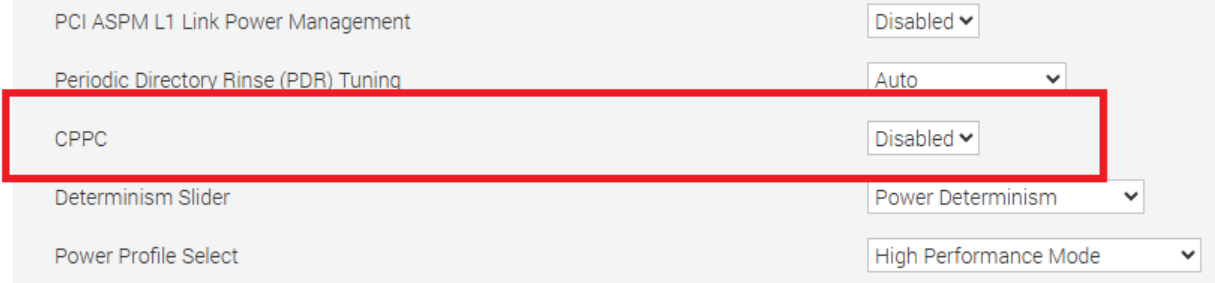
將此選項設為「已啟用」會導致在儲存變更並重新啟動後,設定會回復為「已停用」。
此問題適用於 R6615、R6625、R7615 及 R7625。
Cause
BIOS 無意中開啟了具有 ID 模組的 OEM 型系統的設定。
Resolution
此問題已在 2025 年 6 月推出的 BIOS 1.12.2 中解決。已移除 CPPC 選項,且無法在標準 PowerEdge 伺服器上使用。需要啟用 CPPC 的 PowerEdge 伺服器應使用作業系統 DBPM 作為 CPU 電源管理設定。這是在系統設定檔設定下設定。您可以透過 F2 系統設定找到系統設定檔設定,或透過在組態標籤下選取 BIOS 設定,從 iDRAC UI 中找到。
注意:OEM 型伺服器和特定 ID 模組保留 CPPC 選項。
Affected Products
OEMR R6615, OEMR R6625, OEMR R7615, OEMR R7625, OEMR XL R6615, OEMR XL R6625, OEMR XL R7615, OEMR XL R7625, PowerEdge R6615, PowerEdge R6625, PowerEdge R7615, PowerEdge R7625, PowerFlex appliance R6625, PowerFlex appliance R7625
, PowerFlex custom node R6625, PowerFlex custom node R7625, Dell vSAN R6615 Ready Node, Dell vSAN R7615 Ready Node, Dell vSAN Ready Node R7625
...
Article Properties
Article Number: 000293675
Article Type: Solution
Last Modified: 22 May 2026
Version: 3
Find answers to your questions from other Dell users
Support Services
Check if your device is covered by Support Services.