Nie można zapisać czułości myszy Dell Bluetooth Travel Mouse MS700
Summary: Informacje na temat zmiany ustawień czułości myszy Dell Bluetooth Travel Mouse MS700 z powrotem na średnią podczas korzystania z programu Dell Display an Peripheral Manager (DDPM).
This article applies to
This article does not apply to
This article is not tied to any specific product.
Not all product versions are identified in this article.
Symptoms
Po zmianie ustawień czułości myszy Dell Bluetooth Travel Mouse MS700 na niską lub wysoką podczas korzystania z oprogramowania DDPM. Jeśli mysz jest wyłączona i włączona, ustawienia czułości zmienią się z powrotem na średnie.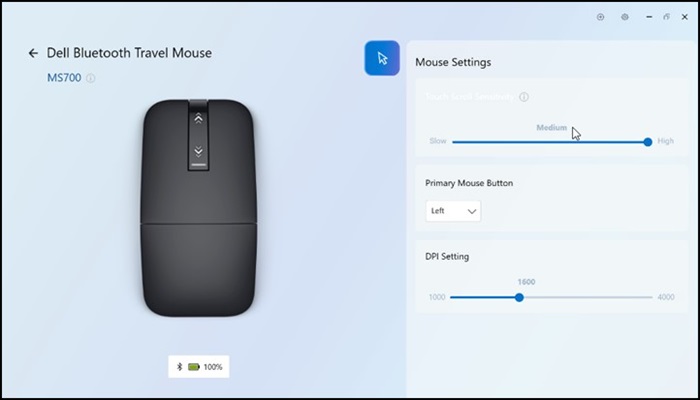
Cause
Jest to problem z programem DDPM, który nie mapuje prawidłowo czułości w stosunku do oprogramowania wewnętrznego myszy Dell Bluetooth Travel Mouse MS700.
Resolution
Aktualizacja Dell Display i Peripheral Manager
Ten problem zostanie rozwiązany w nowej wersji DDPM (2.0.0.070), która ma zostać wydana do 30 maja 2025 r. (data może ulec zmianie).
Affected Products
Dell Bluetooth Travel Mouse MS700, Dell 14 Plus 2-in-1 DB04255, Dell Display and Peripheral Manager, Dell Pro 13 Plus PB13255, Dell Pro 14 Plus PB14255, Dell Pro 16 Plus PB16255, Dell Pro 14 PC14255, Dell Pro 16 PC16255Article Properties
Article Number: 000302671
Article Type: Solution
Last Modified: 01 Oct 2025
Version: 2
Find answers to your questions from other Dell users
Support Services
Check if your device is covered by Support Services.