Dell Optimizer 戴尔智能调优软件在戴尔 16 DC16250 和 16 DC16251 上的深色模式下显示黑色字体
Summary: 有关 Dell Optimizer 戴尔智能调优软件版本 6.0.2.0-76 在无外设模式下启动时显示黑色文本的信息。
This article applies to
This article does not apply to
This article is not tied to any specific product.
Not all product versions are identified in this article.
Symptoms
在无外设模式下启动 Dell Optimizer 戴尔智能调优软件时,您会看到文本颜色为黑色,没有白色轮廓。无外设模式意味着应用程序在没有用户界面 (UI) 的情况下运行。这适用于服务器、自动化脚本、远程控制或嵌入式系统等场景。
黑色文本示例:
白色文本示例:
受影响系统:
- 戴尔 16 DC16250
- 戴尔 16 DC16251
Cause
新样式已用于文本,而不是覆盖基本样式。因此,不会应用深色模式文本颜色,这已在基本样式中定义。
Resolution
更新 Dell Optimizer 戴尔智能调优软件
Dell Optimizer 戴尔智能调优软件版本 6.1 中更新了深色模式文本颜色,预计将于 2025 年 6 月底发布。
要解决此问题,请使用以下步骤还原 Dell Optimizer 戴尔智能调优软件:
- 卸载 Dell Optimizer 戴尔智能调优软件,然后从 Windows 程序和功能中卸载 Dell Core 服务。
- 通过以下链接下载并安装 Dell Optimizer 戴尔智能调优软件 :Dell Optimizer 戴尔智能调优软件下载
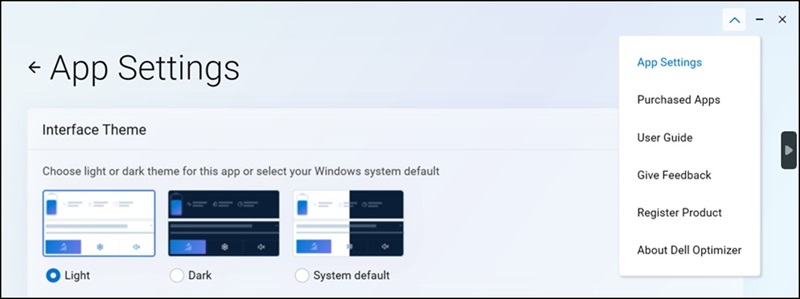
- 打开 Dell Optimizer 戴尔智能调优软件 ,然后转至 应用程序设置 下拉菜单。
- 将 “界面主题 ”设置回 “浅色 ”模式。
Affected Products
Dell 16 DC16250, Dell 16 DC16251, Dell OptimizerArticle Properties
Article Number: 000320517
Article Type: Solution
Last Modified: 15 Sept 2025
Version: 2
Find answers to your questions from other Dell users
Support Services
Check if your device is covered by Support Services.