Dell Pro Laptop Grinding Fan Noise
Summary: This article provides information about Dell Pro laptops making a sound as if the fan is hitting something within the chassis.
This article applies to
This article does not apply to
This article is not tied to any specific product.
Not all product versions are identified in this article.
Symptoms
Affected Platforms:
- Dell Pro 14 PC14250
- Dell Pro 16 PC16250
- Dell Pro 14 PC14255
- Dell Pro 16 PC16255
Cause
- When the computer is operating under heavy loads, the fan may produce noticeably louder noise
- The bottom cover mesh interferes with the fan
Resolution
- Run the ePSA diagnostic to determine if the fan unit is causing the issue
- Open Dell Optimizer and click Thermal Management
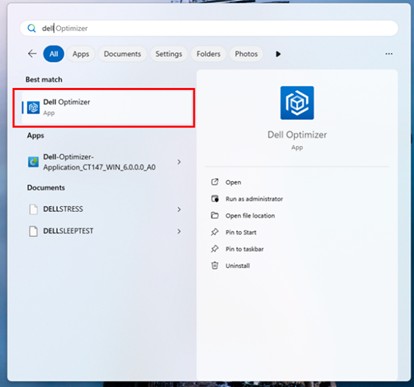
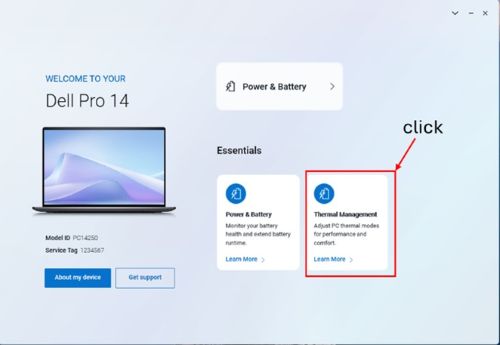
- Adjust Thermal Management to Quiet mode.
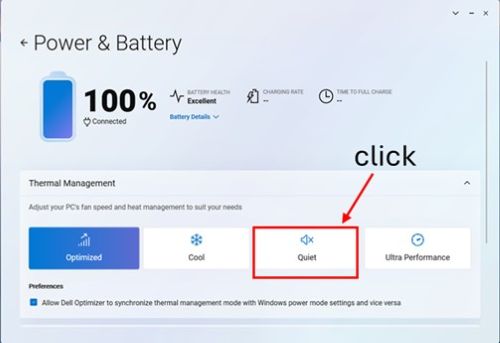
Affected Products
Dell Pro 14 PC14250, Dell Pro 14 PC14255, Dell Pro 16 PC16250, Dell Pro 16 PC16255Article Properties
Article Number: 000348629
Article Type: Solution
Last Modified: 07 Oct 2025
Version: 4
Find answers to your questions from other Dell users
Support Services
Check if your device is covered by Support Services.