SupportAssist for Home PCs 版本 4.10.1 和 4.10.5 无法成功打开,建议重新启动计算机
Summary: 了解为什么 SupportAssist 消费者版本 4.10.1 和 4.10.5 无法成功打开并建议重新启动计算机。
This article applies to
This article does not apply to
This article is not tied to any specific product.
Not all product versions are identified in this article.
Symptoms
SupportAssist 消费者版本 4.10.1 和 4.10.5 可能无法成功打开,并显示以下消息:
This is taking longer than expected. We recommend restarting your PC and trying again.

受影响的软件:
- SupportAssist for Home PCs 版本 4.10.1
- SupportAssist for Home PCs 版本 4.10.5
Cause
这是由于代码中的故障不支持对比它们,而不是“无”。
Resolution
提醒:开始更新之前,请执行以下作:
- 备份所有个人数据。有关详细信息,请参阅 备份和恢复。
- 如果笔记本电脑上运行更新,请连接交流适配器。
- 如果台式机上运行更新,请确保电源保持连接。
执行以下步骤之一以解决此问题:
- 将计算机上的 SupportAssist for Home PCs 更新到版本 4.10.6 或更高版本可解决此问题。要下载并安装 SupportAssist for Home PCs,请参阅 SupportAssist for Home PCs。
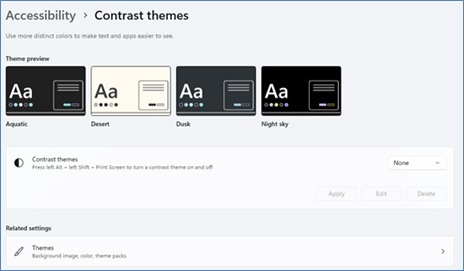
- 将“对比度主题”从“设置”更新为“默认值”无”。
- 打开“Settings”。单击 辅助功能 ,然后展开 对比度主题。
- 从下拉列表中选择 None ,然后选择 Apply。
Affected Products
Chromebox, Alienware, Dell Pro All-in-One, Dell Pro Max Micro, Dell Pro Max Slim, Dell Pro Max Tower, Dell Pro Micro, Dell Pro Slim, Dell Pro Tower, Dell Slim, Dell Tower, Inspiron, OptiPlex, Vostro, XPS, G Series, Chromebook, G Series, Alienware
, Dell Plus, Dell Pro, Dell Pro Max, Dell Pro Plus, Dell Pro Premium, Inspiron, Latitude, Dell Pro Rugged, Vostro, XPS, Dell Pro Max Micro FCM2250, SupportAssist for Home PCs
...
Article Properties
Article Number: 000396036
Article Type: Solution
Last Modified: 26 Nov 2025
Version: 1
Find answers to your questions from other Dell users
Support Services
Check if your device is covered by Support Services.