VxRail:如何将 VSPHERELOCAL 管理员用户权限从 VMware HCIA 管理更改为管理员
Summary: 如果“administrator@vsphere.local”角色更改为“VMware HCIA 管理”,并且没有其他管理员帐户可用,则可以使用以下步骤通过 CLI 创建管理员帐户。
This article applies to
This article does not apply to
This article is not tied to any specific product.
Not all product versions are identified in this article.
Instructions
如何将 VSPHERELOCAL\Administrator 用户权限从 VMware HCIA Management 更改为 Administrator。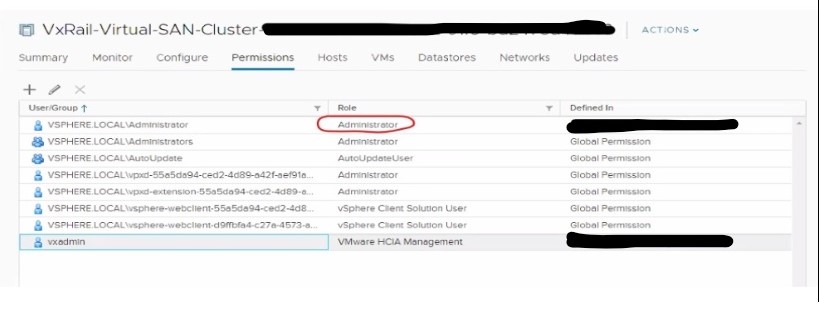
如果 administrator@vsphere.local 角色从管理员更改为 VMware HCIA 管理,请按照以下步骤恢复为原始权限角色(管理员):
- 在 ssh 会话上以根用户身份登录 VCSA。
- 通过执行以下命令,在 SSO 上创建新用户帐户:
/usr/lib/vmware-vmafd/bin/dir-cli user create --account <accountname> --first-name <name> --last-name <name> --user-password '<password>' For Example: root@VCSA6.5:# [ ~ ]# /usr/lib/vmware-vmafd/bin/dir-cli user create --account <name> --first-name <name> --last-name <name> --user-password '<Password>' Enter password for administrator@vpshere.local: User account [<USER>] created successfully - 通过执行以下命令,将用户添加到组 Administrator:
/usr/lib/vmware-vmafd/bin/dir-cli group modify --name Administrators --add <USER> For Example: root@VCSA6.5:# [ ~ ]# /usr/lib/vmware-vmafd/bin/dir-cli group modify --name Administrators --add <USER> Enter password for administrator@vpshere.local: Account [<USER>] added to group [Administrators] Group member [<USER>] added successfully. - 访问 vSphere Web 客户端门户并尝试使用新创建的用户 (name@vsphere.local) 登录。
- 将角色权限从 VMware HCIA Management改回 Administrator。
Additional Information
Affected Products
VxRail, VxRail Appliance Series, VxRail SoftwareArticle Properties
Article Number: 000012383
Article Type: How To
Last Modified: 08 Jul 2025
Version: 6
Find answers to your questions from other Dell users
Support Services
Check if your device is covered by Support Services.