ViPR SRM: Change backend port
This article applies to
This article does not apply to
This article is not tied to any specific product.
Not all product versions are identified in this article.
Instructions
You can change the backend port by editing Backends/APG-Backend/Default/conf/negotiating-socket-interface.xml
and changing the listen value, to the new port you want to use
i.e.: from <listen>2000</listen>
to <listen>2005</listen>
save the change and restart the backend (bin/apg-backend-default restart)
You will then have to update the Load-Balancer Arbiter
Centralized-Management -> SolutionPacks -> Other Components -> load-balancer-arbiter
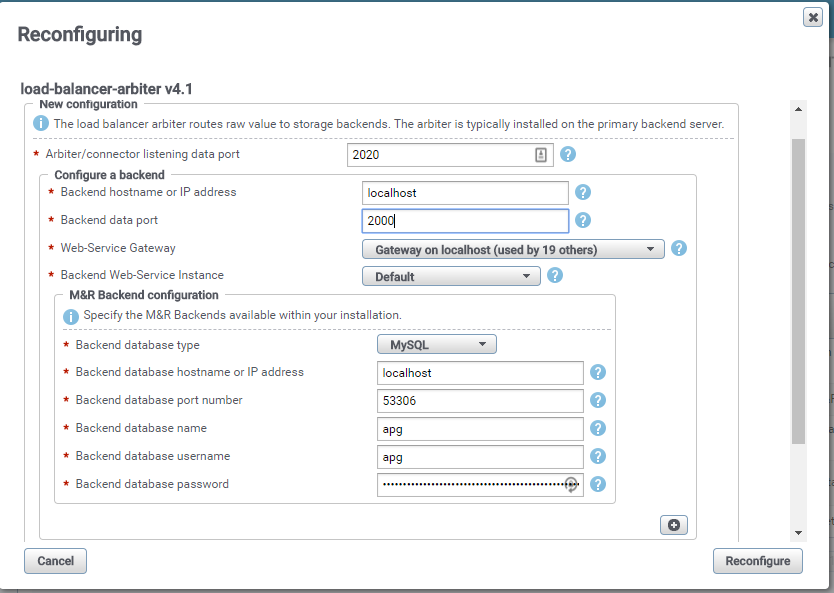
update the port number for the back-end that you have previously updated
From
To
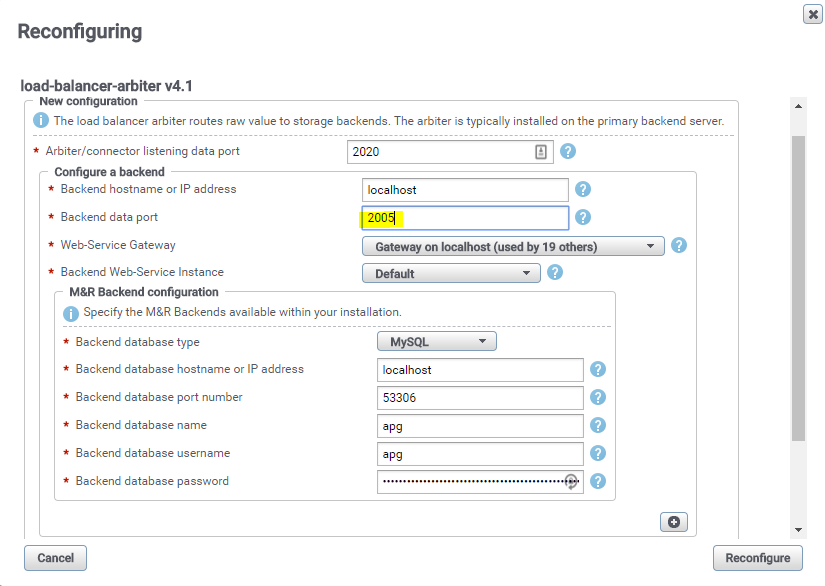
Hitting the reconfigure button will trigger a restart of the Load-Balancer Arbiter and it will automatically sync the new port with all the Load-Balancer-Connector.
and changing the listen value, to the new port you want to use
i.e.: from <listen>2000</listen>
to <listen>2005</listen>
save the change and restart the backend (bin/apg-backend-default restart)
You will then have to update the Load-Balancer Arbiter
Centralized-Management -> SolutionPacks -> Other Components -> load-balancer-arbiter
update the port number for the back-end that you have previously updated
From
To
Hitting the reconfigure button will trigger a restart of the Load-Balancer Arbiter and it will automatically sync the new port with all the Load-Balancer-Connector.
Affected Products
SRMProducts
SRMArticle Properties
Article Number: 000019567
Article Type: How To
Last Modified: 24 Sept 2024
Version: 3
Find answers to your questions from other Dell users
Support Services
Check if your device is covered by Support Services.