Dell Unity:變更 NAS 伺服器 SP 擁有權
Summary: 本文說明手動將 NAS 伺服器的擁有權變更至對等儲存處理器 (SP) 的步驟。
This article applies to
This article does not apply to
This article is not tied to any specific product.
Not all product versions are identified in this article.
Instructions
變更 NAS 伺服器及其檔案系統的儲存處理器 (SP) 擁有者可透過多種方式執行:
Unisphere:
範例:由於負載平衡問題,將 NAS 伺服器從 SPA「NAS_Unity_01」變更為 SPB:
- 在 Unisphere 中,前往 儲存 > 檔案 > NAS 伺服器
- 按兩下要修改的 NAS 伺服器 。
- 在 一般 標籤中,前往 SP 擁有者 區段, 然後選取要移動 NAS 伺服器的 SP 。
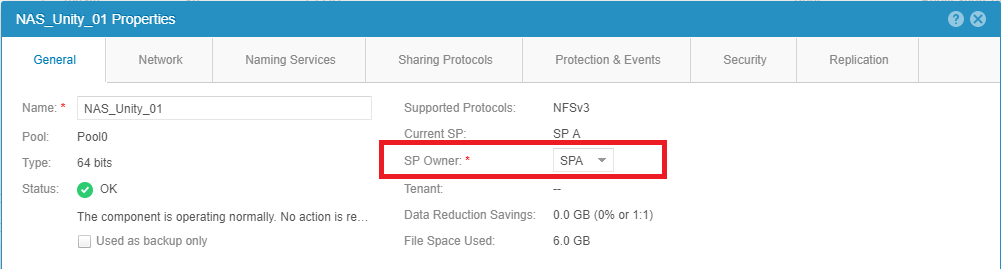
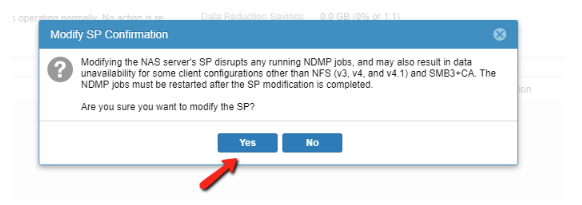
- 選取可在 畫面底部 套用 變更的按鈕。
注意:如果複寫正在執行中,此作業可能會失敗。暫停複寫,並再次嘗試移動。
- 關閉 NAS 伺服器的「一般屬性」,然後重新整理清單,以確保變更已完成。
- 完成所有工作後, 請繼續複製。
請確定網路組態正確,以允許在對等儲存處理器上使用 NAS 介面的 IP。
如果未套用正確的網路組態設定,將 NAS 伺服器移至另一個儲存處理器可能會導致資料不可用性 (DU) 情況。
UEMCLI:
範例:將 NAS 伺服器的「NAS_Unity_01」從 SPB 變更為 SPA。
- 收集 NAS 伺服器 ID 消息:
可以使用下列命令:
uemcli /net/nas/server show
執行上述命令時,會收到下列輸出。輸出結果列出機器上的所有 NAS 伺服器:
service@Unity spa:~/user # uemcli -u admin -p password /net/nas/server show
1:    ID                            = nas_73                   -> ID of the NAS Server
      Name                          = NAS_Unity_01             -> Name of the NAS Server
      NetBIOS name                  =
      SP                            = spb                      -> Current SP that is the owner of the NAS Server.
- 若要變更 NAS 伺服器 SP 擁有權,請使用陣列認證 執行 下列 命令 :
uemcli -u <Admin_User> -p <Password> /net/nas/server -id <NAS_ID> set -sp <Destination SP>
service@Unity spa:~/user # uemcli -u admin -p password /net/nas/server -id nas_73 set -sp spa
WARNING: modifying the NAS server's SP disrupts any running NDMP jobs, and may also result in data unavailability for some client configurations other than NFS (v3, v4, and v4.1) and SMB3+CA. The NDMP jobs must be restarted after the SP modification is completed.
Are you sure you want to modify the SP?
yes / no: yes
ID = nas_73
Operation completed successfully.
- 使用步驟 1 的命令,確認 SP 擁有權已變更:
service@Unity spa:~/user # uemcli -u admin -p password /net/nas/server -id nas_73 show
1:    ID                            = nas_73
      Name                          = NAS_Unity_01
      NetBIOS name                  =
      SP                            = spa                      -> New SP that is the owner of the NAS Server.
Affected Products
Dell EMC Unity FamilyProducts
Dell Unity 300, Dell EMC Unity 300F, Dell EMC Unity 350F, Dell EMC Unity 400, Dell EMC Unity 400F, Dell EMC Unity 450F, Dell EMC Unity 500, Dell EMC Unity 500F, Dell EMC Unity 550F, Dell EMC Unity 600, Dell EMC Unity 600F, Dell EMC Unity 650F
, Dell EMC Unity Family |Dell EMC Unity All Flash, Dell EMC Unity Family, Dell EMC Unity Hybrid, Dell EMC UnityVSA Professional Edition/Unity Cloud Edition
...
Article Properties
Article Number: 000019599
Article Type: How To
Last Modified: 03 Oct 2025
Version: 5
Find answers to your questions from other Dell users
Support Services
Check if your device is covered by Support Services.