Dell Unity: Modifica della proprietà dell SP del server NAS
Summary: Questo articolo illustra la procedura per modificare manualmente la proprietà di un server NAS in uno Storage Processor (SP) peer.
This article applies to
This article does not apply to
This article is not tied to any specific product.
Not all product versions are identified in this article.
Instructions
La modifica del proprietario dello storage processor (SP) di un server NAS e dei relativi file system può essere eseguita in diversi modi:
Unisphere:
Esempio: Modifica del server NAS "NAS_Unity_01" da SPA a SPB a causa di problemi di bilanciamento del carico:
- In Unisphere, accedere a Storage > File > NAS Servers
- Cliccare due volte sulserver NAS da modificare.
- Nella scheda General , passare alla sezione SP Owner e selezionare l'SPin cui spostare il server NAS.
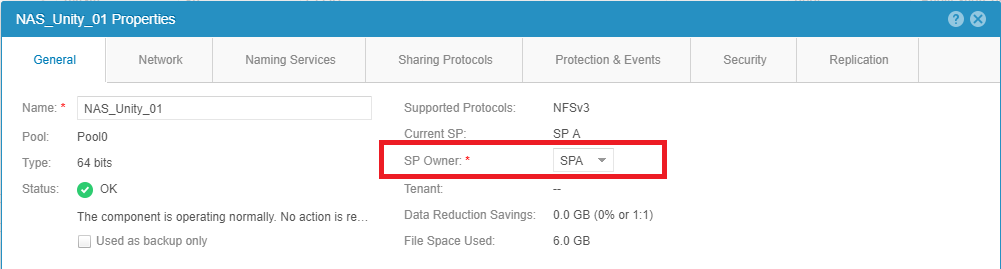
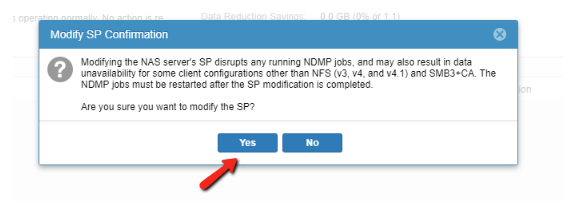
- Selezionare il pulsante Apply the changes nella parte inferiore della schermata.
Nota: Questa operazione potrebbe non riuscire se la replica è in esecuzione. Sospendere la replica e ritentare lo spostamento.
- Chiudere le proprietà generali del server NAS e aggiornare l'elenco per assicurarsi che la modifica sia stata completata.
- Al termine del lavoro, riprendere la replica.
Assicurarsi che la configurazione di rete sia corretta per consentire l'utilizzo dell'IP dell'interfaccia NAS sullo storage processor peer.
Se non vengono applicate le impostazioni di configurazione di rete corrette, lo spostamento del server NAS su un altro storage processor potrebbe causare uno scenario di non disponibilità dei dati (DU).
UEMCLI:
Esempio: Modifica del server NAS "NAS_Unity_01" da SPB a SPA.
- Raccogliere l'ID del server NAS Informazione:
È possibile utilizzare il seguente comando:
uemcli /net/nas/server show
Durante l'esecuzione del comando precedente, viene visualizzato l'output seguente. L'output elenca tutti i server NAS presenti sulla macchina:
service@Unity spa:~/user # uemcli -u admin -p password /net/nas/server show
1:    ID                            = nas_73                   -> ID of the NAS Server
      Name                          = NAS_Unity_01             -> Name of the NAS Server
      NetBIOS name                  =
      SP                            = spb                      -> Current SP that is the owner of the NAS Server.
- Per modificare la proprietà dell SP del server NAS, eseguire il comando seguente con le credenziali dell'array:
uemcli -u <Admin_User> -p <Password> /net/nas/server -id <NAS_ID> set -sp <Destination SP>
service@Unity spa:~/user # uemcli -u admin -p password /net/nas/server -id nas_73 set -sp spa
WARNING: modifying the NAS server's SP disrupts any running NDMP jobs, and may also result in data unavailability for some client configurations other than NFS (v3, v4, and v4.1) and SMB3+CA. The NDMP jobs must be restarted after the SP modification is completed.
Are you sure you want to modify the SP?
yes / no: yes
ID = nas_73
Operation completed successfully.
- Verificare che la proprietà dell'SP sia stata modificata utilizzando il comando del passaggio 1:
service@Unity spa:~/user # uemcli -u admin -p password /net/nas/server -id nas_73 show
1:    ID                            = nas_73
      Name                          = NAS_Unity_01
      NetBIOS name                  =
      SP                            = spa                      -> New SP that is the owner of the NAS Server.
Affected Products
Dell EMC Unity FamilyProducts
Dell Unity 300, Dell EMC Unity 300F, Dell EMC Unity 350F, Dell EMC Unity 400, Dell EMC Unity 400F, Dell EMC Unity 450F, Dell EMC Unity 500, Dell EMC Unity 500F, Dell EMC Unity 550F, Dell EMC Unity 600, Dell EMC Unity 600F, Dell EMC Unity 650F
, Dell EMC Unity Family |Dell EMC Unity All Flash, Dell EMC Unity Family, Dell EMC Unity Hybrid, Dell EMC UnityVSA Professional Edition/Unity Cloud Edition
...
Article Properties
Article Number: 000019599
Article Type: How To
Last Modified: 03 Oct 2025
Version: 5
Find answers to your questions from other Dell users
Support Services
Check if your device is covered by Support Services.