Dell Unity: NAS 서버 SP 소유권 변경
Summary: 이 문서에서는 수동으로 NAS 서버의 소유권을 피어 SP(Storage Processor)로 변경하는 단계에 대해 설명합니다.
This article applies to
This article does not apply to
This article is not tied to any specific product.
Not all product versions are identified in this article.
Instructions
NAS 서버 및 해당 파일 시스템의 SP(Storage Processor) 소유자 변경은 여러 가지 방법으로 수행할 수 있습니다.
Unisphere 크랙:
예: 로드 밸런싱 문제로 인해 NAS 서버 "NAS_Unity_01"를 SPA에서 SPB로 변경:
- Unisphere에서 StorageFileNAS >> Servers로 이동합니다.
- 수정할 NAS 서버를 두 번 클릭합니다.
- General 탭에서 SP Owner 섹션으로 이동하여 NAS 서버를 이동할 SP를 선택합니다.
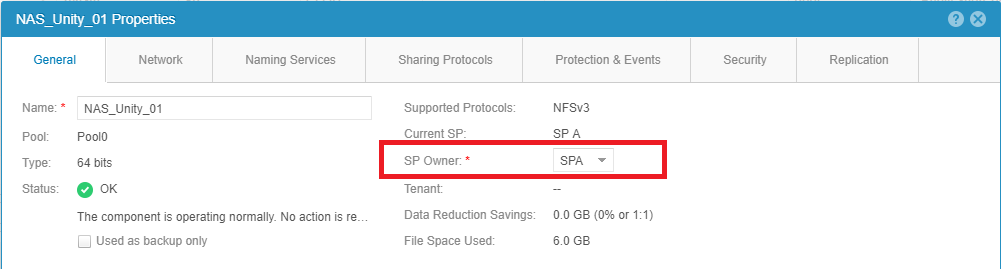
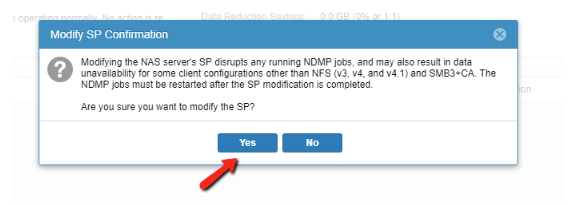
- 화면 아래쪽에서 변경 사항 적용 버튼을 선택합니다.
참고: 복제가 실행 중인 경우 이 작업이 실패할 수 있습니다. 복제를 일시 중지하고 이동을 다시 시도하십시오.
- NAS 서버의 General Properties를 닫고 목록을 새로 고쳐 변경이 완료되었는지 확인합니다.
- 모든 작업이 완료되면 복제를 다시 시작합니다.
피어 스토리지 프로세서에서 NAS 인터페이스의 IP를 사용할 수 있도록 네트워크 구성이 올바른지 확인하십시오.
올바른 네트워크 구성 설정이 적용되지 않은 경우 NAS 서버를 다른 스토리지 프로세서로 이동하면 DU(Data Unavailability) 시나리오가 발생할 수 있습니다.
UEMCLI:
예: NAS 서버 "NAS_Unity_01"를 SPB에서 SPA로 변경하는 중입니다.
- NAS 서버 ID 수집 정보:
다음 명령을 사용할 수 있습니다.
uemcli /net/nas/server show
위의 명령을 실행하는 동안 다음 출력이 수신됩니다. 출력에는 머신에 있는 모든 NAS 서버가 나열됩니다.
service@Unity spa:~/user # uemcli -u admin -p password /net/nas/server show
1:    ID                            = nas_73                   -> ID of the NAS Server
      Name                          = NAS_Unity_01             -> Name of the NAS Server
      NetBIOS name                  =
      SP                            = spb                      -> Current SP that is the owner of the NAS Server.
- NAS 서버 SP 소유권을 변경하려면 어레이 자격 증명으로 다음 명령을 실행합니다.
uemcli -u <Admin_User> -p <Password> /net/nas/server -id <NAS_ID> set -sp <Destination SP>
service@Unity spa:~/user # uemcli -u admin -p password /net/nas/server -id nas_73 set -sp spa
WARNING: modifying the NAS server's SP disrupts any running NDMP jobs, and may also result in data unavailability for some client configurations other than NFS (v3, v4, and v4.1) and SMB3+CA. The NDMP jobs must be restarted after the SP modification is completed.
Are you sure you want to modify the SP?
yes / no: yes
ID = nas_73
Operation completed successfully.
- 1단계의 명령을 사용하여 SP 소유권이 변경되었는지 확인합니다.
service@Unity spa:~/user # uemcli -u admin -p password /net/nas/server -id nas_73 show
1:    ID                            = nas_73
      Name                          = NAS_Unity_01
      NetBIOS name                  =
      SP                            = spa                      -> New SP that is the owner of the NAS Server.
Affected Products
Dell EMC Unity FamilyProducts
Dell Unity 300, Dell EMC Unity 300F, Dell EMC Unity 350F, Dell EMC Unity 400, Dell EMC Unity 400F, Dell EMC Unity 450F, Dell EMC Unity 500, Dell EMC Unity 500F, Dell EMC Unity 550F, Dell EMC Unity 600, Dell EMC Unity 600F, Dell EMC Unity 650F
, Dell EMC Unity Family |Dell EMC Unity All Flash, Dell EMC Unity Family, Dell EMC Unity Hybrid, Dell EMC UnityVSA Professional Edition/Unity Cloud Edition
...
Article Properties
Article Number: 000019599
Article Type: How To
Last Modified: 03 Oct 2025
Version: 5
Find answers to your questions from other Dell users
Support Services
Check if your device is covered by Support Services.