Isilon:共用無法載入,錯誤「共用未載入。發生未知錯誤」
Summary: 當我們開啟名稱中有「&」的共用時,無法使用 CLI 和 UI 載入/開啟。共用不存在:No such file or directory.
This article applies to
This article does not apply to
This article is not tied to any specific product.
Not all product versions are identified in this article.
Instructions
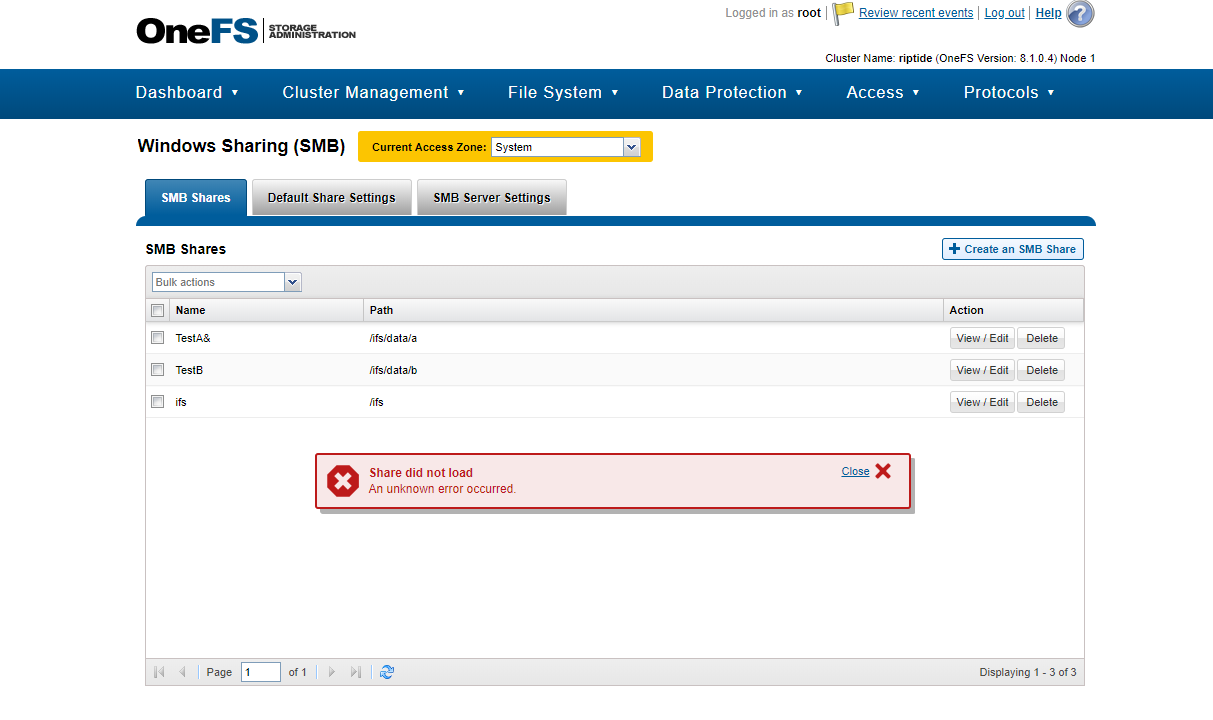
GUI/WebUI 錯誤:
不帶引號的 CLI 錯誤:
您可以使用報價在 CLI 中檢視此類共用:
請勿在任何檔案、目錄和共用名稱中使用「&」字元。
「共用未載入。發生未知錯誤」
不帶引號的 CLI 錯誤:
riptide-1# isi smb shares view TestA&
[1] 36952
riptide-1# Share(s) do(es) don(es) 不存在:沒有此類檔案或目錄
[1] + 結束 1 isi smb 共用檢視 TestA
[1] 36952
riptide-1# Share(s) do(es) don(es) 不存在:沒有此類檔案或目錄
[1] + 結束 1 isi smb 共用檢視 TestA
您可以使用報價在 CLI 中檢視此類共用:
riptide-1# isi SMB 共用檢視「TestA&」
共用名稱:TestA&
路徑:/ifs/data/a
說明:
用戶端快取原則:手動
自動展開使用者名稱或網域名稱:False
自動為使用者建立主目錄:錯誤
可瀏覽:True
權限:
帳戶帳戶類型 以 root 執行權限類型 Permission
----------------------------------------------------------------
admin 使用者 False deny read
----------------------------------------------------------------
Total:
1 存取型列舉:無
存取型枚舉 僅根:否
允許刪除唯讀:不允許
一律執行:無
CA 逾時:120
持續可用:無
嚴格 CA 鎖定:
是 ca 寫入完整性:寫-讀-連貫
變更通知:norecurse
建立權限:預設 acl
目錄建立遮罩:0700
目錄建立模式:0000
檔案建立遮罩:0700
檔案建立模式:0100
已啟用檔案篩選:無
檔案篩選器副檔名:-
檔案過濾器類型:拒絕
隱藏點檔:無
主機 ACL:-
冒充客人:從不
冒充使用者:-
Mangle 位元組開始:
0XED00 Mangle Map:0x01-0x1F:-1、0x22:-1、0x2A:-1、0x3A:-1、0x3C:-1、0x3E:-1、0x3F:-1、0x5C:-1
Ntfs ACL 支援:
是 Oplocks:
是嚴格沖洗:
是,嚴格鎖定:否
共用名稱:TestA&
路徑:/ifs/data/a
說明:
用戶端快取原則:手動
自動展開使用者名稱或網域名稱:False
自動為使用者建立主目錄:錯誤
可瀏覽:True
權限:
帳戶帳戶類型 以 root 執行權限類型 Permission
----------------------------------------------------------------
admin 使用者 False deny read
----------------------------------------------------------------
Total:
1 存取型列舉:無
存取型枚舉 僅根:否
允許刪除唯讀:不允許
一律執行:無
CA 逾時:120
持續可用:無
嚴格 CA 鎖定:
是 ca 寫入完整性:寫-讀-連貫
變更通知:norecurse
建立權限:預設 acl
目錄建立遮罩:0700
目錄建立模式:0000
檔案建立遮罩:0700
檔案建立模式:0100
已啟用檔案篩選:無
檔案篩選器副檔名:-
檔案過濾器類型:拒絕
隱藏點檔:無
主機 ACL:-
冒充客人:從不
冒充使用者:-
Mangle 位元組開始:
0XED00 Mangle Map:0x01-0x1F:-1、0x22:-1、0x2A:-1、0x3A:-1、0x3C:-1、0x3E:-1、0x3F:-1、0x5C:-1
Ntfs ACL 支援:
是 Oplocks:
是嚴格沖洗:
是,嚴格鎖定:否
請勿在任何檔案、目錄和共用名稱中使用「&」字元。
Additional Information
此問題會在 8.0、8.1 和 8.2 中出現。
Affected Products
IsilonProducts
IsilonArticle Properties
Article Number: 000019720
Article Type: How To
Last Modified: 23 Oct 2025
Version: 5
Find answers to your questions from other Dell users
Support Services
Check if your device is covered by Support Services.